Will a GT 710 Boot an OptiPlex 5055 With a P40?
The questionWhere do these come from?
headless mode for optiplex 5055
i have a bit of a dilemma, I picked up a nvidia p40 gpu for AI experimentation. this graphics card does not have video out. when I plug it into my optiplex 5055, it doesnt boot due to the lack of video out.
A PCIe x1 GT 710 can add video to a 5055 tower, but the stock 240W PSU and chassis cannot safely host a 250W passive Tesla P40.
A low-profile GT 710 can provide the missing monitor output—but only in an OptiPlex 5055 tower whose Tesla P40 power, fit, and cooling problems have already been solved. It will not turn a stock 5055 into a safe P40 host: Dell specifies a 240W power supply, while NVIDIA rates the P40 alone at 250W.
That distinction matters because “no display” and “will not boot” are not the same fault. The P40 has no physical display connector, so a running computer can look dead when the monitor has nowhere to connect. A blinking amber diagnostic code, by contrast, means POST stopped and adding another display adapter may accomplish nothing.
No picture and no POST need different fixes
Start with the OptiPlex power-button LED before buying a GT 710.
- Steady white: Dell defines this as the fully functional, powered-on state. If storage activity continues or the machine answers SSH, Remote Desktop, or pings, it may already be booting normally. The missing display output is then the likely problem.
- Three amber blinks, pause, one amber blink: Dell assigns code 3-1 to a PCIe-device or video-subsystem failure.
- Three amber blinks, pause, two amber blinks: Code 3-2 is a video-subsystem failure.
- Two amber blinks, pause, two amber blinks: Dell points to the motherboard, power supply, or power cabling.
Those definitions come directly from Dell’s OptiPlex 5055 diagnostic-code table. A GT 710 is a plausible answer to steady-white-with-no-picture. It is not a credible remedy for an amber PCIe or power fault until the P40 is removed and the system passes POST again.
The Ryzen CPU version of the 5055 tower has another relevant limitation: Dell lists integrated video as unavailable and says its video ports come from an add-in PCIe graphics card. Connecting the monitor to a motherboard port therefore will not substitute for a display GPU on that configuration. The APU version is different, so check the service tag and processor rather than assuming every 5055 has the same display path.
The stock power supply rules out the finished build
NVIDIA’s Tesla P40 board specification gives four numbers that decide this case:
- 250W total board power
- PCIe 3.0 x16 interface
- 4.376-by-10.5-inch, dual-slot board
- one CPU-style 8-pin auxiliary power connector
Dell’s OptiPlex 5055 specification sheet rates both the tower and SFF factory power supplies at 240W. The P40’s maximum board power is therefore 10W greater than the entire computer’s PSU rating before accounting for a 65W Ryzen processor, memory, drives, fans, motherboard losses, or a GT 710.
Do not test that combination under load and do not use SATA-to-8-pin, Molex-to-8-pin, or an unidentified cable to make the connector fit. NVIDIA documents a CPU 8-pin feed or its specified dongle supplied from two suitable PCIe cables; an ordinary PCIe 8-pin plug is not automatically interchangeable just because it has eight contacts.
A second loosely synchronized PSU outside the computer introduces grounding, startup-sequencing, and exposed-cabling hazards. The defensible solution is a properly sized, electrically compatible supply in a platform designed to accept it—not a cable adapter attached to the stock 240W unit. A GT 710 does not change that requirement.
The SFF chassis is not a P40 host
The 5055 SFF accepts half-height expansion cards. The P40 is a 4.376-inch-high, full-height card, so it cannot be installed normally in that chassis regardless of which low-profile display card is added.
The tower is the only 5055 variant worth assessing, but even there the fit is extremely tight. Dell lists the entire tower at 10.8 inches deep; the P40 board itself is 10.5 inches long. External chassis depth is not internal card clearance, and cables, the drive cage, and the front structure still occupy space. Measure from the rear expansion bracket to the first obstruction before ordering anything.
Just want the recommendation?
Skip to the picksThis is the same distinction between “low profile” and “low power” that matters in other Dell SFF GPU upgrades: bracket height solves only one part of compatibility.
Cooling is an equally firm limit. NVIDIA describes the P40 as passively cooled and explicitly requires system airflow through the card to keep it inside its 0–45°C operating range. “Passive” does not mean that the card needs no fan; it means the server supplies the high-pressure airflow instead of the card carrying its own blower. A stock office-desktop case fan is not evidence that sufficient air passes through the P40 heatsink.
The GT 710 connector matters more than its profile
“Low profile” describes bracket height, not the PCIe edge connector. Most low-profile GT 710 cards still have an x16-length connector, which creates a slot conflict when the P40 occupies the tower’s principal x16 slot.
| Card | Host connection | Slot use | Verdict |
|---|---|---|---|
| ZOTAC GT 710 ZT-71304-20L | PCIe x1 | Single-slot, half-height option | Consider for firmware or console video |
| PNY GT 710 VCGGT7102XPB-BB | Physical PCIe x16, electrically x8 | Single-slot, low-profile | Skip for this two-card layout |
The unusual ZOTAC ZT-71304-20L is the relevant variant. ZOTAC specifies a PCIe x1 interface, single-slot cooler, low-profile brackets, HDMI/DVI/VGA outputs, no auxiliary power input, and maximum 25W consumption. Dell’s tower board provides two x1 connectors in addition to its x16 and x4 connectors, so the x1 GT 710 can leave the primary graphics slot available for the P40.
Skip the PNY GeForce GT 710 VCGGT7102XPB-BB for this two-GPU OptiPlex layout: PNY requires an x16 graphics slot, making it the wrong default for anyone keeping the P40 in the 5055’s primary x16 slot. Its low-profile bracket and single-slot width do not overcome that connector conflict.
No independent lab measurement for the exact ZOTAC PCIe x1 model was found in the reviewed sources; its 25W figure is the manufacturer’s specification. As a useful thermal reference rather than a substitute measurement, Phoronix monitored a different passively cooled ASUS GT 710 during OpenGL tests and recorded 59.5°C average and 66°C peak. Even the small display adapter therefore needs some case airflow—especially beside a much hotter P40.
Test the display path before reinstalling the P40
Use this order so each test answers one question:
- Shut the computer down, unplug it, and remove the P40. Do not continue powering a questionable auxiliary connection.
- Reinstall the previously working graphics card, or test the GT 710 by itself. Connect the monitor directly to that card—not to the motherboard and not to the P40.
- Confirm that the Dell logo and F2 setup screen appear. If they do not, record the exact amber blink pattern and troubleshoot that code before adding the P40.
- Check the service tag on Dell Support and update the correct BIOS while the computer is in its known-good configuration. Dell lists BIOS 1.15.0 for the Ryzen CPU tower and SFF; CPU, APU, and A-Series variants have different packages. Suspend BitLocker first if it is enabled.
- In BIOS, leave Boot Mode on UEFI. Under Video, set Primary Display to Auto and keep Multi-Display enabled. These are the menu names in Dell’s 5055 system-setup documentation. The P40 specification says UEFI is supported, so changing to Legacy mode is not the first fix.
- Power down and install the x1 display card in a free x1 slot. Confirm that it still produces the Dell logo before the P40 returns.
- Reinstall the P40 only after a suitable PSU, correct auxiliary cabling, verified physical clearance, and forced-air cooling are present.
- Keep the monitor connected to the GT 710. In Linux, check
lspci -nn | grep -Ei 'VGA|3D|NVIDIA'andnvidia-smi; in Windows, check both adapters in Device Manager before starting a compute load.
If the GT 710 shows the Dell logo with the P40 installed, the missing boot-display problem is solved. If the LED changes to 3-1 or 3-2 only when the P40 is added, the fault is P40 initialization, power, cabling, seating, or the card itself—not the lack of a monitor connector.
Driver support is the final GT 710 catch
The ZOTAC x1 GT 710 is a Kepler-generation GPU. NVIDIA ended normal Game Ready updates for desktop Kepler in October 2021 and provided critical security updates only through September 2024. On Linux, NVIDIA identifies the 470 series as the last proprietary driver branch supporting GKxxx Kepler GPUs.
The P40 is Pascal and can use newer data-center drivers, so one proprietary NVIDIA driver branch may not provide current support for both cards. The GT 710 can still be useful for UEFI setup, early boot output, or a machine administered primarily over SSH, but a fully accelerated modern desktop is a narrower and less dependable use case. Plan the operating-system driver arrangement before buying the card; do not discover the R470 limitation after completing the hardware work.
A new motherboard is not automatically required merely because the P40 lacks outputs. However, preserving the 5055 motherboard still leaves the harder requirements: a non-stock power solution, correct P40 cabling, enough physical space, server-like forced airflow, a free PCIe slot, and an aging GT 710 driver stack. If those conditions are not already engineered, moving the P40 to a suitable workstation or server platform is the reliable fix; a low-profile GT 710 alone is not.
The bottom line
Two candidates — the symptom tells you which:
Top pick
It depends
ZOTAC GeForce GT 710 1GB PCIe x1 ZT-71304-20L
ZOTAC
ZOTAC specifies a PCIe x1 interface, single-slot half-height format, no auxiliary input, and 25W maximum consumption, but the Kepler GPU is limited to NVIDIA’s legacy R470 driver family.
Consider this specific x1 model when the P40 must retain the OptiPlex tower’s primary x16 slot and only firmware or console video is needed. Its drawback is legacy Kepler driver support, and it does nothing to correct the P40’s power or cooling requirements.Available at Amazon(paid link) — opens Amazon in a new tab. Price and availability shown there.The alternative
Skip this
PNY GeForce GT 710 2GB Single Fan Low Profile VCGGT7102XPB-BB
PNY
PNY requires a physical PCIe x16 graphics slot, so this model is wrong when the Tesla P40 already occupies the 5055 tower’s x16 slot.
This is a normal low-profile GT 710, but its x16-length connector competes with the P40 for the OptiPlex’s primary graphics slot. It is compact and slot-powered, yet those traits do not solve the connector conflict.Available at Amazon(paid link) — opens Amazon in a new tab. Price and availability shown there.
Recommended products
Ordered by how well each one fits the situations above. Each link below is a paid link.
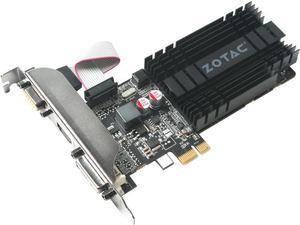
ZOTAC GeForce GT 710 1GB PCIe x1 ZT-71304-20L
ZOTAC
It depends — ZOTAC specifies a PCIe x1 interface, single-slot half-height format, no auxiliary input, and 25W maximum consumption, but the Kepler GPU is limited to NVIDIA’s legacy R470 driver family.
Consider this specific x1 model when the P40 must retain the OptiPlex tower’s primary x16 slot and only firmware or console video is needed. Its drawback is legacy Kepler driver support, and it does nothing to correct the P40’s power or cooling requirements.Available at Amazon(paid link) — opens Amazon in a new tab. Price and availability shown there.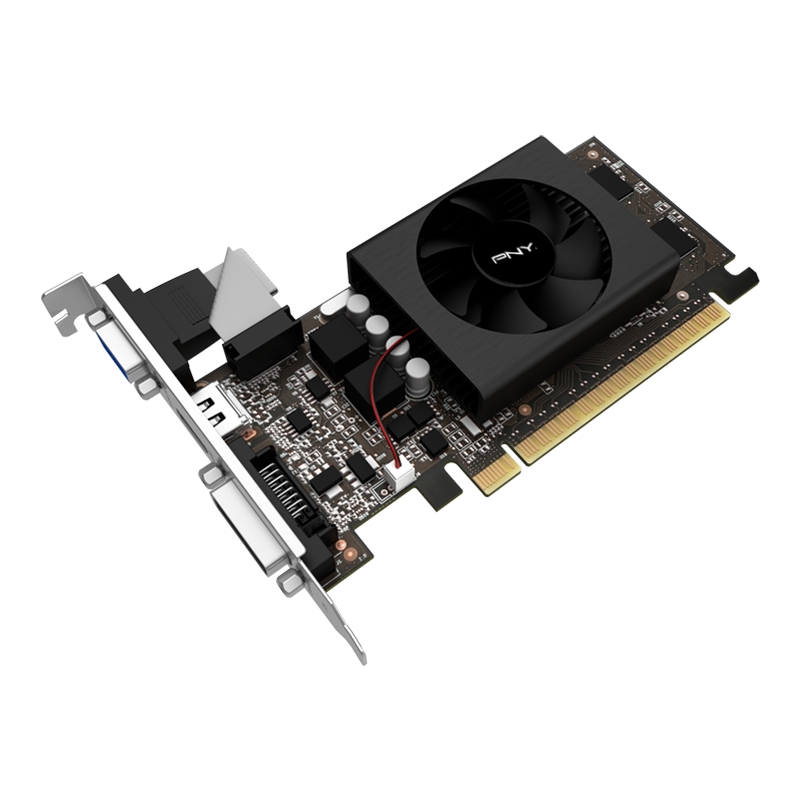
PNY GeForce GT 710 2GB Single Fan Low Profile VCGGT7102XPB-BB
PNY
Skip — PNY requires a physical PCIe x16 graphics slot, so this model is wrong when the Tesla P40 already occupies the 5055 tower’s x16 slot.
This is a normal low-profile GT 710, but its x16-length connector competes with the P40 for the OptiPlex’s primary graphics slot. It is compact and slot-powered, yet those traits do not solve the connector conflict.Available at Amazon(paid link) — opens Amazon in a new tab. Price and availability shown there.
Sources
Pages consulted while researching this article. None of these are affiliate links.
- NVIDIA Tesla P40 GPU Accelerator Product Brief — images.nvidia.com
- Dell OptiPlex 5055 Features and Technical Specifications — i.dell.com
- Dell OptiPlex 5055 Diagnostic and Power LED Codes — dell.com
- Dell OptiPlex 5055 Tower System Board Layout — dell.com
- Dell OptiPlex 5055 System Setup Options — dell.com
- Dell OptiPlex 5055 System BIOS 1.15.0 — dell.com
- ZOTAC GeForce GT 710 1GB PCIe x1 Specifications — zotac.com
- PNY GeForce GT 710 2GB Single-Fan Low-Profile Specifications — pny.com