R740xd Won't Detect the RTX 4500 Ada? Check the Riser
The questionWhere do these come from?
[HELP] RTX 4500 Ada not detected on Dell PowerEdge R740xd - lspci empty
Hi everyone, I'm trying to install an NVIDIA RTX 4500 Ada Generation (model PE138C) in my Dell PowerEdge R740xd but the GPU is not being detected at all.
An RTX 4500 Ada needs the R740xd GPU Enablement Kit's riser and power cable — a bare PCIe slot only delivers 75W of its 210W.
An RTX 4500 Ada that seats fine but never shows up in the BIOS, iDRAC, or nvidia-smi on a PowerEdge R740xd is almost never a dead card. It’s a card asking for more power and a different riser than the slot it’s sitting in can provide. The RTX 4500 Ada has a 210W total board power draw and no way to get that power except through a supplementary connector — a bare PCIe x16 slot only delivers 75W under spec. If the riser in that slot isn’t one of the GPU-rated risers from Dell’s R740xd GPU Enablement Kit, there is no cable to carry the other 135W, and the card either brownouts during init or never completes PCIe link training at all. That reads to the OS as “not detected,” not as a power fault, which is why it’s easy to mistake for a bad card or a bad slot.
There’s a second, separate reason this specific card is a bad match for this specific server without preparation: the R740xd’s Dell-certified GPU list was frozen before Ada Lovelace existed. Nothing about that makes the card unusable here, but it does mean you’re on your own for cooling and power validation once you go outside that list — which is exactly where an enablement kit and a correct PSU matter more, not less.
Why the RTX 4500 Ada specifically trips this
The RTX 4500 Ada is a dual-slot, full-height full-length card built on PCIe Gen4 x16, rated at 210W total board power, and it has no onboard power connector cable in the box — the auxiliary power lead is a separate, server-specific part that has to be ordered to match the chassis it’s going into, according to Lenovo’s own product guide for the same silicon in a ThinkSystem chassis. Dell’s R740xd installation manual states the same threshold from its own side: “any GPU that is greater than 75 W requires a power cable. GPUs with 75 W or less does not require a power cable.” A 210W card is nearly three times over that line.
Community reports on Dell’s own PowerEdge R740/R740xd builds put a practical ceiling on what a GPU riser slot can deliver once the correct cable is in place: roughly 300W per card, split as 75W from the slot itself and up to 225W over the auxiliary cable running from the riser or power interposer board to the card’s power connector. That headroom comfortably covers a 210W RTX 4500 Ada — but only if that cable exists and is plugged in. Without it, the card is drawing on slot power alone, which is less than half of what it needs to come up cleanly.
What the GPU Enablement Kit actually changes
Dell sells this as a single kit (part 490-BEIX) rather than a loose riser, and that’s deliberate — a GPU-rated riser without the matching cable and airflow hardware doesn’t fix anything on its own. Per Dell’s installation and service manual, the kit includes:
- A GPU-rated riser assembly — described in Dell’s documentation as “Riser 3A or 3B,” paired with “Riser 2A or 2E or 2D or 2F” and “Riser 1A or 1D” depending on which riser bay the GPU occupies
- A GPU air shroud and mylar baffle strip that route airflow directly over the card
- High-performance fans (six of them) that replace the standard fans
- The GPU power cable itself, run from the power interposer board to the card’s auxiliary connector
- 1U high-performance heatsinks for the CPUs, since GPU installation raises the minimum cooling requirement across the whole chassis
If your R740xd currently has a standard, non-GPU riser in that PCIe bay — which is the default on any unit that didn’t ship from the factory with a GPU — there is no power cable path to the card at all, regardless of how the card is seated. That matches the “likely riser or enablement” instinct exactly: it’s not a diagnosis of last resort, it’s the first thing to check.
Confirm which riser configuration you actually have
Dell’s own guidelines specify that double-width GPUs — which the RTX 4500 Ada is — are supported only under Riser Configuration 4. Riser Configuration 6 is for single-width cards only, and every other numbered configuration on the R740xd is a non-GPU layout. You can check which riser configuration is installed through iDRAC (System Inventory → PCIe devices, or the riser identification silkscreen if you’re physically inspecting the board) rather than guessing from the slot the card is plugged into.
This matters more on the R740xd than on the plain R740 because the xd chassis’ drive backplane options compete for the same PCIe lanes. Dell’s community forum has multiple threads from owners of the 24-bay NVMe backplane variant finding that the bridge cards required for that backplane occupy risers that would otherwise carry a GPU, and that installing them in the wrong slot leads to unrecognized configurations. If your R740xd runs the 24x NVMe backplane, verify the bridge cards are seated in the slots Dell’s manual specifies before troubleshooting the GPU further — a conflict here can look identical to a GPU riser problem.
Just want the recommendation?
Skip to the picksCheck the PSU next — “not detected” and “power fault” look the same
Dell’s installation guidance is specific: “install PSUs with 1100 W or higher, and set the PSU configuration to non-redundant mode” whenever a GPU is present. A base R740xd frequently ships with 495W or 750W supplies, which were sized for a GPU-less configuration. Add a 210W card on top of dual Xeon Scalable CPUs and those units can’t cover peak draw, particularly during the transient spike at PCIe link training.
Two SEL/UEFI events are worth checking in iDRAC’s Lifecycle Log if the card isn’t showing up: UEFI0060 (“power required exceeds the system PSU’s [capacity]”) and UEFI0077 (“PCIe device error on previous boot”). Owners troubleshooting GPU installs on the R740 platform have hit both of these specifically when the installed PSUs were undersized for the card, and Dell’s own PFault Fail-Safe documentation lists “third-party or high-power GPU/NIC/HBA cards” as a known trigger for voltage-fault events on shared power rails. If either event is logged, the fix is the 1100W PSU pair in non-redundant mode, not a different riser.
Rule out the BIOS memory-mapped I/O ceiling
The RTX 4500 Ada carries 24GB of GDDR6 with ECC, which requires a large PCI BAR to map. Older R740xd BIOS versions capped 64-bit memory-mapped I/O allocation at 64GB per root port — Dell’s release notes for PowerEdge BIOS 2.10.0 (covering the R740, R740xd, R640, R940, and 7920R) specifically raised that ceiling from 64GB to 256GB per root port to support “Nvidia A100 GPU and other PCIe cards that request > 64GB of 64bit PCIe memory.” A card with a large BAR on a BIOS older than 2.10.0 can fail to fully enumerate even with correct power and the right riser. Confirm “Memory Mapped I/O Base” and “Memory Mapped I/O above 4GB” are both enabled in System BIOS → Integrated Devices, and update system BIOS to 2.10.0 or later if it predates that.
Physical fit is a separate failure mode from power
The RTX 4500 Ada measures 4.4 inches by 10.5 inches — dual-slot, full-length. Owners running similarly sized RTX cards in R740-family chassis report the physical clearance in the GPU riser bay is tight enough (around 2 slots and roughly 112mm of width) that longer cards only fit in specific riser positions, and that fitting a card near 300mm sometimes requires removing the upper section of the factory air shroud to clear it. If the card doesn’t fully seat — visible gap at the bracket, connector not fully engaged — it can register in lspci as present but never link-train correctly, which again presents as “not detected” to nvidia-smi even though something is technically there.
What “not on Dell’s certified list” actually means for you
Dell’s official PowerEdge GPU support for the R740xd runs from the Tesla K80 era through the Ampere generation — T4, P4, P40, P100, M60, M10, V100, and later A10, A40, and A100 PCIe added through driver package updates. Ada Lovelace-generation cards, including the RTX 4500 Ada, were qualified by Dell starting on the 15th- and 16th-generation platforms (R750xa, R760xa, and similar), not on the 14th-generation R740xd. That doesn’t make the RTX 4500 Ada physically incompatible — it means there’s no Dell-validated thermal or power profile for it in this chassis, no factory driver bundle, and no guarantee iDRAC’s fan curves react correctly to it under load. Everything above — the enablement kit, the PSU, the BIOS ceiling — is what a qualified configuration would have handled for you automatically. Running an uncertified card means checking each of those manually, once, rather than trusting a shipped config.
Comparing the fix against the alternatives
| Verdict | What decides it | The catch | |
|---|---|---|---|
| Dell R740xd GPU Enablement Kit (490-BEIX) | Buy | Bundles the double-wide-rated riser (Config 4), the power cable for a >75W card, and the airflow hardware Dell’s own thermal guidance requires | Sold as a used/pulled part on the secondary market; some listings arrive missing the power cable, which reintroduces the exact fault this article covers |
| NVIDIA RTX 4000 SFF Ada Generation | Consider | Single-slot, 70W, no auxiliary power connector — runs on slot power in any standard riser, no kit or PSU change needed | Roughly half the CUDA/RT core count and 20GB VRAM instead of 24GB, so it’s a downgrade for whatever workload justified the 4500 Ada in the first place |
| Dell 1100W Power Supply (pair, non-redundant) for R740/R740xd | Consider | Required by Dell’s own GPU installation guidance any time a GPU draws over the base config’s PSU headroom | Does nothing by itself if the riser is still the wrong one — this fixes power faults, not missing risers |
The enablement kit is the fix for the specific fault this question describes — a card that seats and spins its fans but never enumerates. It’s worth flagging that these kits are commonly resold pulled from decommissioned servers, and the single most common complaint in Dell’s own community forum about R740xd GPU installs is confusion over which power cable came with which kit. If you’re buying a used kit, confirm the GPU power cable is included before assuming the riser alone will solve this.
If you don’t want to deal with riser configurations, PSU swaps, or BIOS ceilings at all, the RTX 4000 SFF Ada sidesteps the entire problem by drawing everything it needs from the slot — at the cost of meaningfully less compute and VRAM than the 4500 Ada. That’s the right trade only if your workload was already borderline for a 20GB card; if you specifically need the 4500 Ada’s 24GB, the enablement kit isn’t optional, it’s the only path that gets the card powered.
If you’ve confirmed Riser Configuration 4 is installed, the enablement kit’s power cable is connected to the card, the PSUs are 1100W and non-redundant, BIOS is at 2.10.0 or later with MMIO above 4GB enabled, and the card still doesn’t enumerate, that combination of checks ruling out riser, power, and BIOS points to either a damaged card or a damaged riser slot — at that point it’s a Dell ProSupport case with an SEL export, not something to keep troubleshooting blind.
For a build where the GPU is the point rather than an afterthought, The Practical RTX 4090 LLM Build: Exact Parts covers the parts list for a chassis designed around the card from the start, which is worth comparing against retrofitting an R740xd if you’re still deciding which way to go.
The bottom line
Which part you need depends on what broke:
Top pick
Buy this
Dell PowerEdge R740xd GPU Enablement Kit 490-BEIX
Dell PowerEdge
Dell's own manual requires a power cable for any GPU over 75W, and only the GPU-rated riser in this kit carries that cable to the card.
Bundles the double-wide-rated riser, the auxiliary power cable a 210W card needs beyond the 75W a bare slot supplies, and the airflow hardware Dell’s thermal guidance requires — this is the fix the fault in this article describes.Available at Amazon(paid link) — opens Amazon in a new tab. Price and availability shown there.The alternative
It depends
NVIDIA RTX 4000 SFF Ada Generation Graphics Card
NVIDIA RTX
Roughly half the CUDA/RT core count and 20GB VRAM versus the RTX 4500 Ada's 24GB, so it only fits workloads that didn't need the bigger card's headroom.
A complement-free alternative: single-slot, 70W, no auxiliary power connector, so it runs on slot power in a standard riser without the enablement kit, PSU swap, or riser-config check at all.Available at Amazon(paid link) — opens Amazon in a new tab. Price and availability shown there.
Recommended products
Ordered by how well each one fits the situations above. Each link below is a paid link.
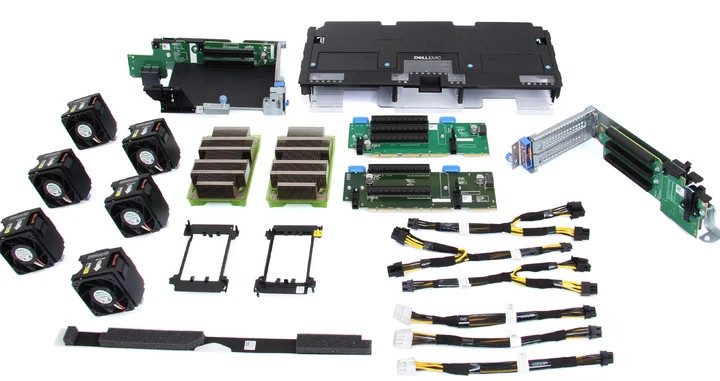
Dell PowerEdge R740xd GPU Enablement Kit 490-BEIX
Dell PowerEdge
Buy — Dell's own manual requires a power cable for any GPU over 75W, and only the GPU-rated riser in this kit carries that cable to the card.
Bundles the double-wide-rated riser, the auxiliary power cable a 210W card needs beyond the 75W a bare slot supplies, and the airflow hardware Dell’s thermal guidance requires — this is the fix the fault in this article describes.Available at Amazon(paid link) — opens Amazon in a new tab. Price and availability shown there.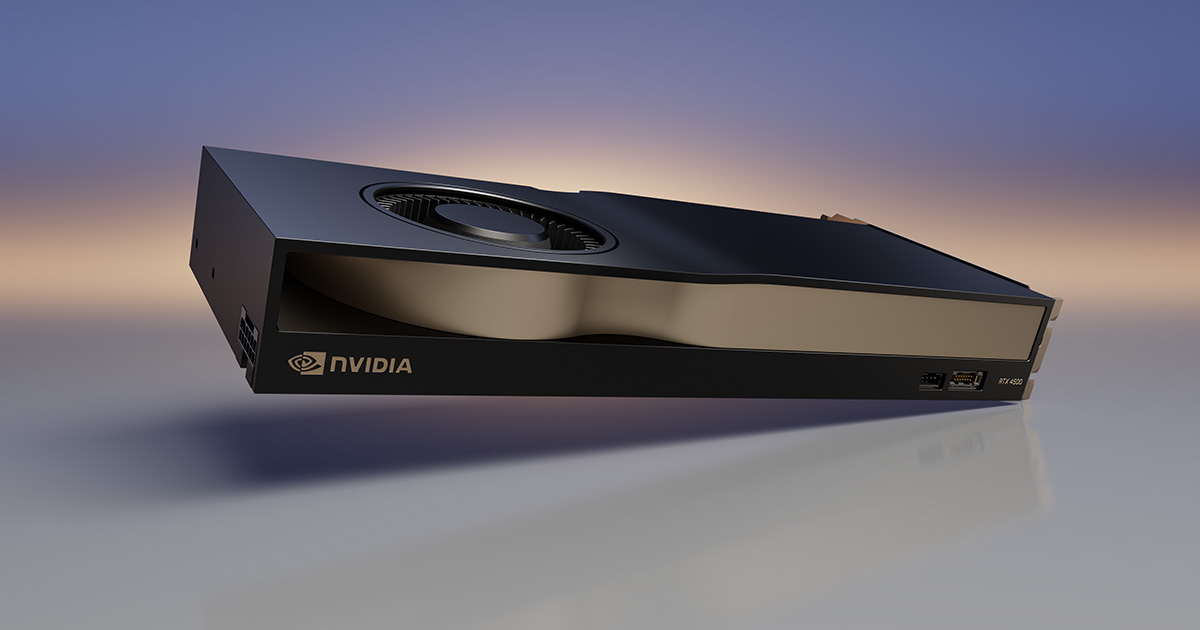
NVIDIA RTX 4000 SFF Ada Generation Graphics Card
NVIDIA RTX
It depends — Roughly half the CUDA/RT core count and 20GB VRAM versus the RTX 4500 Ada's 24GB, so it only fits workloads that didn't need the bigger card's headroom.
A complement-free alternative: single-slot, 70W, no auxiliary power connector, so it runs on slot power in a standard riser without the enablement kit, PSU swap, or riser-config check at all.Available at Amazon(paid link) — opens Amazon in a new tab. Price and availability shown there.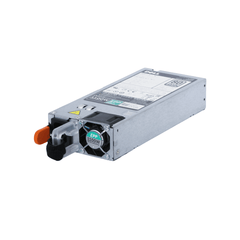
Dell 1100W Power Supply PowerEdge R740xd
Dell
It depends — Dell's manual specifies 1100W-or-higher PSUs in non-redundant mode whenever a GPU is installed, and undersized PSUs log the same power-fault events reported by R740 GPU installers hitting this exact issue.
The complement Dell’s installation guide requires alongside any GPU install — set to non-redundant mode, it covers the power draw that base-config 495W or 750W units can’t.Available at Amazon(paid link) — opens Amazon in a new tab. Price and availability shown there.
Sources
Pages consulted while researching this article. None of these are affiliate links.
- Dell PowerEdge R740xd Installation and Service Manual — GPU or ACLR Card Installation Guidelines — dell.com
- Dell PowerEdge R740xd Installation and Service Manual — Expansion Card Installation Guidelines — dell.com
- Dell PowerEdge R740xd Installation and Service Manual — Installing a GPU — dell.com
- PowerEdge R740xd Information Update Tech Sheet — Expansion Card Installation Guidelines — dell.com
- Dell PowerEdge R740xd BIOS and UEFI Reference Guide — Integrated Devices Details — dell.com
- Dell EMC Server PowerEdge BIOS R740/R740xd/R640/R940/7920R Version 2.10.0 — Driver Details — dell.com
- NVIDIA RTX 4500 Ada Generation — Official Specifications — nvidia.com
- PNY NVIDIA RTX 4500 Ada Generation Datasheet — pny.com