Dell R520 iDRAC7 and Lifecycle Controller Disabled: Fix
The questionWhere do these come from?
Need advice on fixing Dell server
Hey everyone I recently had a power outage to my entire neighborhood which led to my Dell R520 server going down.
Re-enable LC and reflash iDRAC7 firmware before buying a module for a Dell R520 disabled after a power loss; if a good card fails too, suspect the board.
Don’t buy an iDRAC7 module first. On a Dell PowerEdge R520 whose iDRAC and Lifecycle Controller (LC) stay disabled after a power outage, the usual order is: re-enable LC in System Setup, reflash iDRAC firmware, rule out a bad card, and only then suspect the system board. A replacement card helps only if the old card is the failed part. One Dell Community thread describes the same disabled state persisting after resets, an NVRAM reset and a reseated or replaced iDRAC port card, which suggests the fault can sit on the board.
This page rests on Dell’s documentation and the Dell Community threads cited below. No independent lab has measured anything here, and nobody on this site tested it. Individual forum fixes are single cases, and no source found for this page gives a confirmed fix for this exact R520 state.
What the three failure layers look like
| Layer | What failed | Typical sign | Fix | Does a new iDRAC card help? |
|---|---|---|---|---|
| Settings or LC state | LC flagged disabled or in Recovery Mode | Boot message that LC is disabled or needs updates | Enable LC in F2 System Setup | No |
| Firmware | iDRAC7 firmware image corrupted | iDRAC unreachable, repeated resets | Recovery with a matching firmimg.d7 | No |
| Hardware | Card, board flash or NVRAM | Everything above fails | Test the card elsewhere, then board | Only if the card is the faulty part |
Step 1: re-enable the Lifecycle Controller
Press F2 at boot, open iDRAC Settings, and set Lifecycle Controller to Enabled. Dell’s knowledge-base article on LC Recovery Mode describes this fix for the “Lifecycle Controller Updates Required” state, and warns that a forced warm reset during certain operations can push LC into that mode. A sudden power loss is a plausible way to hit the same trap.
Dell’s article covers that boot message, not every disabled state. In the cited Dell Community threads the F2 setting did not resolve the problem, and in one the option was unavailable with error SWC0700. If you see that, move on to firmware.
Step 2: firmware recovery for a corrupted iDRAC7
In one Dell Community thread, a Dell moderator pointed a user with an unresponsive iDRAC to a recovery procedure using a firmimg.d7 file, for cases where the installed iDRAC firmware version is unknown. No current Dell article found for this page confirms the procedure for the R520, so take the file only from Dell’s own support download for your model. Match the iDRAC7 firmware family to the server and don’t improvise with another PowerEdge generation’s image.
Step 3: power drain, jumpers and NVRAM
If you haven’t already, do these in order:
Just want the recommendation?
Skip to the picks- Unplug both power cords and hold the power button for about 30 seconds to drain residual charge, then leave the server unplugged for several minutes.
- Reseat the iDRAC card and its connector.
- Reset NVRAM with the board jumper, following the service manual for your service tag.
The R520 thread cited above describes a reseat and NVRAM reset with no change, so treat a failure here as evidence for the next step.
When a replacement iDRAC7 module is justified
A module is worth buying when the card is shown to be bad and not merely suspected. The cleanest proof is putting the suspect card in another R520 (or a close PowerEdge 12th-generation machine) and watching it fail there, or fitting a known-good card to yours. The Dell R520 iDRAC7 module is a card-level repair. It cannot fix a corrupted flash on the board.
Skip buying a second or third module speculatively. If one replacement card changed nothing, a second is unlikely to either. The card you buy must be the iDRAC7 part for the R520 (check the Dell part number from your server’s service manual), not a different generation’s card or one that is just labelled “iDRAC”.
When it is the board
If firmware recovery, a power drain, an NVRAM reset and a known-good card all leave LC and iDRAC disabled, the system board is the remaining suspect: the iDRAC7 controller and its flash live there. That means a board replacement or a different server, and the call depends on what the R520 is worth to you. If the server is under a Dell service contract, open a case first, since the board swap is then Dell’s cost.
A CR2032 battery is a sensible low-cost check on an older machine that lost power, but nothing cited here ties a flat cell to this fault, so it is a way to remove one variable. It will not repair iDRAC firmware.
Should you keep running an R520 that does this
If you can still boot the OS and only the out-of-band management is gone, the server works as a normal machine, just without remote console, virtual media or LC. That may be acceptable for a homelab. For anything that depends on remote management, a board replacement or a newer server is the real fix, and the module is a gamble that pays off only when the card is actually the part that died.
What is still unresolved
No source found for this page documents a guaranteed recovery for an R520 that stays disabled after the steps above. Where firmware recovery and a known-good card both fail, the remaining answer is Dell support or a board replacement.
The bottom line
Which part you need depends on what broke:
Top pick
It depends
IndustrialField iDRAC7 Enterprise Remote Access Card 2827M WD6D2 81RK6 for PowerEdge R520 R320 with iDRAC 7 Enterprise License I
IndustrialField
A replacement card does nothing if the fault sits in the system board's iDRAC flash or NVRAM, and the cited Dell Community thread describes the same disabled state after a card swap.
The thing to swap if the iDRAC card itself is dead, but it is a repair of last resort: in one Dell Community thread a replacement card did not clear the disabled state on an R520. Buy it only after firmware recovery fails and the card is shown faulty, for instance by testing it in a second R520.Available at Amazon(paid link) — opens Amazon in a new tab. Price and availability shown there.The alternative
It depends
Dell Sparepart PowerEdge R520 Motherboard, Version 3, W128447744 (Version 3)
Dell
Replace the board only after firmware recovery, a full power drain, an NVRAM reset and a known-good card all fail.
The rival repair path: the iDRAC7 controller, its flash and the Lifecycle Controller partition live on the board, so a card swap that changes nothing points here. Expensive and a full rebuild, so get a second opinion first.Available at Amazon(paid link) — opens Amazon in a new tab. Price and availability shown there.
Recommended products
Ordered by how well each one fits the situations above. Each link below is a paid link.

IndustrialField iDRAC7 Enterprise Remote Access Card 2827M WD6D2 81RK6 for PowerEdge R520 R320 with iDRAC 7 Enterprise License I
IndustrialField
It depends — A replacement card does nothing if the fault sits in the system board's iDRAC flash or NVRAM, and the cited Dell Community thread describes the same disabled state after a card swap.
The thing to swap if the iDRAC card itself is dead, but it is a repair of last resort: in one Dell Community thread a replacement card did not clear the disabled state on an R520. Buy it only after firmware recovery fails and the card is shown faulty, for instance by testing it in a second R520.Available at Amazon(paid link) — opens Amazon in a new tab. Price and availability shown there.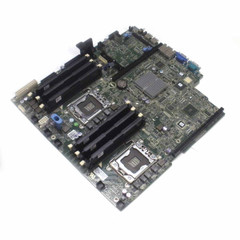
Dell Sparepart PowerEdge R520 Motherboard, Version 3, W128447744 (Version 3)
Dell
It depends — Replace the board only after firmware recovery, a full power drain, an NVRAM reset and a known-good card all fail.
The rival repair path: the iDRAC7 controller, its flash and the Lifecycle Controller partition live on the board, so a card swap that changes nothing points here. Expensive and a full rebuild, so get a second opinion first.Available at Amazon(paid link) — opens Amazon in a new tab. Price and availability shown there.
Sources
Pages consulted while researching this article. None of these are affiliate links.
- Dell: Enabling the Lifecycle Controller when it is in Recovery Mode — dell.com
- Dell Community: R520 Lifecycle Controller disabled, unable to initialize iDRAC — dell.com
- Dell Community: Alert iDRAC not responding, rebooting (firmimg.d7 recovery) — dell.com
- Dell Community: iDRAC 7 serial console access (SWC0700 and LC disabled) — dell.com