PS5 Pro in a Bright Room: Three TVs Worth Buying
The question this answersWhere do these come from?
Which TV should I buy for PS5 Pro gaming in a bright room?
Choose the Samsung QN90F for persistent daylight and glare; consider the S95F for evening gaming or BRAVIA 9 for indirect light.
For a PS5 Pro in a bright room, the Samsung QN90F is the strongest starting point: it combines a matte screen with substantial brightness across the whole picture. TechRadar measured its 65-inch sample at 667 nits on a full-screen HDR white pattern, versus 2,086 nits on a 10% window, both in Movie mode—a useful distinction when comparing daytime visibility with small HDR highlights. TechRadar’s QN90F measurements
Choose the Samsung S95F instead when you also play extensively after dark and want OLED contrast. Consider the Sony BRAVIA 9 when daylight is mostly indirect and you can keep windows out of the screen’s reflection. These are three defensible purchases, with different limitations; none deserves a blanket skip simply because the room is bright.
Three TVs, three different lighting conditions
The comparison below uses the 65-inch versions. Size is held constant to make the hardware comparison clear, not because every room needs a 65-inch screen.
| TV | Panel and screen finish | Inputs supporting 4K at 120Hz | Best lighting match |
|---|---|---|---|
| Samsung QN90F, QN65QN90FAFXZA | Mini LED LCD; matte | HDMI 1–4 | Persistent daylight and visible window reflections |
| Samsung S95F, QN65S95FAFXZA | QD-OLED; matte | HDMI 1–4 | Daytime glare plus substantial evening gaming |
| Sony BRAVIA 9, K-65XR90 | Mini LED LCD; glossy | HDMI 3–4 | Bright indirect light, with reflections controlled |
Samsung specifies input support up to 4K at 165Hz for both models; Sony specifies 4K at 120Hz for the BRAVIA 9. The extra Samsung refresh-rate capability does not make PS5 Pro games run at 165fps. For this console, prioritize 4K/120Hz support, VRR and visibility in your room. Samsung QN90F specifications, Samsung S95F specifications, Sony BRAVIA 9 specifications
A reflected window makes the QN90F the better fit
Before choosing a TV, look at your existing screen while it is switched off, from your usual seat, during your normal gaming hours. A recognizable window or lamp indicates a direct reflection problem. A generally bright room without a distinct reflected object places more emphasis on screen brightness.
That distinction changes the recommendation. A bright display can make a sunny racing circuit easier to see, but its peak brightness specification says little about whether a reflected window will obscure a dark corridor.
RTINGS found that the QN90F’s matte coating greatly reduces direct reflection intensity. Its tradeoff is that reflections spread over a larger area instead of remaining sharply defined. That supports choosing the QN90F when a window faces the screen, although it does not promise that room lighting becomes invisible. RTINGS’ QN90F testing
The 667-nit measurement above also needs its qualification: it is a full-screen test in Movie mode, not a sustained Game Mode measurement. It demonstrates why a headline peak figure cannot describe every scene; it should not be presented as the brightness every PS5 Pro game will deliver.
There is a gaming caveat. In its June 19, 2026 review update, RTINGS reported that the QN90F can enable black frame insertion when establishing a 120Hz connection with VRR disabled. The relevant Picture Clarity control is unavailable in Game Mode; the lab’s workaround is to use VRR. If you specifically require fixed 120Hz operation without VRR, check this behavior before committing to the QN90F. RTINGS’ documented 120Hz limitation
Just want the recommendation?
Skip to the picksEvening gaming gives the S95F a reason to win
The 65-inch Samsung S95F makes sense when bright-room gaming is only part of your use. Its OLED panel controls light at each pixel, avoiding the backlight halos that can surround bright objects on an LCD. Its matte finish also addresses reflections rather than relying solely on brightness.
However, the S95F gives up dark-looking blacks under strong ambient light, which makes it a less suitable default than the QN90F for someone who mainly plays during bright afternoons. RTINGS found that its black levels rise noticeably in a bright room, despite excellent suppression of direct reflections. A screen can therefore hide the reflected outline of a lamp while still losing apparent contrast. RTINGS’ S95F testing
This is why “OLED is unsuitable for bright rooms” is too broad. If you can shade the room for darker games, and evening picture quality matters just as much as daytime visibility, the S95F is a reasonable choice. If the room remains brightly lit throughout nearly every session, its strongest advantage becomes harder to appreciate.
Keep the size distinction: RTINGS identifies the 55-, 65- and 77-inch S95F as QD-OLED, while the 83-inch version uses WOLED. Do not automatically transfer the smaller models’ ambient-light behavior to the 83-inch version. For the broader technology decision, see Mini LED vs OLED for PS5 Pro.
Indirect daylight is the BRAVIA 9’s stronger case
The Sony BRAVIA 9 is a credible alternative when the room is bright but windows do not reflect directly toward your seat. RTINGS found substantial brightness for overcoming indirect lighting, but only adequate direct reflection handling: lamps and windows remain visible on its glossy screen. For a room with an unavoidable reflected window, that is what the BRAVIA 9 gets wrong compared with the QN90F. RTINGS’ BRAVIA 9 testing
Its connections also deserve attention before purchase. HDMI 3 and HDMI 4 support 4K/120Hz, but HDMI 3 doubles as the eARC connection. Connect an eARC soundbar there and HDMI 4 becomes the remaining direct high-refresh input. One PS5 Pro fits comfortably; adding another console or gaming PC makes the two Samsung models more convenient.
RTINGS also reports slower pixel transitions and higher input lag than competing models. That keeps the BRAVIA 9 on the narrower shortlist for bright-room campaign gaming, rather than making it the first choice for competitive shooters. The Sony badge alone is not a reason to pair it with a PlayStation.
Set up the PS5 Pro before judging daytime visibility
Use the console’s included HDMI cable, connect directly to a suitable TV input, and enable the TV’s Game Mode and required enhanced HDMI input setting. Then open Settings > Screen and Video > Video Output on the PS5 Pro:
- Set Resolution to Automatic or 2160p.
- Set 120 Hz Output and VRR to Automatic.
- Select HDR > On When Supported.
- Run Adjust HDR after choosing the TV’s gaming picture settings.
- Check Information for the Connected HDMI Device to confirm the available HDR and VRR capabilities.
PlayStation documents these controls and recommends checking the cable, port, firmware and intermediary equipment when 4K/120Hz fails. A compatible game must also support the desired output mode; the TV cannot turn every game into a 120fps title. PlayStation’s video-output guide
Avoid treating HDR calibration as a way to erase reflections. Evaluate a familiar dark scene with the room arranged as you actually use it. If shading one window restores the missing detail, that identifies a lighting problem that another peak-brightness number may not solve. Buy the QN90F for persistent glare, the S95F for a room that also becomes dim, or the BRAVIA 9 when you can control reflections and mainly want bright, cinematic gaming.
The bottom line
Both work; your situation picks one:
Top pick
Buy this
Samsung 65-Inch Neo QLED QN90F QN65QN90FAFXZA
Samsung
Its matte coating reduces direct reflections, and all four HDMI inputs support 4K/120Hz for PS5 Pro gaming.
The strongest default for persistent daylight and reflected windows, with a matte screen and four high-refresh HDMI inputs. RTINGS documents a 120Hz black-frame-insertion bug when VRR is disabled.Available at Amazon(paid link) — opens Amazon in a new tab. Price and availability shown there.The alternative
It depends
Samsung 65-Inch OLED S95F QN65S95FAFXZA
Samsung
RTINGS found excellent reflection suppression but noticeably elevated black levels in bright rooms, making it better suited to mixed daytime and evening use.
Choose it when evening OLED contrast matters alongside daytime reflection control. Strong ambient light raises the QD-OLED panel’s black levels.Available at Amazon(paid link) — opens Amazon in a new tab. Price and availability shown there.
Recommended products
Ordered by how well each one fits the situations above. Each link below is a paid link.
Samsung 65-Inch Neo QLED QN90F QN65QN90FAFXZA
Samsung
Buy — Its matte coating reduces direct reflections, and all four HDMI inputs support 4K/120Hz for PS5 Pro gaming.
The strongest default for persistent daylight and reflected windows, with a matte screen and four high-refresh HDMI inputs. RTINGS documents a 120Hz black-frame-insertion bug when VRR is disabled.Available at Amazon(paid link) — opens Amazon in a new tab. Price and availability shown there.Samsung 65-Inch OLED S95F QN65S95FAFXZA
Samsung
It depends — RTINGS found excellent reflection suppression but noticeably elevated black levels in bright rooms, making it better suited to mixed daytime and evening use.
Choose it when evening OLED contrast matters alongside daytime reflection control. Strong ambient light raises the QD-OLED panel’s black levels.Available at Amazon(paid link) — opens Amazon in a new tab. Price and availability shown there.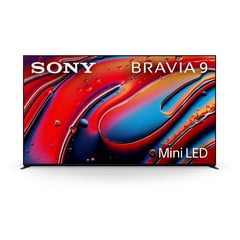
Sony 65-Inch BRAVIA 9 Mini LED K-65XR90
Sony
It depends — Its strong brightness suits indirect daylight, but RTINGS found only adequate direct reflection handling and slower gaming response than competing models.
A capable choice for bright indirect light and campaign gaming. Direct reflections remain visible, and an eARC soundbar occupies one of its two 4K/120Hz inputs.Available at Amazon(paid link) — opens Amazon in a new tab. Price and availability shown there.


Sources
Pages consulted while researching this article. None of these are affiliate links.
- TechRadar: Samsung QN90F review and brightness measurements — techradar.com
- Samsung QN90F 65–85-inch specification sheet — images.samsung.com
- Samsung S95F US specification sheet — images.samsung.com
- Sony K-65XR90 BRAVIA 9 specifications — sony.com
- RTINGS: Samsung QN90F review — rtings.com
- RTINGS: Samsung S95F OLED review — rtings.com
- RTINGS: Sony BRAVIA 9 review — rtings.com
- PlayStation: PS5 resolution and video-output settings — playstation.com