Pro XG 8 PoE vs Flex 10 GbE: Count the Usable Ports
The question this answersWhere do these come from?
Should I get the Ubiquiti Pro XG 8 PoE or the Flex 10 GbE switch?
Choose the Pro XG 8 PoE for powered devices and expansion; the Flex 10 GbE suits a small network with separate device power.
Choose the Ubiquiti Pro XG 8 PoE when you need to power connected devices or expand beyond four 10GbE connections. Choose the Flex 10 GbE for a smaller network with separately powered equipment, remembering that a 10GbE uplink consumes one of its four fast ports.
The models compared here are USW-Pro-XG-8-PoE and USW-Flex-XG. Flex 10 GbE is the product also called Flex XG; it is a different switch from the Flex 2.5G PoE.
| Deciding specification | Pro XG 8 PoE | Flex 10 GbE |
|---|---|---|
| Ethernet ports | 8 × 10GbE RJ45; 2 × 10G SFP+ | 4 × 10GbE RJ45; 1 × 1GbE RJ45 |
| PoE output | 8 PoE++ ports; 155W shared budget | None |
| Switch power input | Included external DC adapter | PoE+ or 5V USB-C adapter |
| Routing | Layer 3 | Layer 2 |
| Total non-blocking throughput | 100Gbps | 41Gbps |
These are manufacturer specifications, not measurements from this site. Pro XG 8 PoE specifications, Flex 10 GbE specifications.
A NAS and two computers fit the Flex—with an uplink
Count every connection before choosing the Flex. One NAS, two computers and one 10GbE connection to your main switch occupy all four fast ports. Add another workstation and you have outgrown that arrangement.
The Flex’s fifth socket cannot rescue this layout at 10GbE: it is a gigabit port. Ubiquiti’s datasheet explicitly distinguishes that port from the four ports supporting 100Mbps, 1Gbps, 2.5Gbps, 5Gbps and 10Gbps. Flex XG datasheet.
There is a useful alternative if your upstream connection only needs gigabit speed. Connect the router through the gigabit port and reserve all four fast ports for local equipment. Traffic between devices in the same VLAN can stay on the switch; it does not all pass through the router connection. Consequently, a gigabit internet uplink does not automatically limit local NAS transfers to gigabit speed.
That distinction makes the Flex a sensible choice for a small storage network. The question is whether your fast traffic stays between its connected devices or must cross the uplink.
The Pro provides more room to expand. An SFP+ uplink leaves all eight copper ports available; a copper uplink leaves seven. The Flex 10 GbE is the wrong choice for four 10GbE endpoints plus a 10GbE uplink, because it has only four 10GbE ports in total. That is a port-count limitation, not a claim that its individual connections are slower.
Access points need PoE output, not merely PoE input
The Flex’s PoE capability powers the switch itself. It cannot supply power to an access point or camera. Supplying it with a higher-powered upstream PoE port does not create PoE output. Its documented power inputs are PoE+ and USB-C. Flex power specifications.
If you want Ethernet cables to carry both data and power to your access points, choose the Pro. Its limit is 60W per port at the power-sourcing equipment, with 155W shared across the switch. Eight PoE++ ports therefore do not mean eight simultaneous 60W loads: three such allocations alone would require 180W. Pro XG 8 PoE power specifications.
Build the power plan from each device’s documented maximum requirement, including delivery losses where applicable. An access point drawing little power while idle does not prove that the whole installation will fit during startup or heavier operation.
Just want the recommendation?
Skip to the picksAlso distinguish remote power from remote bandwidth. Using the Flex’s PoE input as its sole upstream cable gives you a gigabit upstream connection. A separate connection to a fast port is needed for a 10GbE uplink, even when PoE supplies the switch’s power. The Pro, meanwhile, requires its external power supply; it is not a replacement for a remotely PoE-powered Flex.
The Pro adds capacity, not a faster speed class
The Pro’s larger aggregate throughput figure describes a switch with more ports. It does not mean that a single NAS connection becomes faster than 10GbE.
ServeTheHome tested the Pro using a Keysight traffic generator and recorded 100Gbps of aggregate Layer 1 traffic across ten ports without frame loss, including its 64-byte frame test. That supports the Pro’s ability to handle simultaneous traffic across its port set. ServeTheHome’s Pro XG 8 PoE measurements.
ServeTheHome separately measured the Flex at just under 40Gbps aggregate throughput in its Keysight CyPerf testing. The publication used different test arrangements for the two reviews, so these figures should not be treated as a controlled comparison of latency or application performance. ServeTheHome’s Flex XG measurements.
For one workstation copying to one NAS, check the storage system and both network interfaces before assuming that replacing the Flex with the Pro will accelerate transfers.
Beside a desk, power and cooling matter
The Pro has active cooling: ServeTheHome’s teardown identified two fans. Its testing recorded roughly 19.6W at idle, and approximately 37dBA against a 34dBA room noise floor after startup while running its line-rate traffic test. Those conditions do not establish silence in a bedroom or noise under a full PoE load. Pro hardware inspection, Pro power and noise testing.
For the Flex, ServeTheHome recorded 10.35W with UniFi connected and only the gigabit management connection attached. This is not an equivalent workload to a fully populated switch, but it gives a useful reference for a lightly connected installation. Flex power testing.
Treat those readings as dated test results. Ubiquiti subsequently documented Energy Efficient Ethernet support for the Pro XG 8 PoE in switch firmware 7.5.10; that release note does not quantify the resulting savings. It would be unjustified to promise a fixed present-day power difference from the older measurements. Ubiquiti’s 7.5.10 release notes.
Layer 3 matters when you actually route between VLANs
The Pro can route between VLANs, whereas the Flex leaves that job to another device. This can matter when substantial storage or server traffic crosses network boundaries. It offers no routing advantage for a workstation and NAS communicating within the same VLAN.
There are configuration consequences. Ubiquiti’s Layer 3 routing implementation uses transit VLAN 4040. A third-party gateway must support VLAN tagging and static routes. Ubiquiti also states that switch routing does not perform NAT and that Traffic Identification and dependent features are unavailable on networks managed by the Layer 3 switch. Buying the Pro does not replace an internet gateway. Ubiquiti Layer 3 routing documentation.
Neither switch deserves a blanket warning. The Pro is the broader recommendation for expansion and powered endpoints; consider the Flex when your complete connection plan fits its four fast ports and you already have device power handled. Before ordering, write down the uplink alongside the endpoints—the uplink is the connection most likely to change this decision.
The bottom line
Both are defensible — the split is what you do with it:
Top pick
Buy this
Ubiquiti UniFi Pro XG 8 PoE USW-Pro-XG-8-PoE
Ubiquiti UniFi
Eight 10GbE PoE++ copper ports and two 10G SFP+ ports accommodate powered endpoints and expansion beyond the Flex’s four fast ports.
Choose it for powered access points, additional 10GbE endpoints or SFP+ connections. Its active cooling and shared 155W PoE budget need to fit your installation.Available at Amazon(paid link) — opens Amazon in a new tab. Price and availability shown there.The alternative
It depends
Ubiquiti UniFi Flex 10 GbE USW-Flex-XG
Ubiquiti UniFi
Its four 10GbE ports suit a small network, but the fifth port is gigabit-only and its PoE capability supplies input power only.
Consider it for a small NAS and workstation network with separately powered devices. A 10GbE uplink leaves three fast endpoint ports, and there is no PoE output.Available at Amazon(paid link) — opens Amazon in a new tab. Price and availability shown there.
Recommended products
Ordered by how well each one fits the situations above. Each link below is a paid link.
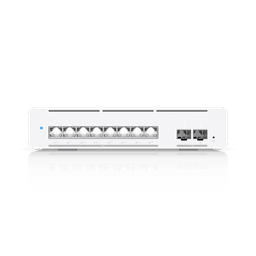
Ubiquiti UniFi Pro XG 8 PoE USW-Pro-XG-8-PoE
Ubiquiti UniFi
Buy — Eight 10GbE PoE++ copper ports and two 10G SFP+ ports accommodate powered endpoints and expansion beyond the Flex’s four fast ports.
Choose it for powered access points, additional 10GbE endpoints or SFP+ connections. Its active cooling and shared 155W PoE budget need to fit your installation.Available at Amazon(paid link) — opens Amazon in a new tab. Price and availability shown there.
Ubiquiti UniFi Flex 10 GbE USW-Flex-XG
Ubiquiti UniFi
It depends — Its four 10GbE ports suit a small network, but the fifth port is gigabit-only and its PoE capability supplies input power only.
Consider it for a small NAS and workstation network with separately powered devices. A 10GbE uplink leaves three fast endpoint ports, and there is no PoE output.Available at Amazon(paid link) — opens Amazon in a new tab. Price and availability shown there.
Sources
Pages consulted while researching this article. None of these are affiliate links.
- Ubiquiti Pro XG 8 PoE technical specifications — techspecs.ui.com
- Ubiquiti Flex 10 GbE technical specifications — techspecs.ui.com
- Ubiquiti Flex XG datasheet — dl.ui.com
- ServeTheHome: Pro XG 8 PoE performance, power and noise measurements — servethehome.com
- ServeTheHome: Flex XG performance and power measurements — servethehome.com
- ServeTheHome: Pro XG 8 PoE internal hardware inspection — servethehome.com
- Ubiquiti UniFi Switch 7.5.10 release notes — community.ui.com
- Ubiquiti Layer 3 routing requirements and limitations — help.ui.com