MOZA KS Pro on the R5: What Works and What Changes
The question this answersWhere do these come from?
Does the MOZA KS Pro work with the R5 wheelbase, and will it add torque or Xbox support?
The MOZA KS Pro connects directly to the R5 on PC, adding a screen and more controls, but it does not increase torque or enable Xbox support.
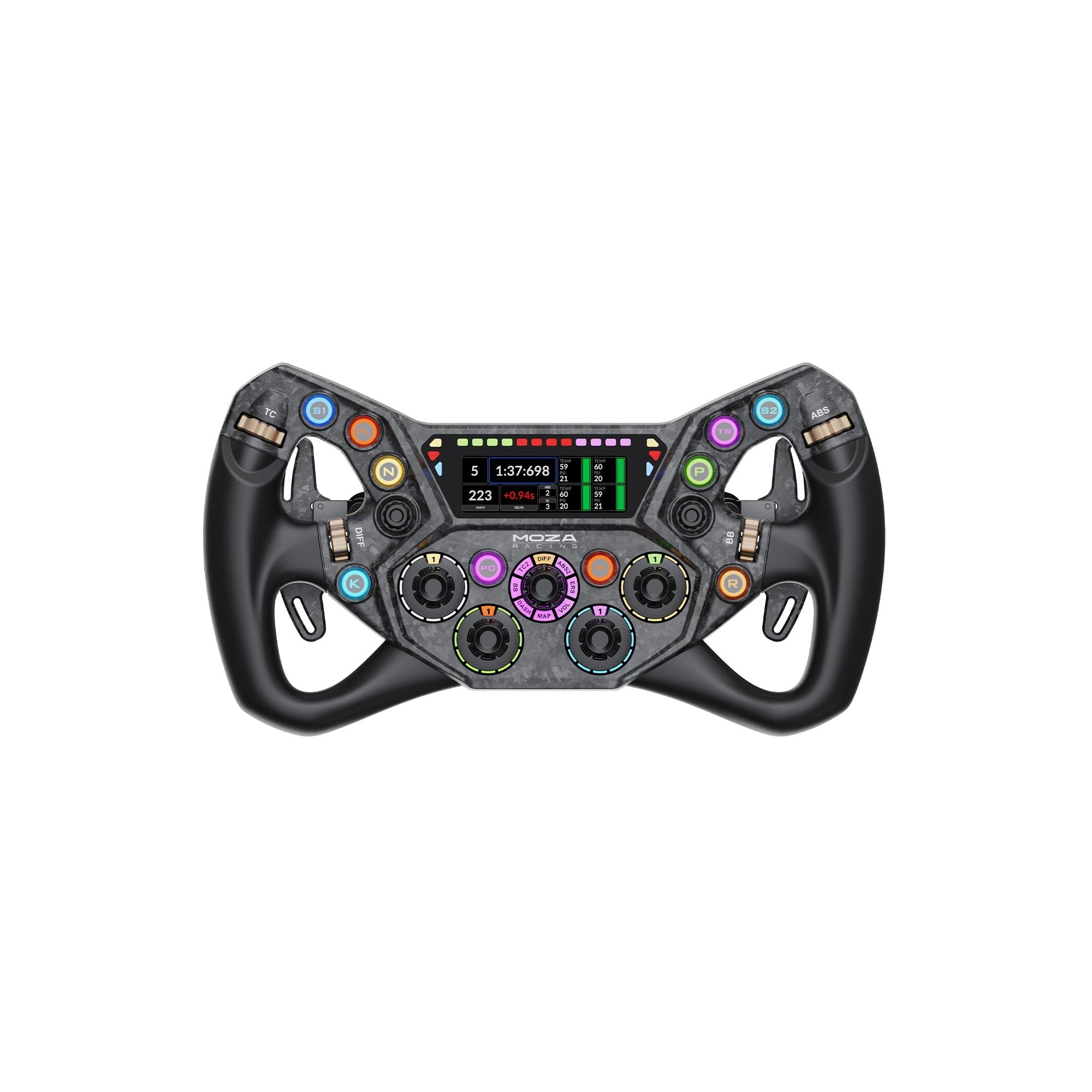
The MOZA KS Pro works directly with the MOZA R5 wheelbase on PC, using its supplied quick release without a separate hub. It adds a 300 mm GT-style wheel and a 2.99-inch display; the R5 remains a 5.5 Nm base, and this pairing does not provide Xbox compatibility. MOZA compatibility chart, R5 specifications, MOZA console requirements.
Buy the KS Pro for an R5 when you want more controls and a dashboard within the wheel. If the aim is stronger steering forces, changing the rim does not provide the missing motor torque.
The R5 connection needs no extra adapter
MOZA’s compatibility chart explicitly marks the KS Pro Wheel / R5 combination as a direct connection. This is stronger evidence than a general claim that both products belong to the same ecosystem: the chart defines its checkmark as connection directly to the wheelbase.
The KS Pro communicates through a conductive slip ring and includes an aluminum quick release. Its support documentation describes the Universal Hub Kit as the route for using third-party wheelbases. You do not need that hub, a replacement quick release or a separate wheel-to-PC cable for the normal R5 installation. KS Pro hardware specifications.
Keep the product names separate when ordering. KS, KS Pro, ES and ESX are different wheels. The standard R5 bundle includes the ES wheel; purchasing the KS Pro wheel alone does not supply an R5 base or pedals. Check a seller’s bundle contents rather than assuming a photograph of the assembled equipment describes everything included. R5 bundle contents.
Choose the KS Pro for its display and controls
These three wheels connect to the R5, but their useful differences are the screen, size and console support.
| Wheel | Width / diameter | Built-in dashboard screen | Supported platform with R5 |
|---|---|---|---|
| MOZA KS Pro | 300 mm | 2.99 inches | PC |
| MOZA KS | 300 mm | None | PC |
| MOZA ESX | 280 mm | None | PC and Xbox |
The dimensions and hardware come from MOZA’s KS Pro specifications, KS support documentation and ESX specifications; Xbox operation requires the licensed wheel under MOZA’s console compatibility rules.
The KS Pro is the pick for PC GT and formula racing when you want telemetry on the wheel. It has five rotary encoders, two seven-way funky switches and two rear buttons, alongside its ten illuminated face buttons. The display supports dashboards configured through Pit House. Those additions give you more places to assign brake balance, traction control and other frequently used functions.
The original KS falls short for drivers seeking an integrated dashboard because it has no screen and only three rotary encoders. It remains a sensible alternative if you already use your monitor, a separate dashboard or VR for race information: its 300 mm format and two clutch paddles cover the core GT-wheel requirements. Neither KS model deserves a blanket warning for PC use; the distinction is whether you will use the Pro’s additional interface.
There are ergonomic caveats. In his independent KS Pro review, Traxion’s Ross McGregor found most buttons accessible while driving, but reported discomfort during prolonged use at higher force-feedback levels and noted play in the funky switches. That is evidence of his experience, not a measured failure rate or proof that the switches will fail. Drivers with larger hands should pay particular attention to grip fit. Traxion’s KS Pro review.
Just want the recommendation?
Skip to the picksThe R5 stays at 5.5 Nm
A larger steering wheel changes the leverage at your hands. It does not change the motor’s torque rating. MOZA specifies 5.5 Nm peak torque for the original R5 discussed here.
For a transparent illustration, compare the 280 mm ESX with the 300 mm KS Pro. Using nominal half-width as the lever arm, equivalent tangential force at the rim is torque divided by radius: 5.5 ÷ 0.14 gives approximately 39.3 N, while 5.5 ÷ 0.15 gives approximately 36.7 N. That is about 6.7% less equivalent rim force at the larger radius.
This is a geometry calculation from MOZA’s published dimensions and torque rating, not a measured loss of force-feedback detail. Actual grip position, wheel inertia, game settings and the motor’s changing output all affect what you feel. It would be misleading to turn that calculation into a claim that the KS Pro makes the R5 exactly 6.7% worse.
No independent instrumented measurements of the KS Pro fitted to an R5 were located for this article. The specifications above are manufacturer figures; the available independent review supplies driving impressions rather than an R5 torque or response-time benchmark.
The practical decision follows from that limit: choose the KS Pro if you are satisfied with the R5’s strength and want a different interface. If the R5 already feels too weak, the KS Pro does not resolve that complaint. Compatibility alone cannot promise that the combination will feel strong enough for every driver.
Xbox requires the ESX wheel
Skip the KS Pro for an Xbox-only R5 setup: it lacks the Xbox licensing required for the base to operate on the console. A wheel fitting the shaft does not establish console support. MOZA’s console FAQ specifically requires an Xbox-licensed steering wheel and identifies the ESX as that option. PlayStation support is not provided by this pairing either. MOZA console requirements.
For Xbox, consider the ESX instead. Its drawback is straightforward: you give up the KS Pro’s integrated dashboard and GT control layout. Check support for the particular Xbox game as well; MOZA documents game-specific restrictions and limitations on some button functions. MOZA Xbox FAQ.
When the wheel fits but inputs do not work
Check recognition in Pit House before assuming the KS Pro is incompatible with the R5. MOZA recommends updating both base and wheel firmware for persistent recognition problems. Its documented next steps include changing steering-wheel access detection to continuous, or using automatic detection with its calibration procedure. MOZA steering-wheel troubleshooting.
If the wheel registers but a paddle misses inputs, use Recovery and Reset → Calibrate Paddles and follow the prompts. If steering and buttons work but the shift lights do not follow engine speed, the KS Pro support page directs you to Configure beside the game on the Pit House home page, followed by the rev-speed matching setting on the steering-wheel page. These are separate checks for input calibration and game telemetry. KS Pro support procedures.
Persistent detection or paddle faults after those documented steps need MOZA support to determine whether repair or replacement is required. Buying a hub is not the next diagnostic step for a combination MOZA explicitly supports directly.
The bottom line
Both fit — your exact model decides:
Top pick
Buy this
MOZA KS Pro Steering Wheel
MOZA
MOZA explicitly supports direct R5 connection, and the KS Pro provides a 2.99-inch display and five rotary encoders.
Choose it for PC GT and formula racing on the R5 when you want an integrated dashboard and more controls. It adds neither motor torque nor Xbox support.Available at Amazon(paid link) — opens Amazon in a new tab. Price and availability shown there.The alternative
It depends
MOZA KS Steering Wheel
MOZA
The KS directly supports the R5 and includes two clutch paddles, but has no dashboard screen and three rotary encoders rather than five.
Consider it when race information already lives on your monitor, separate dashboard or VR display. It retains the 300 mm format and clutch paddles but lacks the Pro’s screen.Available at Amazon(paid link) — opens Amazon in a new tab. Price and availability shown there.
Recommended products
Ordered by how well each one fits the situations above. Each link below is a paid link.
MOZA KS Pro Steering Wheel
MOZA
Buy — MOZA explicitly supports direct R5 connection, and the KS Pro provides a 2.99-inch display and five rotary encoders.
Choose it for PC GT and formula racing on the R5 when you want an integrated dashboard and more controls. It adds neither motor torque nor Xbox support.Available at Amazon(paid link) — opens Amazon in a new tab. Price and availability shown there.
MOZA KS Steering Wheel
MOZA
It depends — The KS directly supports the R5 and includes two clutch paddles, but has no dashboard screen and three rotary encoders rather than five.
Consider it when race information already lives on your monitor, separate dashboard or VR display. It retains the 300 mm format and clutch paddles but lacks the Pro’s screen.Available at Amazon(paid link) — opens Amazon in a new tab. Price and availability shown there.
MOZA ESX Steering Wheel
MOZA
It depends — The ESX supplies the Xbox licensing required by MOZA’s console compatibility rules and is listed as directly compatible with the R5.
Consider it for an R5 used on Xbox or shared between Xbox and PC. Its console licensing comes without the KS Pro’s integrated screen and GT control layout.Available at Amazon(paid link) — opens Amazon in a new tab. Price and availability shown there.
Sources
Pages consulted while researching this article. None of these are affiliate links.
- MOZA Racing Products Compatibility — support.mozaracing.com
- MOZA R5 Wheel Base Support — support.mozaracing.com
- MOZA KS Pro Steering Wheel Specifications — mozaracing.com
- MOZA KS Steering Wheel Support — support.mozaracing.com
- MOZA ESX Steering Wheel Specifications — mozaracing.com
- MOZA Wheel Base FAQs — support.mozaracing.com
- Traxion: Moza KS Pro Wheel Review — traxion.gg
- MOZA Xbox FAQ — support.mozaracing.com