HP Pavilion Gaming 15-ec: Replace Just One Fan?
The questionWhere do these come from?
Issue with my CPU fan. Hp service center charging me 9500/Rs for a new pair of fans for my Pavilion Gaming laptop. They said you shouldn't get individual fan because there would be calibration/rpm issue otherwise. I don't know if I am being scammed. Help!!
CPU fan of my 'HP pavilion gaming laptop 15- ec1xxx' has stopped working. I took it out and cleaned it a couple days ago and it worked for 2 days after that and then the issue returned.
A single failed fan can be replaced without buying a pair, provided its part number, connector and housing match your Pavilion 15-ec.
Yes—replacing only the failed fan in an HP Pavilion Gaming 15-ec is reasonable when the replacement matches the installed part and the other fan works correctly. A supplier offering a pair does not establish that both fans must be replaced, and HP’s documented fan replacement procedure contains no pairing or RPM calibration step. HP Maintenance and Service Guide, page 41
The buying decision starts with the full laptop model and the label on the failed fan. L72702-001 and L77560-001 are useful identifiers to investigate, but neither should replace checking the actual connector and housing.
When only one fan has failed
The strongest physical evidence comes from the documented disassembly of a Pavilion 15-ec0751ms. Inside My Laptop removes the two blowers separately, identifies the installed fan as L77560-001, and reports that the left and right fans in that machine are identical and interchangeable. This supports replacing an individual blower in that configuration; it does not prove that every replacement advertised for the entire 15-ec family fits every production variant. Inside My Laptop’s Pavilion 15-ec disassembly
For a repair involving one confirmed failed fan, a mandatory pair replaces a working component without establishing why it needs replacement. Ask the repairer to distinguish three explanations: both fans have faults, their supplier packages them together, or their repair warranty requires replacing both. Those are different reasons, and only the first establishes that both fans are defective.
A correctly matched pair is not a bad product. Replacing both is reasonable if both grind, struggle to start or fail diagnostics, or if you deliberately want preventive replacement while the laptop is open. There is no evidence here that warrants condemning a particular fan pair; the warning is against treating pair replacement as an established calibration requirement.
If a technician specifically claims that a single replacement causes an RPM mismatch, request the HP service bulletin or procedure applicable to your full product number. Compatibility matters, but that claim needs more support than the fact that the machine contains two fans.
Match the installed fan before ordering
HP’s September 2019 guide explicitly covers 15-ec0xxx and 15z-ec000 models and lists L72702-001 under “Fans.” The photographed teardown identifies L77560-001 on its installed blower. These sources explain why searches encounter both numbers, but they are not a blanket cross-reference for every later 15-ec configuration. HP service guide, photographed fan identification
Before buying, assemble this matching information:
- Full laptop identity: Record the complete 15-ec model suffix and HP product number, rather than just “Pavilion Gaming 15.”
- Original fan label: Photograph the HP service number, manufacturer model code and electrical rating.
- Connector: Compare its shape, keying, occupied contacts and wire arrangement. Matching the number of wires alone is insufficient.
- Housing: Compare screw tabs, outlet shape, thickness, cable exit and cable reach with the original.
- Package contents: Confirm whether the selected item contains one blower, two blowers or a larger assembly.
Treat these as checks to resolve before installation. A seller’s long compatibility title is not confirmation that the item pictured matches the part in your laptop. Ask for photographs of the actual replacement label and plug if the listing leaves either unclear.
Just want the recommendation?
Skip to the picksDo not force a connector, rearrange wires or splice the original cable onto a different fan to make an uncertain purchase fit. If the label is unreadable or the replacement connector differs, have HP or a repairer identify the correct part from the product number and photographs. That uncertainty cannot be resolved reliably from “15-ec” alone.
The single replacement worth considering
The HK-Part Fan for HP Pavilion Gaming 15-EC 16-A CPU Fan L77560-001 L77558-001 L72702-001 is an individual replacement listed on Amazon. Consider it when the selected item matches the original fan label, plug and housing. Its appeal is that it lets you replace one blower; its limitation is that the advertised compatibility does not independently establish equivalence across the whole laptop family.
No independent laboratory measurements were located for this HK-Part replacement’s airflow, noise, speed response or service life. Consequently, there is no evidence here to call it quieter, longer-lasting or equal in performance to an original HP-supplied fan. The recommendation is conditional on matching and successful post-installation checks.
Choose a seller that clearly identifies the supplied part and permits returns for an incompatible item. Keep the original fan until the replacement has been verified, so its label and connector remain available for comparison.
Fan replacement does not automatically require repasting
HP documents fan removal separately from heat-sink removal. Its fan procedure calls for disconnecting the battery and fan cables, releasing the power cable from the right fan’s clips, and removing five Phillips M2.0 × 3.5 screws across the two fans. Heat-sink removal is not a prerequisite. HP places this work in its service-provider section. HP service guide, pages 41–43
That distinction matters when agreeing on the repair: replacing a blower need not disturb the processor’s thermal interface. If the heat sink is removed, HP requires renewing the thermal materials. Ask whether that additional work is actually needed.
For someone comfortable servicing laptops, the preparation is to shut down fully, unplug external power, remove the bottom cover using the applicable guide, and disconnect the internal battery before touching fan connections. Photograph cable routing first. The photographed 15-ec0751ms procedure removes the left fan before the right, so replacing only one part may still involve temporarily moving the other. Inside My Laptop’s removal procedure
Check the repair before returning to gaming
A 90B startup warning means the system has detected improper cooling-fan operation; it does not establish that both fan motors have failed. HP recommends checking for dust obstruction and contacting support if the fault persists. HP’s fan-error guidance
After reassembly, start the laptop and press Esc, then F2, to enter HP Hardware Diagnostics UEFI. Open Component Tests and run the fan tests if available. HP documents a Fan Speed Test and a Fan Thermal Test, while noting that available component tests differ between computers. Save any failure ID. HP hardware diagnostic instructions
Check for recurring startup warnings, scraping and interrupted operation before resuming demanding games. Stop if the fan remains inoperative or the laptop overheats. A replacement that still fails needs its compatibility, connection and motherboard fan circuit investigated; buying the second fan is not an established fix for that unresolved fault.
The bottom line
What to replace:
Top pick
It depends
HK-Part Fan for HP Pavilion Gaming 15-EC 16-A CPU Fan L77560-001 L77558-001 L72702-001
HP
It is sold as an individual replacement referencing L77560-001 and L72702-001, but compatibility must be checked against the installed fan rather than the 15-ec family name alone.
An individual blower to consider when only one fan has failed and its label, connector and housing match the original. Independent airflow, noise and durability measurements were not located.Available at Amazon(paid link) — opens Amazon in a new tab. Price and availability shown there.
Recommended products
Ordered by how well each one fits the situations above. Each link below is a paid link.
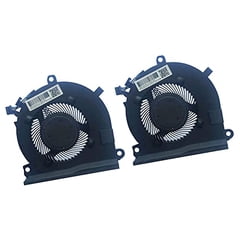
HK-Part Fan for HP Pavilion Gaming 15-EC 16-A CPU Fan L77560-001 L77558-001 L72702-001
HP
It depends — It is sold as an individual replacement referencing L77560-001 and L72702-001, but compatibility must be checked against the installed fan rather than the 15-ec family name alone.
An individual blower to consider when only one fan has failed and its label, connector and housing match the original. Independent airflow, noise and durability measurements were not located.Available at Amazon(paid link) — opens Amazon in a new tab. Price and availability shown there.
Sources
Pages consulted while researching this article. None of these are affiliate links.
- HP Pavilion Gaming 15 Maintenance and Service Guide, September 2019 — documents.cdn.ifixit.com
- Inside My Laptop: HP Pavilion 15-ec series disassembly — insidemylaptop.com
- HP PCs: Cooling-fan startup errors and troubleshooting — support.hp.com
- HP PCs: Testing for hardware failures — support.hp.com