Hisense U75QG Panel Defects: Exchange or Upgrade?
The questionWhere do these come from?
85" U75QG with screen defects
I have an 85" u75qg, that I've had set up about 3 weeks now. I've really loved the picture quality and overall been very happy. And zero DSE, whcih I know is an issue with these so I was happy about that too.
Exchange a new Hisense 85U75QG if fixed panel marks distract during viewing; choose the U8QG for better picture performance, not assured reliability.
Request an exchange for a new Hisense 85U75QG if pixel defects or debris-like marks stay in the same position across sources and distract you during normal viewing. Moving to the Hisense U8QG makes sense for better picture performance, but the reviewed evidence does not establish that it is less likely to arrive with panel defects.
The model distinction matters: 85U75QG belongs to Hisense’s U7 series, despite search results mixing it with the U8. The same-generation, 85-inch U8 alternative is 85U8QG; advice about a U8H, U8K or U8N concerns a different television. Hisense identifies the 85U75QG here.
Check whether the mark belongs to the screen
Complete these checks before deciding whether to keep the television. They help separate a physical screen problem from an external source problem; they cannot identify the contents of a sealed panel.
- Inspect the screen with the television off. Look for an obvious surface speck under ordinary room lighting. Follow the supplied cleaning instructions if cleaning is needed. Do not scrape a mark or press on it to determine whether it is underneath the surface.
- Open the TV’s home screen and another built-in app. Look at the same physical location. A mark visible there as well as over an HDMI source makes that external device or its cable an unlikely explanation.
- Briefly display white, gray, red, green and blue backgrounds. Record which backgrounds reveal the mark. A tiny point and an irregular shadow are useful descriptions; neither proves the cause by itself.
- Restart once and repeat the check. Hisense’s U8QG-linked manual describes switching off, unplugging for 60 seconds, reconnecting and switching on. It also recommends changing channels or content when investigating dots and lines. These are basic isolation checks, not a promise to repair a physical defect. Hisense troubleshooting instructions.
- Return to your usual seat and actual programmes. Check a bright scene, a dark scene and a slow camera pan. Record whether the problem remains distracting at the distance where you watch.
If the symptom appears only on one HDMI device, test another input and a known-working cable before condemning the panel. If it remains fixed over built-in content, buying an HDMI cable is unlikely to help.
Fixed dots and debris-like shadows need different descriptions
A consistently dark point can be compatible with a dead pixel; a persistently coloured point can indicate a subpixel problem. An irregular mark extending across several pixels could instead involve contamination, an optical-layer defect or damage. Without inspection, a photograph cannot reliably settle those alternatives.
Describe what you can demonstrate: “fixed dark mark visible over white and green backgrounds in two built-in apps” is stronger evidence than declaring that the television contains dust or an insect. Include both a close photograph and a wider image that establishes its position.
Broad shaded patches are a separate issue. RTINGS found darker corners and dirty-screen effect on its tested U75QG, and explicitly notes that uniformity differs between individual units. That finding can explain broad unevenness during sports pans; it does not establish that a sharply defined speck is normal. RTINGS’ U75QG uniformity assessment.
Do not massage pixels, flex the screen, use suction cups or open the panel to move suspected debris. Hisense warns against pressing hard on or jolting its LCD panels. A persistent internal mark needs seller or manufacturer assessment, not increasingly forceful cleaning. Hisense safety guidance.
Exchange visible defects; keep only what you can accept
Exchange is the preferred outcome when a fixed mark interrupts ordinary viewing and the seller accepts the return. You do not need to establish the precise failed component before reporting an unacceptable picture.
Just want the recommendation?
Skip to the picksKeeping the television is reasonable when a tiny point is visible only during close inspection, ordinary content looks satisfactory, and you knowingly accept it. That is a personal acceptance decision, not evidence that the point will disappear. Do not let repeated test-pattern sessions consume the seller’s return period while waiting for improvement.
A replacement 85U75QG is the straightforward choice if its brightness, motion and everyday picture already meet your needs. Examine the replacement during its own return period. One defective sample does not establish the defect rate of the entire model, and an exchange does not guarantee perfect uniformity.
Neither the U75QG nor the U8QG deserves a blanket “do not buy” verdict from the available panel-defect evidence. The warning applies to accepting a visibly defective individual television or treating an upgrade as proven protection against another faulty panel.
The U8QG upgrade buys picture performance
The following published measurements illustrate the performance difference. They are review-sample results, not measurements of the particular 85-inch television delivered to you.
| Tom’s Guide measurement | Hisense U75QG | Hisense U8QG |
|---|---|---|
| HDR brightness, 10% window | 3,338 nits | 3,916 nits |
| UHDA-P3 gamut coverage | 94.9% | 97.53% |
| Input latency | 9.8 ms | 9.7 ms |
Tom’s Guide measured these results and identifies its U75QG sample as the 65-inch version. Its table supports a brightness and colour advantage for the U8QG, while the reported input-latency difference is just 0.1 ms. None of these measurements assesses manufacturing defect rates. Tom’s Guide’s measurements.
Consider the Hisense 85U8QG if you also want stronger HDR highlights and better contrast. RTINGS’ direct comparison likewise finds the U8QG brighter, with better contrast and a wider colour range. RTINGS’ U75QG–U8QG comparison.
For readers who already like the U75QG’s picture, the U8QG gets the replacement decision wrong when it is chosen solely to avoid dead pixels: the cited testing establishes performance advantages, not a lower panel-defect rate. Its own limitations also remain relevant—RTINGS reports restricted viewing angles and slow pixel transitions on its tested U8QG. RTINGS’ U8QG review.
When the return period has ended
Contact Hisense with the receipt, full model number, serial number, delivery date and photographs. Explain whether the mark appeared immediately and whether it persists across built-in apps. Use the 85U75QG support page to identify the correct product.
Do not assume that one dead pixel automatically qualifies for warranty replacement. A published Hisense US safety/warranty document says a few non-active pixels are not considered defects; it does not establish a numerical acceptance threshold specifically for the 85U75QG. Request the terms applicable to your model and country. The same document lists US support at 1-888-935-8880 and requires proof of purchase for warranty service. Hisense warranty and service information.
If support classifies the mark as contamination or damage, request that diagnosis and its basis in writing. A persistent internal panel problem cannot be resolved confidently through remote troubleshooting alone; the next step is an authorised assessment, repair or replacement decision.
The bottom line
Two candidates — the symptom tells you which:
Top pick
Buy this
Hisense 85U75QG 85-Inch U7 Mini-LED ULED 4K Google Smart TV
Hisense
A replacement 85U75QG preserves the existing model’s features, while the cited evidence does not establish that moving to the U8QG lowers panel-defect risk.
Choose the same model as an exchange when its picture already meets your needs. Inspect the replacement promptly: RTINGS found uniformity weaknesses, and individual panels differ.Available at Amazon(paid link) — opens Amazon in a new tab. Price and availability shown there.The alternative
It depends
Hisense 85U8QG 85-Inch U8 Mini-LED ULED 4K Google Smart TV
Hisense
Independent comparisons establish higher brightness and better contrast, but do not establish a lower rate of dead pixels or internal panel contamination.
Consider this upgrade for stronger HDR performance and contrast. It has no established panel-reliability advantage, and RTINGS identifies viewing-angle and pixel-response limitations.Available at Amazon(paid link) — opens Amazon in a new tab. Price and availability shown there.
Recommended products
Ordered by how well each one fits the situations above. Each link below is a paid link.
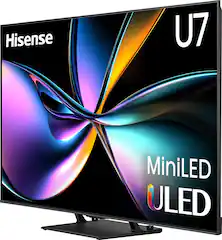
Hisense 85U75QG 85-Inch U7 Mini-LED ULED 4K Google Smart TV
Hisense
Buy — A replacement 85U75QG preserves the existing model’s features, while the cited evidence does not establish that moving to the U8QG lowers panel-defect risk.
Choose the same model as an exchange when its picture already meets your needs. Inspect the replacement promptly: RTINGS found uniformity weaknesses, and individual panels differ.Available at Amazon(paid link) — opens Amazon in a new tab. Price and availability shown there.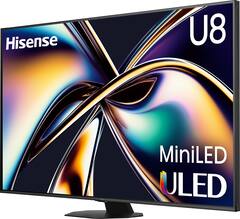
Hisense 85U8QG 85-Inch U8 Mini-LED ULED 4K Google Smart TV
Hisense
It depends — Independent comparisons establish higher brightness and better contrast, but do not establish a lower rate of dead pixels or internal panel contamination.
Consider this upgrade for stronger HDR performance and contrast. It has no established panel-reliability advantage, and RTINGS identifies viewing-angle and pixel-response limitations.Available at Amazon(paid link) — opens Amazon in a new tab. Price and availability shown there.
Sources
Pages consulted while researching this article. None of these are affiliate links.
- Hisense 85U75QG official product information — hisense-usa.com
- Hisense U8QG-linked e-manual and troubleshooting instructions — hisense-usa.com
- RTINGS Hisense U75QG review — rtings.com
- Hisense important safety information and US limited warranty — files.hisense-usa.com
- Tom’s Guide Hisense U75QG review and measurements — tomsguide.com
- RTINGS Hisense U75QG and U8QG comparison — rtings.com
- RTINGS Hisense U8QG review — rtings.com
- Hisense 85U75QG product support — hisense-usa.com