Canon R50 + RF 35mm F1.8: Set It Up Right
The questionWhere do these come from?
Need help with a Lens
Hello, I’m very new to this so please don’t mind if the question seems stupid. I’ve just got myself an R50V, it’s been two months now, and I’ve been toying with it and the kit lens it came with.
The Canon RF 35mm F1.8 mounts directly on the R50; set the lens to AF and IS On, then allow for its roughly 56mm-equivalent view.
The Canon RF 35mm F1.8 Macro IS STM works directly on the EOS R50, with autofocus and optical stabilization; no mount adapter is required. Mount it with the camera switched off, set the lens switches to AF and IS ON, and expect a roughly 56mm-equivalent field of view rather than a wide-angle view. Canon’s R50 specifications
Mount the lens and set up your first portraits
- Switch the R50 off and remove the caps. Align the red mounting marks on the lens and camera, then rotate the lens until it clicks into place. Remove the front cap before shooting.
- Set the lens’s focus switch to AF. This lens has a physical AF/MF switch, and Canon specifies that the lens switch takes precedence over the camera’s focus-mode setting. A missing AF → Focus mode menu entry with this lens attached is therefore normal. Canon’s RF lens mounting instructions
- Set the lens’s stabilizer switch to ON for handheld shooting. Do not search for a missing still-photo IS mode toggle: Canon says that setting is not displayed when an attached lens has its own IS switch. You control this lens’s optical stabilization on the barrel. Canon’s still-photo IS instructions
- Turn the mode dial to Av and start at f/2.8 with Auto ISO. This is a suggested starting point for portraits, giving more depth of field than f/1.8. Open to f/1.8 when you need more light or stronger background blur.
- Configure autofocus for people. Under the AF tab, select AF area → Whole area AF, Subject to detect → People, and enable eye detection. Select AF operation → Servo AF for someone who moves. Tap the intended eye, then hold the shutter halfway while following the person. Canon’s AF area and eye-detection instructions
- Check shutter speed before trusting stabilization. For a person posing, 1/125 second is a reasonable starting point; try 1/250 second or faster when they move. These are starting settings, not guarantees. If Av chooses a slower speed, use M with Auto ISO to select both aperture and shutter speed.
Optical stabilization reduces blur from camera movement. It cannot keep a turning head or moving hand sharp during a long exposure. When the background looks sharp but the person looks smeared, increase shutter speed before blaming autofocus.
The framing deserves a check before you buy. The R50’s APS-C sensor produces approximately a 1.6× crop relative to full frame, so 35 × 1.6 ≈ 56mm equivalent. The physical focal length remains 35mm and the maximum aperture remains f/1.8. Canon lists the sensor dimensions as approximately 22.3 × 14.9mm. Canon’s R50 specifications
If you already have a zoom covering 35mm, set it to 35mm and leave it there while composing your intended pictures. This previews the prime’s framing, though it does not reproduce its maximum aperture or close-focus capability. If you keep backing into a wall, the RF 35mm will not solve that problem.
For the camera’s broader controls, the guide to taking your first photos and videos with the EOS R50 covers the setup beyond this lens.
Record video without an unexpected tighter crop
The RF 35mm makes practical sense for a seated presenter, an interview detail, or a product shot when you can place the camera far enough away. Its approximately 56mm-equivalent view makes it a poor choice as your only lens for arm’s-length filming or showing a small room.
Start with the camera in movie mode and follow this sequence:
Just want the recommendation?
Skip to the picks- Compose with Movie Digital IS set to Off. Find it under Shooting → IS (Image Stabilizer) mode → Movie Digital IS. Keep the lens’s physical IS switch ON for a handheld shot.
- Enable continuous movie focusing when the subject moves. Set AF → Movie Servo AF → Enable. For a presenter, use people detection and eye detection, then check that the camera follows the intended face.
- Try digital stabilization only after checking the frame. On magnifies the image slightly; Enhanced magnifies it further. Leave space around the subject before enabling either setting.
- Record a short clip and review both the picture and sound. Check for changes in framing during focus transitions and for lens sounds picked up by the microphone.
There is a useful interaction here: on the R50, Movie Digital IS will not operate when this lens’s optical IS switch is OFF. Turning the barrel switch off and selecting digital stabilization in the menu does not give you digital-only stabilization with this lens. Canon also recommends Movie Digital IS Off when using a tripod. Canon’s movie stabilization instructions
If a locked shot repeatedly refocuses, establish focus and disable Movie Servo AF, or use manual focus when neither camera nor subject will move. Canon warns that the built-in microphone can capture lens operation sounds and recommends positioning an external microphone away from the camera and lens when this happens. Continuous AF can also produce visible changes in image magnification during recording. Canon’s Movie Servo AF instructions
Get close-ups without expecting full 1:1 macro
Canon specifies a 0.17m minimum focusing distance and 0.5× maximum magnification for the RF 35mm F1.8 Macro IS STM. The focusing distance is measured from the camera’s sensor plane, so it does not mean 17cm of clear space in front of the lens. At close range, leave room for light to reach the subject. Canon’s lens specifications
An independent measurement supports the magnification claim: Gordon Laing at Cameralabs measured a 72mm-wide subject filling the frame on a camera with a 36mm-wide sensor, confirming 1:2 reproduction. That test used a full-frame camera, not an R50. Cameralabs’ RF 35mm review
For the R50, the useful calculation is 22.3mm ÷ 0.5 = 44.6mm. At maximum magnification, a subject approximately 44.6mm wide should span the uncropped still-photo frame. This is a calculation from Canon’s sensor width and lens magnification specifications, not a measured R50 result. The smaller sensor gives tighter framing; the lens still provides 0.5× optical reproduction.
To photograph a small object:
- Start at f/5.6 or f/8, with the camera supported and the subject well lit. At close distances, f/1.8 leaves very little depth in focus.
- Choose 1-point AF and place it on the critical detail. If tracking keeps selecting something else, set Whole area tracking Servo AF → Off and Subject to detect → None.
- Move back slightly if focus will not lock. You may be inside the minimum focusing distance. For a stationary subject, switch the lens to MF and use magnified live view to check the detail. Canon’s focusing instructions
- Inspect the captured image at high magnification. If the chosen detail is sharp but the rest of the object is blurred, adjust aperture or the object’s angle. That pattern alone does not indicate a faulty lens.
There is no compatibility-based reason to avoid the Canon RF 35mm F1.8 Macro IS STM on the R50. Buy it when you want this framing, a bright aperture, optical stabilization, and close-ups in one lens. Its limits are specific: it cannot provide a wide view on the R50, and its 0.5× reproduction does not replace a 1:1 macro lens.
The bottom line
What you need for this:
Top pick
Buy this
Canon RF35mm F1.8 Macro IS STM
Canon
It mounts directly on the EOS R50 and combines an f/1.8 maximum aperture, optical image stabilization, and documented 0.5× maximum magnification.
A direct-mount R50 lens for portraits, presenter shots, and close-ups, with optical stabilization and a bright aperture. Its roughly 56mm-equivalent view is tight for arm’s-length video, and macro magnification stops at 0.5×.Available at Amazon(paid link) — opens Amazon in a new tab. Price and availability shown there.
Recommended products
Ordered by how well each one fits the situations above. Each link below is a paid link.
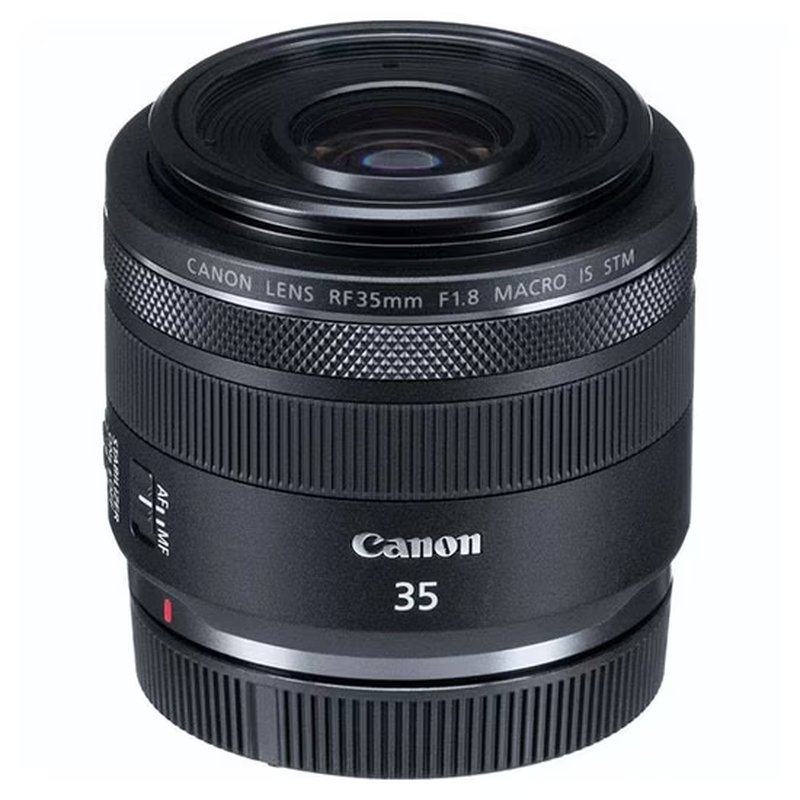
Canon RF35mm F1.8 Macro IS STM
Canon
Buy — It mounts directly on the EOS R50 and combines an f/1.8 maximum aperture, optical image stabilization, and documented 0.5× maximum magnification.
A direct-mount R50 lens for portraits, presenter shots, and close-ups, with optical stabilization and a bright aperture. Its roughly 56mm-equivalent view is tight for arm’s-length video, and macro magnification stops at 0.5×.Available at Amazon(paid link) — opens Amazon in a new tab. Price and availability shown there.
Sources
Pages consulted while researching this article. None of these are affiliate links.
- Canon EOS R50 support and specifications — usa.canon.com
- Canon EOS R50: Attaching and Detaching RF/RF-S Lenses — cam.start.canon
- Canon EOS R50: Still-photo Image Stabilizer Settings — cam.start.canon
- Canon EOS R50: Selecting the AF Area — cam.start.canon
- Canon EOS R50: Movie Digital IS — cam.start.canon
- Canon EOS R50: Movie Servo AF — cam.start.canon
- Canon RF35mm F1.8 Macro IS STM Specifications — personal.canon.jp
- Cameralabs: Canon RF 35mm f1.8 Macro Review — cameralabs.com