Samsung 870 EVO 4TB Fits the ProDesk 400 G2 Mini
The questionWhere do these come from?
HP ProDesk 400 G2 MINI: 2x NVME SSDs or 1 + SATA?
Bear with me; my terminology may not be 100% correct. I'm a noob. I have an HP ProDesk 400 G2 MINI I use for data processing/machine learning. I'm close to the limit of my factory NVMe 256 GB SSD and need to add another HDD.
Yes—the 870 EVO 4TB fits the ProDesk 400 G2 Mini’s single 2.5-inch SATA bay; it needs the HP cable and GPT, not an M.2 slot.
Yes. The Samsung 870 EVO 4TB is physically and electrically compatible with the HP ProDesk 400 G2 Desktop Mini’s 2.5-inch SATA position. It is the right way to add 4TB when the computer’s single storage M.2 socket already contains the boot drive—but the SATA cage, HP cable/connector and mounting screws must be present.
The ProDesk has two storage positions, not two NVMe slots
The ProDesk 400 G2 Mini provides one connector labeled SSD for an M.2 PCIe storage drive and one connector labeled SATA0 for a 2.5-inch drive. Its separate M.2-shaped WLAN socket is for the Wi-Fi card, not a second NVMe SSD.
That distinction is explicit in HP’s system-board callout: HP lists separate SSD, WLAN and SATA0 connectors. The same service guide describes one M.2 PCIe 2280 SSD and one removable 2.5-inch drive in the Desktop Mini chassis. HP’s Maintenance and Service Guide therefore resolves the confusing part of this upgrade: an occupied WLAN socket does not indicate that the machine supports two storage M.2 drives.
| Drive | Interface and size | Where it can go | Verdict for expansion |
|---|---|---|---|
| Samsung 870 EVO 4TB | 2.5-inch, 6.8 mm, SATA 6 Gb/s | The single 2.5-inch SATA bay | Buy when the bay is empty |
| Samsung 990 EVO Plus 4TB | M.2 2280, PCIe NVMe | The single storage M.2 socket | Skip when that socket already holds a drive |
Skip the Samsung 990 EVO Plus 4TB if the existing system drive is already in the M.2 socket: the ProDesk has no second storage M.2 connector for it, and the WLAN connector is not an alternative. The 990 EVO Plus is relevant only when the actual storage M.2 socket is empty, which is a narrower upgrade scenario than adding storage alongside an existing M.2 drive.
When the 870 EVO is an addition—and when it is a replacement
Open the computer and identify the installed drive before ordering anything. The result determines whether the 870 EVO increases the number of internal drives or replaces one:
- If Windows or Linux currently boots from the M.2 SSD and the 2.5-inch cage is empty, the 870 EVO can be added as a second internal drive.
- If the current boot drive is already a 2.5-inch SATA disk, the 870 EVO must replace it. There is only one 2.5-inch position, so clone the old disk or plan a clean operating-system installation.
- If both the storage M.2 socket and the 2.5-inch bay are occupied, the chassis has no third internal storage position. Expanding further requires replacing one drive or using external storage.
- If a small card with antenna wires occupies the other M.2-shaped connector, leave it alone. That is the WLAN module.
This is why “buy another NVMe drive” is incomplete advice for this particular mini PC. An NVMe drive may be faster, but speed is irrelevant when there is no vacant storage socket to receive it.
Why the 4TB capacity is not the same as HP’s factory options
Samsung specifies the 4TB 870 EVO as a 100 × 69.85 × 6.8 mm, 2.5-inch drive using a SATA 6 Gb/s interface that is backward-compatible with SATA 3 Gb/s and 1.5 Gb/s. Those dimensions and that interface match the type of drive used by the ProDesk’s SATA bay. Samsung rates it for sequential reads up to 560 MB/s, writes up to 530 MB/s and 2,400 TB written under its five-year limited-warranty terms. Samsung’s 870 EVO data sheet contains the capacity, dimensions and interface specifications.
HP’s 2016 service guide lists the drive capacities HP supplied as service parts, including 2.5-inch hard drives up to 2TB and SATA SSDs up to 512GB. That list is not an explicit maximum-capacity statement. HP did not qualify the later Samsung 870 EVO 4TB by model number, so this is a standards-based compatibility finding rather than an OEM certification of that exact SSD.
For an ordinary secondary data drive, the important capacity condition is the partition table. Initialize the 4TB disk as GPT, not MBR. Microsoft documents that GPT supports volumes larger than 2TB, whereas MBR cannot address capacity beyond roughly 2.2TB. Microsoft’s disk-initialization guidance recommends GPT for large disks.
A nominal 4TB drive contains 4,000,000,000,000 bytes, so an operating system reporting approximately 3.64 TiB is normal; that is unit conversion, not missing capacity. If the 870 EVO will become the boot disk rather than a secondary data disk, use 64-bit Windows in UEFI mode with a GPT system disk. HP’s guide documents a UEFI boot order, but an old installation configured for Legacy BIOS and MBR should not simply be cloned and expected to expose the full disk without conversion.
Just want the recommendation?
Skip to the picksCheck the refurbished chassis for missing hardware
Many ProDesk 400 G2 Minis now circulate as refurbished or decommissioned business systems. Their configurations are not necessarily complete. Before buying the SSD, shut the computer down, unplug its power adapter and remove the top cover by loosening the rear thumbscrew and sliding the panel forward, following HP’s procedure.
Look for all three of these parts:
- The 2.5-inch drive cage beside the heat sink.
- The HP SATA power/data cable or connector running from SATA0 to the drive position.
- The isolation mounting guide screws that slide into the cage rails.
A bare 870 EVO cannot compensate for missing chassis hardware. HP specifically identifies a SATA cable/connector among the Mini’s service parts, and its installation procedure says to transfer the silver-and-blue guide screws from the old drive to the new one. If the bay was never populated and those pieces are absent, obtain the correct HP drive hardware using the computer’s product ID or serial number before installing the SSD. Do not assume an ordinary desktop SATA cable will fit the Mini’s internal layout.
Installing and initializing the drive safely
Back up important files before opening the case. HP also instructs users to disconnect the power cord because voltage remains on the system board while the adapter is connected.
With the machine unplugged, remove the cover. Seat the guide screws in the 870 EVO, align them with the cage slots, lower the drive into place and slide it forward until it locks. Attach the SATA power/data connector without sharply creasing its ribbon or cable, then replace the cover.
After starting Windows:
- Right-click Start and open Disk Management.
- Confirm the new disk by its capacity. A blank 4TB Samsung drive will appear close to 3.64 TiB.
- Right-click the disk label, choose Initialize Disk, and select GPT.
- Right-click the unallocated area, choose New Simple Volume, assign a drive letter and format it as NTFS unless another file system is specifically required.
Check the disk number and capacity carefully before initializing or formatting anything. Selecting an existing drive can destroy its partition information.
If the SSD is absent from both the F10 firmware setup and the operating system, power down and reseat the cable first. If it appears in firmware but not File Explorer, inspect Disk Management; a new uninitialized disk does not receive a drive letter automatically. If it remains undetected with a known-good HP cable, update the system BIOS from HP’s support page for the exact product ID and test the SSD in another SATA-capable computer or enclosure before treating it as defective.
SATA performance is appropriate for this bay
The 870 EVO will not deliver NVMe transfer rates because the ProDesk connects it through SATA. That is a platform limit, not an incompatibility. It remains suitable for datasets, media, backups, virtual-machine images and general file storage where capacity matters more than multi-gigabyte-per-second sequential throughput.
Independent testing also supports its use inside a compact chassis. Tom’s Hardware tested the 4TB 870 EVO and measured peak power consumption of only 2.58W, reporting no significant thermal-throttling concern in its workload. The review also found the lowest latency among its SATA comparison group in the demanding PCMark 10 full-system-drive test. Tom’s Hardware’s 4TB measurements are more useful here than Samsung’s maximum-speed claim alone because heat and power matter inside a Mini.
The practical answer is therefore conditional but clear: buy the Samsung 870 EVO 4TB when the ProDesk’s 2.5-inch bay is vacant and its HP mounting hardware is present. It can sit beside the existing M.2 boot drive, but it cannot sit beside another 2.5-inch disk, and it should be initialized as GPT to use its full capacity.
The bottom line
Both fit — your exact model decides:
Top pick
Buy this
Samsung 870 EVO 4TB 2.5-inch SATA SSD MZ-77E4T0B/AM
Samsung
Its 100 × 69.85 × 6.8 mm 2.5-inch body and SATA 6 Gb/s interface match the Mini’s documented 2.5-inch SATA drive position.
This is the correct form factor and interface for the ProDesk 400 G2 Mini’s 2.5-inch SATA bay. It is limited to SATA performance and still requires the HP cage, cable/connector and guide screws.Available at Amazon(paid link) — opens Amazon in a new tab. Price and availability shown there.The alternative
Skip this
Samsung 990 EVO Plus 4TB NVMe SSD MZ-V9S4T0B/AM
Samsung
The ProDesk 400 G2 Mini has one SSD M.2 socket, so this M.2 2280 drive has nowhere to install when the existing storage M.2 position is occupied.
This M.2 2280 NVMe drive cannot be added as a second NVMe SSD when the ProDesk’s sole storage M.2 socket is occupied. It is relevant only when that socket is empty, and it does not fit the 2.5-inch SATA bay.Available at Amazon(paid link) — opens Amazon in a new tab. Price and availability shown there.
Recommended products
Ordered by how well each one fits the situations above. Each link below is a paid link.
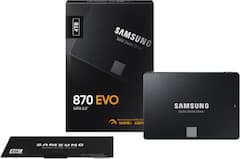
Samsung 870 EVO 4TB 2.5-inch SATA SSD MZ-77E4T0B/AM
Samsung
Buy — Its 100 × 69.85 × 6.8 mm 2.5-inch body and SATA 6 Gb/s interface match the Mini’s documented 2.5-inch SATA drive position.
This is the correct form factor and interface for the ProDesk 400 G2 Mini’s 2.5-inch SATA bay. It is limited to SATA performance and still requires the HP cage, cable/connector and guide screws.Available at Amazon(paid link) — opens Amazon in a new tab. Price and availability shown there.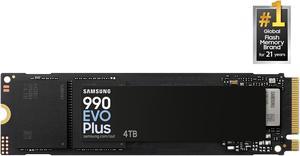
Samsung 990 EVO Plus 4TB NVMe SSD MZ-V9S4T0B/AM
Samsung
Skip — The ProDesk 400 G2 Mini has one SSD M.2 socket, so this M.2 2280 drive has nowhere to install when the existing storage M.2 position is occupied.
This M.2 2280 NVMe drive cannot be added as a second NVMe SSD when the ProDesk’s sole storage M.2 socket is occupied. It is relevant only when that socket is empty, and it does not fit the 2.5-inch SATA bay.Available at Amazon(paid link) — opens Amazon in a new tab. Price and availability shown there.
Sources
Pages consulted while researching this article. None of these are affiliate links.
- HP ProDesk 400 G2 Desktop Mini Maintenance and Service Guide — h10032.www1.hp.com
- Samsung SSD 870 EVO Data Sheet — download.semiconductor.samsung.com
- Samsung 870 EVO 4TB Performance Results — Tom’s Hardware — tomshardware.com
- Initialize New Disks — Microsoft Learn — learn.microsoft.com
- Samsung SSD 990 EVO Plus Data Sheet — download.semiconductor.samsung.com