RTX 3080 10GB vs 3060 Ti: The Clear Winner
The question this answersWhere do these come from?
Should I choose the RTX 3080 10GB or the RTX 3060 Ti?
The RTX 3080 10GB is roughly 29–38% faster in rasterized gaming, while the 3060 Ti draws 120W less and makes more sense for modest 1080p systems.
The RTX 3080 10GB is the clear performance winner. Choose the RTX 3060 Ti only when lower power consumption, less heat, or a shorter reference card matters more than frame rate; an upgrade from a 3060 Ti to a 3080 is substantial, but it is not a major upgrade in features or VRAM longevity.
What the benchmark gap actually looks like
Tom’s Hardware tested the original 8GB GDDR6 RTX 3060 Ti and the RTX 3080 10GB on the same Core i9-12900K platform. Its rasterization scores combine eight games, while its ray-tracing scores cover five games. DLSS was disabled, making this a direct rendering-performance comparison.
| Ultra-quality test | RTX 3080 10GB | RTX 3060 Ti | RTX 3080 lead |
|---|---|---|---|
| 1080p rasterization | 117.0 fps score | 90.7 fps score | 29% |
| 1440p rasterization | 96.4 fps score | 70.0 fps score | 38% |
| 1080p ray tracing | 74.3 fps score | 47.7 fps score | 56% |
| 1440p ray tracing | 47.9 fps score | 30.0 fps score | 60% |
These are composite scores rather than promises for every game, but the direction is unambiguous: the RTX 3080 pulls further ahead as the workload becomes more GPU-bound. The full methodology and results are in the Tom’s Hardware 2022–2024 GPU hierarchy.
The specifications that decide the comparison
| Specification | RTX 3080 10GB FE | RTX 3060 Ti FE | Practical effect |
|---|---|---|---|
| CUDA cores | 8,704 | 4,864 | More rendering and compute throughput on the 3080 |
| VRAM | 10GB GDDR6X, 320-bit | 8GB GDDR6 or GDDR6X, 256-bit | More capacity and bandwidth headroom on the 3080 |
| Graphics-card power | 320W | 200W | The 3060 Ti produces substantially less system heat |
| Recommended system PSU | 750W | 600W | The 3080 can require a PSU replacement |
| Founders Edition size | 285 × 112 mm, 2-slot | 242 × 112 mm, 2-slot | The 3060 Ti FE fits more compact cases |
Those figures come from NVIDIA’s official RTX 3080 specifications and RTX 3060 Ti specifications. Partner cards can be longer, thicker, factory-overclocked, and equipped with different power connectors, so check the exact model rather than relying on Founders Edition dimensions.
Where each card belongs at 1080p, 1440p and 4K
At 1080p, the RTX 3060 Ti remains the more sensible of these two for competitive games played at reduced settings. Those workloads often become CPU-limited before an RTX 3080 can express its full advantage. The RTX 3080 still wins if you combine 1080p with demanding ray tracing, maximum settings, or a very high-refresh monitor, but simply installing it will not fix a CPU bottleneck.
At 1440p, choose the RTX 3080. The measured rasterization lead rises to about 38%, and its additional ray-tracing hardware produces an even larger advantage in the tested RT suite. That difference can turn a borderline frame rate into a comfortable one without relying as heavily on upscaling.
At 4K, the RTX 3080 is also the correct choice between these cards. The RTX 3060 Ti can run lighter games or carefully selected settings at 4K, but its 8GB buffer and lower rendering throughput make it a poor match for maximum textures and ray tracing. The RTX 3080 is much faster, although its 10GB buffer means it should no longer be treated as an uncompromised maximum-settings 4K card.
Why 10GB versus 8GB is not enough by itself
The RTX 3080 has 25% more VRAM capacity than the RTX 3060 Ti, but that does not make it future-proof. It helps when a game’s allocation fits inside 10GB but exceeds 8GB; once a workload exceeds both capacities, both cards can exhibit texture substitution, stutter, or weak one-percent lows.
Independent VRAM testing illustrates why the limit behaves like a cliff rather than a gentle slowdown. Using otherwise matching 8GB and 16GB RTX 4060 Ti cards, TechSpot measured 73 fps versus 49 fps in Horizon Forbidden West at 1440p with DLSS when the 8GB card ran out of memory. The larger card also delivered more consistent frame times. That test does not quantify a 10GB RTX 3080 directly, but it demonstrates why two extra gigabytes cannot guarantee smooth maximum-texture performance in every current game. Lowering texture quality is the first setting to change when VRAM is the constraint; lowering render resolution alone may not solve it. See TechSpot’s VRAM capacity testing for the measured examples.
For competitive games using low or performance settings, this warning matters much less. For new, texture-heavy games at 1440p or 4K, the 3080’s 10GB is preferable to 8GB, but neither card is the ideal answer if long-term VRAM headroom is the main objective.
The 120W power difference is real
NVIDIA rates the RTX 3080 at 320W and the RTX 3060 Ti at 200W. Independent measurements found a slightly wider gap: Tom’s Hardware recorded 335W averages from the RTX 3080 Founders Edition in Metro Exodus and FurMark, while its RTX 3060 Ti Founders Edition used approximately 205W during gaming. Those results are detailed in the lab’s RTX 3080 power testing and RTX 3060 Ti power testing.
Just want the recommendation?
Skip to the picksThat roughly 130W measured difference becomes heat inside the case. The RTX 3080 therefore needs stronger case airflow, places more demand on the PSU, and may make the room perceptibly warmer during long sessions. The 3060 Ti is the better fit for a compact chassis, a thermally constrained prebuilt, or a system that cannot accept a suitable 750W supply.
For an RTX 3080 Founders Edition, NVIDIA specifies two dedicated PCIe eight-pin power cables feeding its included 12-pin adapter. Partner cards may use two or three eight-pin sockets. Do not reuse an unidentified modular PSU cable: the PSU-side pinout is not universal, and Seasonic warns that mixing cables between PSU models can damage components in its power-supply cable guidance.
DLSS, frame generation and streaming are a tie
Both cards use NVIDIA’s Ampere architecture with second-generation RT cores, third-generation Tensor cores, PCIe 4.0, HDMI 2.1, DisplayPort 1.4a, seventh-generation NVENC, and fifth-generation NVDEC. They support DLSS Super Resolution, DLAA, and DLSS Ray Reconstruction.
Neither card supports NVIDIA’s hardware DLSS Frame Generation. NVIDIA’s current DLSS hardware table limits Frame Generation to RTX 40- and 50-series GPUs, while RTX 30-series cards retain Super Resolution and Ray Reconstruction. Moving from a 3060 Ti to a 3080 therefore buys more conventional rendering power, not access to the newer frame-generation tier.
Streaming features are also essentially equal. Both cards can encode H.264 and HEVC through NVENC, but RTX 30-series NVENC does not encode AV1; NVIDIA’s NVENC compatibility table reserves AV1 encoding for RTX 40 and newer generations. The RTX 3080 can preserve more gaming performance while rendering a demanding scene, but its encoded-stream feature set is not newer.
Is a 3060 Ti-to-3080 upgrade worthwhile?
It is worthwhile when the target is 1440p ultra, heavier ray tracing, VR, or entry-level 4K and the system already has the PSU capacity, airflow, and physical clearance. A measured 38% rasterization gain at 1440p is visible, while the RT improvement can approach 60% in the cited five-game suite.
Skip this particular upgrade when the real goal is more modern GPU features or a large VRAM reserve. Both cards are Ampere products, both lack hardware Frame Generation and AV1 encoding, and the memory increase is only from 8GB to 10GB. In that situation, moving to a newer card with a materially larger buffer produces a more complete upgrade.
Downgrading from an RTX 3080 to a 3060 Ti only makes sense to reduce power, heat, noise potential, or card size. It is not a lateral performance move.
Check the exact version before buying used
“RTX 3080” does not always mean the card discussed here. NVIDIA also released a 12GB RTX 3080 with 8,960 CUDA cores, a 384-bit memory interface, and a 350W rating. It is a distinct model, so benchmarks for it should not be presented as results for the 10GB version.
The RTX 3060 Ti also exists with either GDDR6 or GDDR6X memory, although both versions have an 8GB capacity and 256-bit interface. The benchmark figures above describe the original 14Gbps GDDR6 model.
Before accepting either used card:
- Confirm the full model, memory capacity, memory type, and bus width with GPU-Z.
- Match the partner card’s length, thickness, and connector count against the case and PSU.
- Run a sustained game benchmark and a dedicated VRAM test; artifacts, driver resets, fan grinding, or repeated crashes are rejection signs.
- Inspect the PCB and cooler for corrosion, damaged connectors, missing screws, or evidence of careless disassembly.
- Verify that every modular PSU cable came with that exact PSU model.
With comparable card condition and system compatibility, choose the RTX 3080 10GB. Choose the RTX 3060 Ti for a power-limited or compact 1080p build; choose neither as an upgrade if the main objective is a large VRAM increase or RTX Frame Generation.
The bottom line
The choice turns on one thing:
Top pick
Buy this
NVIDIA GeForce RTX 3080 Founders Edition 10GB
NVIDIA
The article names the RTX 3080 the clear performance winner, measuring a 29-38% rasterization lead and up to 60% ray-tracing lead over the 3060 Ti.
This is the faster choice for 1440p ultra, ray tracing, VR, and carefully configured 4K gaming. Its drawbacks are the 320W rating, substantial heat output, and a 10GB buffer that can still constrain maximum-texture workloads.Available at Amazon(paid link) — opens Amazon in a new tab. Price and availability shown there.The alternative
It depends
NVIDIA GeForce RTX 3060 Ti Founders Edition 8GB
NVIDIA
The article says to choose the 3060 Ti only when lower power draw, less heat, or a shorter card matters more than frame rate, and calls it the more sensible pick for CPU-limited 1080p competitive gaming.
This model suits a compact or power-conscious 1080p system and is easier to cool. Its 8GB VRAM and roughly 29–38% rasterization deficit make it the weaker long-term option.Available at Amazon(paid link) — opens Amazon in a new tab. Price and availability shown there.
Recommended products
Ordered by how well each one fits the situations above. Each link below is a paid link.

NVIDIA GeForce RTX 3080 Founders Edition 10GB
NVIDIA
Buy — The article names the RTX 3080 the clear performance winner, measuring a 29-38% rasterization lead and up to 60% ray-tracing lead over the 3060 Ti.
This is the faster choice for 1440p ultra, ray tracing, VR, and carefully configured 4K gaming. Its drawbacks are the 320W rating, substantial heat output, and a 10GB buffer that can still constrain maximum-texture workloads.Available at Amazon(paid link) — opens Amazon in a new tab. Price and availability shown there.
NVIDIA GeForce RTX 3060 Ti Founders Edition 8GB
NVIDIA
It depends — The article says to choose the 3060 Ti only when lower power draw, less heat, or a shorter card matters more than frame rate, and calls it the more sensible pick for CPU-limited 1080p competitive gaming.
This model suits a compact or power-conscious 1080p system and is easier to cool. Its 8GB VRAM and roughly 29–38% rasterization deficit make it the weaker long-term option.Available at Amazon(paid link) — opens Amazon in a new tab. Price and availability shown there.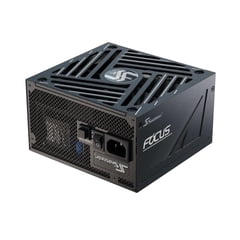
Seasonic FOCUS GX-750 ATX 3.1 Power Supply
Seasonic FOCUS
Buy — Its 750W capacity and two PCIe 6+2-pin cables meet NVIDIA's reference power guidance for the article's recommended RTX 3080 Founders Edition build.
Its 750W capacity and two PCIe 6+2-pin cables meet the RTX 3080 Founders Edition’s reference power guidance. The capacity is unnecessary for a 3060 Ti-only build, and its native 12V-2x6 cable is not used by these Founders Edition cards.Available at Amazon(paid link) — opens Amazon in a new tab. Price and availability shown there.
Sources
Pages consulted while researching this article. None of these are affiliate links.
- 2022–2024 GPU Hierarchy — Tom’s Hardware — tomshardware.com
- GeForce RTX 3080 Family Specifications — NVIDIA — nvidia.com
- GeForce RTX 3060 Ti Family Specifications — NVIDIA — nvidia.com
- How Much VRAM Is Enough for PC Gaming? — TechSpot — techspot.com
- GeForce RTX 3080 Power, Temperatures and Fan Speeds — Tom’s Hardware — tomshardware.com
- GeForce RTX 3060 Ti Power, Temperatures and Fan Speeds — Tom’s Hardware — tomshardware.com
- DLSS Technology and Supported Hardware — NVIDIA — nvidia.com
- NVIDIA NVENC OBS Guide — nvidia.com