Reolink E1 Pro Rental Setup: What Works
The questionWhere do these come from?
Best Camera System for Rental Property (Local Storage, No Cloud Fees)
I’m looking to set up a camera system for a rental property and would appreciate some recommendations.
Use current E1 Pro cameras indoors, an Argus solar pair outside, and a Reolink Home Hub; a router disk or NAS alone is the weak link.
Use two current 5MP Reolink E1 Pro cameras indoors, two Argus PT Ultra solar bundles outside, and a Reolink Home Hub as the local recorder; a USB drive plugged into a router is not, by itself, a four-camera recorder. A NAS can record the E1 Pro directly and can receive event files from specific Argus hardware versions, but the Home Hub is the more dependable center for this mixed powered-and-solar system.
| Product | Verdict | Why it fits | The catch |
|---|---|---|---|
| Reolink Home Hub | Buy | Central local recording for up to eight compatible Reolink cameras | Reolink-only ecosystem; storage uses microSD rather than a hard drive |
| Reolink E1 Pro 5MP | Consider | Indoor power, RTSP, ONVIF, FTP and continuous-recording support | Indoor-only; older 4MP units have different FTP support |
| Reolink Argus PT Ultra with Solar Panel 2 | Consider | Outdoor solar operation and local motion-event recording | Standard Argus models do not provide dependable 24/7 recording |
| Synology DiskStation DS225+ | Skip | Capable NAS and surveillance platform for powered IP cameras | A poor primary recorder for sleeping solar cameras, and four channels exceed the two licenses normally included |
The E1 Pro does work with a NAS—but check which E1 Pro
The current E1 Pro is a 5MP indoor camera, not the older 4MP model still described in many reviews and forum answers. Reolink specifies 2880 × 1616 video at up to 20fps, 355-degree pan, 50-degree tilt, dual-band Wi-Fi, an Ethernet port and a microSD slot supporting up to 512GB. More importantly for this question, the current model lists FTP, RTSP and ONVIF alongside Reolink NVR and Home Hub support. Those are the interfaces that make local network recording possible. Reolink’s current E1 Pro specifications explicitly describe FTP/NAS compatibility and continuous recording.
There are two practical NAS paths:
- FTP or FTPS upload: the camera sends video files to an FTP service running on a NAS or suitably equipped router.
- Surveillance software: Synology Surveillance Station, QNAP QVR or another NVR application records the E1 Pro’s RTSP or ONVIF stream.
The hardware revision matters. Reolink’s current FTP compatibility table excludes the E1 Pro 4MP from standalone FTP support, while the current 5MP E1 Pro supports it. An older 4MP unit can still use RTSP or ONVIF with compatible NAS software, but it should not be purchased on the assumption that the FTP menu will be present.
That makes the current E1 Pro a good indoor component rather than the answer to the whole system. It needs 5V mains power and has no outdoor weather rating. Its pan-and-tilt mechanism also looks in only one direction at a time; place its guard position over the critical doorway instead of assuming that 355-degree movement provides simultaneous room-wide coverage.
The solar cameras change the storage decision
Solar Wi-Fi cameras are battery cameras with solar charging, not continuously powered Wi-Fi cameras. The standard Argus PT Ultra records motion-triggered events and sleeps to preserve energy. Reolink’s documentation says most battery models cannot record continuously even after being connected to a Home Hub or NVR; only specific battery families, such as the Altas series, support continuous recording. Reolink’s continuous-recording guide separates those models explicitly.
The Argus PT Ultra is still a reasonable exterior choice when event recording is sufficient. It provides 3840 × 2160 video at 15fps, IP65 weather resistance, dual-band Wi-Fi, pan and tilt, and support for Solar Panel 2. Its product documentation lists Home Hub, Wi-Fi NVR and FTP storage alongside its internal card option. The Argus PT Ultra specifications identify its normal recording mode as motion-triggered.
Direct FTP support nevertheless depends on hardware. Reolink currently lists Argus PT Ultra revisions including BIPC_560MIX16M35SD938MP, BIPC_NT2BNO28MPW4SD15V5, BIPC_NT2BNO28MPW4SD15V17 and BIPC_NT2BNO28MPW7SD15V15. Other revisions may need a Home Hub or NVR to provide FTP access. Check each camera in Reolink App → Device Settings → Device Info → System Information before treating direct NAS upload as guaranteed.
Choose a solar pair only when motion clips are acceptable. If uninterrupted outdoor footage is mandatory, solar Argus cameras are the wrong architecture: install powered Wi-Fi cameras or, preferably, PoE cameras instead.
Why the Home Hub is the cleanest recorder
The Reolink Home Hub supports up to eight cameras, enough for this four-camera layout. It accepts compatible plug-in Wi-Fi cameras and most current battery Wi-Fi models, including supported Argus PT Ultra revisions. Reolink’s Home Hub compatibility chart also names the excluded or firmware-dependent hardware versions, which is safer than relying on the model name alone.
The standard hub has two microSD slots supporting up to 1TB each, encrypted local storage and local LAN operation. It connects to the router through Ethernet while the cameras remain on Wi-Fi. Recordings therefore stay available on the property without requiring a cloud subscription, and the cameras can continue operating locally during an internet outage. Reolink documents those storage and network limits.
Its drawback is vendor lock-in. The hub is designed around Reolink cameras, and microSD storage is less serviceable than the hard drives in a conventional NVR or NAS. For four cameras—particularly when the outdoor pair records events rather than continuously—the simpler compatibility is usually worth that trade.
Just want the recommendation?
Skip to the picksRouter storage is not automatically camera storage
A router may expose an attached USB disk as an SMB network share. Reolink cameras do not simply mount that share and write their normal timeline to it. The router needs to run a compatible FTP or FTPS server, or another device must run surveillance software capable of ingesting RTSP or ONVIF streams.
For supported cameras, Reolink’s FTP setup is Device Settings → FTP Upload → FTP Settings in the app, or Device Settings → Surveillance → FTP in the desktop client. Configure a dedicated account with permission only for the camera directory, run the connection test and trigger a real motion event before mounting the cameras permanently.
Prefer FTPS where the receiving server supports it. Reolink states that FTP-capable devices can use FTPS but do not support SFTP. Its FTPS and SFTP documentation makes that easy-to-confuse distinction. Keep the service restricted to the local network, never expose FTP port 21 directly to the internet, and use a VPN for administrative remote access.
FTP also produces files, not necessarily a polished four-camera playback timeline. A Home Hub or surveillance application provides easier synchronized browsing, retention management and event filtering.
Skip a Synology NAS as the first recorder
Skip the Synology DiskStation DS225+ if it is being purchased specifically to record this mixed solar system. The NAS is capable, but Reolink says Surveillance Station expects a persistent camera connection while battery cameras sleep between events; forcing persistent streaming can rapidly drain a solar camera. Reolink’s current Synology compatibility guide recommends powered Wi-Fi or PoE cameras for reliable continuous NAS recording.
The Home Hub can expose connected cameras through RTSP and ONVIF, so advanced users may technically pass camera channels to third-party software. That does not turn an ordinary Argus PT Ultra into a sustainable continuous camera. Reolink’s protocol-support chart marks battery cameras as requiring a Home Hub for those protocols.
A DS225+ remains reasonable if it is already serving other storage duties and will receive supported event files over FTP. It is also a good recorder after the outdoor cameras are replaced with powered ONVIF models. What it gets wrong for this particular buyer is being treated as a complete four-camera recorder without the hub, hardware checks or additional camera licensing.
A setup sequence that catches problems early
- Buy the current 5MP E1 Pro rather than unidentified old-stock 4MP units when direct FTP is required.
- Power each camera near the router and open Device Settings → Device Info to record its hardware and firmware versions.
- Compare both Argus PT Ultra hardware versions with Reolink’s current FTP and Home Hub compatibility tables.
- Update camera and Home Hub firmware before mounting anything.
- Connect the Home Hub to the router by Ethernet and add all four cameras while they have strong Wi-Fi signals.
- Configure event recording on the outdoor pair and either scheduled or continuous recording on the powered E1 Pro cameras.
- Walk through every detection zone and confirm that an actual clip appears in Home Hub playback—not merely that a notification reaches the phone.
- Disconnect the internet while leaving the LAN powered, then verify local live view and recording before restoring service.
- Put the cameras on an isolated IoT network where practical. The same principles used for segmenting cameras and other IoT devices apply even when the router and switch models differ.
Use unique administrator credentials, disable unused services, avoid direct port forwarding and export important incident footage promptly. Local recording avoids mandatory cloud storage, but a stolen hub or failed card can still remove the only copy.
What independent testing establishes
VueVille tested the older 4MP E1 Pro at its factory 4MP, 15fps and 3Mbps settings and reported no dropped frames in its day and night samples. The reviewer also recorded a one-second remote-network push-notification delay, received notifications on every test trigger and added the camera to QNAP Surveillance Station through ONVIF. VueVille’s measured E1 Pro review supports the basic NAS-integration case.
Those results should not be misrepresented as testing of the current 5MP revision, the Home Hub or a four-camera rental installation. No independent lab located for this article has measured this exact two-E1-Pro, two-Argus configuration. The system recommendation therefore rests primarily on Reolink’s documented storage, protocol and hardware-version compatibility.
The buying decision
Buy the Reolink Home Hub as the recorder, use two current E1 Pro cameras only in powered indoor positions, and consider two Argus PT Ultra solar bundles outside when motion-triggered footage is sufficient. This gives you one local Reolink playback interface without requiring cloud storage or cards inside every camera.
Choose a NAS-first design instead only when every camera is powered and exposes a persistent RTSP or ONVIF stream. For continuous rental-property surveillance, four powered cameras—ideally PoE—are more professional and predictable than any solar battery system.
The bottom line
Both work; your situation picks one:
Top pick
Buy this
Reolink Home Hub Security Center
Reolink
The Home Hub supports up to eight compatible Reolink cameras and two microSD cards of up to 1TB each, covering this four-camera mixed-power system.
This is the simplest central local recorder for two powered E1 Pro cameras and two compatible solar Argus cameras. The drawback is Reolink ecosystem lock-in and microSD-based storage instead of an internal hard drive.Available at Amazon(paid link) — opens Amazon in a new tab. Price and availability shown there.The alternative
It depends
Reolink E1 Pro 5MP Indoor WiFi Security Camera
Reolink
The current 5MP E1 Pro documents FTP, RTSP, ONVIF, Home Hub and continuous recording support, while Reolink excludes the older 4MP revision from standalone FTP.
Use two indoors where mains power is available and direct FTP, RTSP or ONVIF integration may be useful. It is not weatherproof, and old-stock 4MP units do not have the same FTP support as the current 5MP model.Available at Amazon(paid link) — opens Amazon in a new tab. Price and availability shown there.
Recommended products
Ordered by how well each one fits the situations above. Each link below is a paid link.

Reolink Home Hub Security Center
Reolink
Buy — The Home Hub supports up to eight compatible Reolink cameras and two microSD cards of up to 1TB each, covering this four-camera mixed-power system.
This is the simplest central local recorder for two powered E1 Pro cameras and two compatible solar Argus cameras. The drawback is Reolink ecosystem lock-in and microSD-based storage instead of an internal hard drive.Available at Amazon(paid link) — opens Amazon in a new tab. Price and availability shown there.
Reolink E1 Pro 5MP Indoor WiFi Security Camera
Reolink
It depends — The current 5MP E1 Pro documents FTP, RTSP, ONVIF, Home Hub and continuous recording support, while Reolink excludes the older 4MP revision from standalone FTP.
Use two indoors where mains power is available and direct FTP, RTSP or ONVIF integration may be useful. It is not weatherproof, and old-stock 4MP units do not have the same FTP support as the current 5MP model.Available at Amazon(paid link) — opens Amazon in a new tab. Price and availability shown there.
Reolink Argus PT Ultra 4K Solar Security Camera with Solar Panel 2
Reolink Argus
It depends — Reolink specifies IP65 protection, Solar Panel 2 support and motion-triggered recording, with standalone FTP limited to listed Argus PT Ultra hardware versions.
Use this outside when running power is impractical and motion-triggered recording is acceptable. Direct FTP depends on the hardware revision, and solar charging does not make the standard Argus PT Ultra a 24/7 camera.Available at Amazon(paid link) — opens Amazon in a new tab. Price and availability shown there.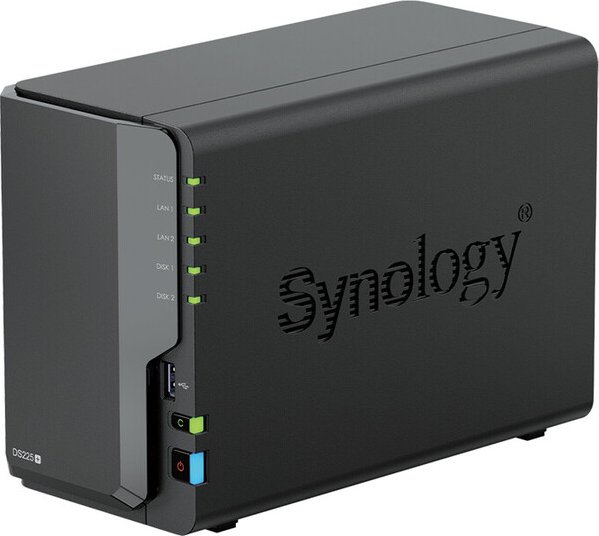
Synology DiskStation DS225+ 2-Bay NAS
Synology DiskStation
Skip — Reolink documents battery and solar cameras as poorly suited to Synology Surveillance Station because its persistent stream requirement can rapidly drain their batteries.
This is a capable NAS for powered ONVIF cameras or as an FTP destination, but it should not be purchased as the sole recorder for this solar-camera layout. Surveillance Station’s persistent connections conflict with battery-camera sleep behavior.Available at Amazon(paid link) — opens Amazon in a new tab. Price and availability shown there.
Sources
Pages consulted while researching this article. None of these are affiliate links.
- Reolink E1 Pro Specifications — reolink.com
- Which Reolink Cameras and NVRs Support FTP Uploading — support.reolink.com
- Reolink Home Hub Compatibility — support.reolink.com
- Reolink Home Hub Specifications — reolink.com
- Reolink Argus PT Ultra Specifications — reolink.com
- What Is Continuous Recording and Where to Save It — support.reolink.com
- Which Reolink Products Support CGI, RTSP and ONVIF — support.reolink.com
- Synology Surveillance Station Cameras Buying Guide — reolink.com