Refurbished ThinkPad T14 Gen 2: Still Worth Buying?
The questionWhere do these come from?
ThinkPad T14 Gen 2 – is this worth it for €686?
Hi everyone, I’m considering buying this refurbished laptop and wanted to get your opinion before pulling the trigger. From my research, it seems like a solid deal, but I’m unsure about the Intel T14 Gen 2 pricing in 2026.
A refurbished ThinkPad T14 Gen 2 remains a sensible work laptop if you verify its screen, battery health, RAM layout and ownership locks.
A refurbished Lenovo ThinkPad T14 Gen 2 is worth buying for office work, study and everyday programming when its battery, screen and ownership status are documented. Start with the AMD Ryzen 5 PRO 5650U configuration; choose Intel when you specifically need Thunderbolt, and reject any unit whose seller cannot resolve essential condition questions.
The recommendation is conditional on the individual laptop. A processor name cannot establish whether a refurbished machine has a worn battery, a replacement display or restricted BIOS settings. Those details can change the decision more than the difference between two processor badges.
Choose AMD for general work, Intel for Thunderbolt
These three configurations provide useful reference points. The table compares specific processors and platform features, rather than treating every T14 as the same laptop.
| Configuration | CPU cores / threads | RAM expansion | USB-C connectivity |
|---|---|---|---|
| T14 Gen 2, Ryzen 5 PRO 5650U | 6 / 12 | One DDR4 SO-DIMM slot | USB 3.2 Gen 2; no Thunderbolt |
| T14 Gen 2, Core i5-1145G7 | 4 / 8 | One DDR4 SO-DIMM slot | Two Thunderbolt 4 ports |
| T14 Gen 3, Ryzen 7 PRO 6850U | 8 / 16 | Soldered RAM; no slot | USB 3.2 Gen 2; no Thunderbolt |
These specifications come from Lenovo’s platform documents for the Gen 2 AMD, Gen 2 Intel and Gen 3 AMD.
The Ryzen 5 configuration is the sensible starting point for general work. Its extra cores make it worth considering for parallel workloads, although core count alone does not establish a particular application’s performance. Prioritize a documented screen and healthy battery before moving up to a Ryzen 7.
The Intel T14 Gen 2 makes sense if you need a Thunderbolt peripheral. Conversely, the AMD T14 Gen 2 gets connectivity wrong for someone relying on a Thunderbolt-only device: its USB-C ports do not provide Thunderbolt. An ordinary USB-C dock is a separate compatibility question; check its supported host connections.
None of these three models deserves a blanket warning against buying it. The meaningful differences are connectivity, memory expansion and screen format; the condition of a particular refurbished unit remains a separate decision.
“Full HD IPS” does not identify the screen you want
Lenovo offered T14 Gen 2 Full HD panels rated at 300 nits with 45% NTSC coverage, alongside a 400-nit low-power option rated at 72% NTSC. The same resolution therefore describes substantially different displays. The 400-nit option is the preferable target when you regularly work on the built-in screen. Lenovo’s display specifications
Notebookcheck measured an average brightness of approximately 367 nits on its Intel T14 Gen 2 review unit’s nominally 400-nit LG LP140WF9-SPF2 panel. That measurement applies to the tested panel, not every refurbished T14 bearing a Full HD description. Notebookcheck’s T14 Gen 2 measurements
Ask the seller to identify the installed panel, especially if the display has been replaced. The original configuration is useful evidence, but it cannot prove what a refurbisher installed later. A listing that only says “IPS” leaves this question unresolved.
For email and documents under controlled indoor lighting, the basic screen can be acceptable. For judging photographs or working beside bright windows, do not treat it as equivalent to the better panel. The same purchasing trap appears in the ThinkPad L14 Gen 4 screen guide: the family name alone does not establish display quality.
RAM expansion is a reason to keep Gen 2 on the shortlist
Both T14 Gen 2 platforms combine soldered memory with one SO-DIMM slot. Lenovo documents configurations reaching 40GB with 8GB soldered, or 48GB with 16GB soldered. Ask how the advertised total is assembled: “16GB RAM” does not tell you whether the slot is occupied. The AMD model also has one documented M.2 storage slot, so plan SSD expansion around replacing the existing drive. Lenovo’s Gen 2 upgrade specifications
Just want the recommendation?
Skip to the picksFor general work, 16GB is a reasonable starting target. If you run virtual machines, containers or unusually large projects, establish the memory layout before ordering. An intended upgrade should be part of the buying decision, rather than a surprise after delivery.
The T14 Gen 3 AMD is the alternative to consider when you want a taller screen: its WUXGA option provides 1920 × 1200 pixels rather than 1920 × 1080. However, its memory is soldered. Choose its 32GB configuration if that is the capacity you expect to need; buying a smaller configuration with plans to add RAM later will not work. Lenovo’s Gen 3 AMD specifications
That makes the newer model a narrower recommendation. It suits readers who want more vertical workspace and can settle their memory needs at purchase. Gen 2 retains a practical advantage for readers who want to expand memory later.
Battery evidence matters more than a cosmetic grade
Request a recent battery report for the actual laptop. In Windows, open Command Prompt as administrator and run powercfg /batteryreport, then open the report at the location shown. Microsoft documents this procedure for inspecting battery capacity and usage. Microsoft’s battery-report instructions
Compare Full Charge Capacity with Design Capacity. For example, 40,000mWh divided by 50,000mWh indicates approximately 80% remaining capacity. Treat 80% as a practical buying preference, not a Lenovo certification or a promise of particular runtime. A lower figure may be acceptable for permanent desk use, but it should be disclosed before purchase.
Notebookcheck recorded 8 hours 58 minutes in its Intel T14 Gen 2 Wi-Fi browsing test at 150 nits. That is a reference measurement from one review configuration, not a battery-life guarantee for an aged refurbished laptop. Notebookcheck’s battery testing
During the return window, unplug the laptop and run your normal applications at your normal brightness. Watch for abrupt percentage drops, unexpected shutdowns and unreliable charging. A clean lid and keyboard cannot answer those questions.
Ownership locks and support can decide against the purchase
Require confirmation that the BIOS supervisor password is cleared. Lenovo states that a forgotten supervisor password cannot simply be reset through its normal support process; system-board replacement is required. Reject a locked unit unless the seller removes the restriction before completing the sale. This is a seller or Lenovo service issue, not something to assume a Windows reinstall will fix. Lenovo’s ThinkPad password guidance
Also require the seller to confirm that the laptop has been released from its previous organization’s management. If setup demands an unfamiliar employer’s account, return it to the seller for resolution. Do not accept instructions to bypass setup as proof that ownership restrictions are gone.
For Windows use, request a properly activated Windows 11 installation. Lenovo lists Windows 11 configurations for this generation; ordinary Windows 10 Home and Pro support ended on October 14, 2025. A working Windows 10 desktop alone is not a satisfactory support plan. Microsoft’s Windows 10 lifecycle
Before ordering, obtain written answers covering the installed screen, battery condition, keyboard layout, included charger, return process and warranty coverage. Distinguish the refurbisher’s warranty from any remaining Lenovo coverage; neither should be assumed from the ThinkPad badge.
On arrival, test every key, the webcam and microphone, Wi-Fi, charging, and the ports you intend to use. Inspect the hinges and display for damage, then try sleep and wake repeatedly. Buy the T14 Gen 2 when these checks support the specification you wanted; walk away when the seller asks you to accept unresolved faults or missing evidence.
The bottom line
Both justify the spend at different budgets:
Top pick
Buy this
Lenovo ThinkPad T14 Gen 2 Ryzen 5 PRO 5650U 16GB 512GB SSD Renewed
Lenovo
The Ryzen 5 PRO 5650U provides six cores and twelve threads, while the platform retains one DDR4 SO-DIMM slot.
The starting choice for general work with expandable RAM. Verify the installed screen and battery; this AMD version has no Thunderbolt.Available at Amazon(paid link) — opens Amazon in a new tab. Price and availability shown there.The alternative
It depends
Lenovo ThinkPad T14 Gen 2 Core i5-1145G7 16GB 512GB SSD Renewed
Lenovo
Two Thunderbolt 4 ports make the Intel model suitable for Thunderbolt peripherals that the AMD Gen 2 does not support.
Choose this configuration when a Thunderbolt peripheral is essential. Its four-core processor offers fewer cores than the AMD Ryzen 5 configuration.Available at Amazon(paid link) — opens Amazon in a new tab. Price and availability shown there.
Recommended products
Ordered by how well each one fits the situations above. Each link below is a paid link.

Lenovo ThinkPad T14 Gen 2 Ryzen 5 PRO 5650U 16GB 512GB SSD Renewed
Lenovo
Buy — The Ryzen 5 PRO 5650U provides six cores and twelve threads, while the platform retains one DDR4 SO-DIMM slot.
The starting choice for general work with expandable RAM. Verify the installed screen and battery; this AMD version has no Thunderbolt.Available at Amazon(paid link) — opens Amazon in a new tab. Price and availability shown there.
Lenovo ThinkPad T14 Gen 2 Core i5-1145G7 16GB 512GB SSD Renewed
Lenovo
It depends — Two Thunderbolt 4 ports make the Intel model suitable for Thunderbolt peripherals that the AMD Gen 2 does not support.
Choose this configuration when a Thunderbolt peripheral is essential. Its four-core processor offers fewer cores than the AMD Ryzen 5 configuration.Available at Amazon(paid link) — opens Amazon in a new tab. Price and availability shown there.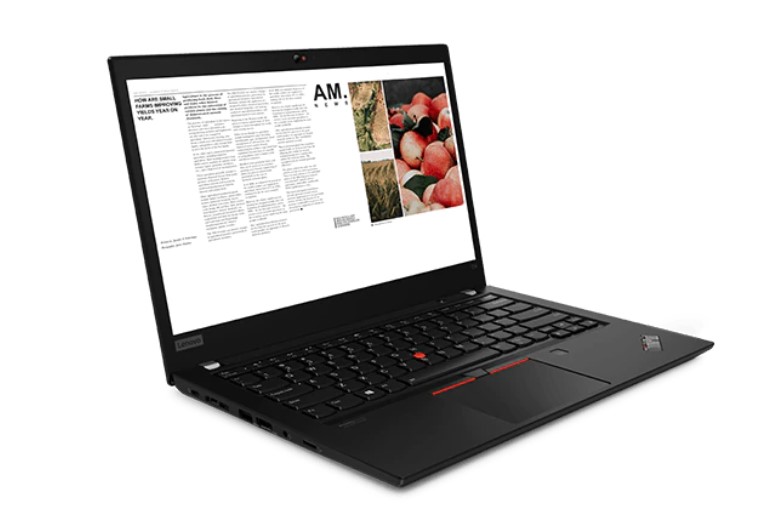
Lenovo ThinkPad T14 Gen 3 AMD Ryzen 7 PRO 6850U 32GB 2TB SSD
Lenovo
It depends — The WUXGA display provides 120 more vertical pixels than Gen 2 Full HD, but the AMD Gen 3 has no memory expansion slot.
Consider this alternative for a taller 1920 × 1200 workspace with memory already provisioned. Its soldered RAM prevents later expansion.Available at Amazon(paid link) — opens Amazon in a new tab. Price and availability shown there.
Sources
Pages consulted while researching this article. None of these are affiliate links.
- Lenovo ThinkPad T14 Gen 2 AMD — Product Specifications Reference — psref.lenovo.com
- Lenovo ThinkPad T14 Gen 2 Intel — Product Specifications Reference — psref.lenovo.com
- Lenovo ThinkPad T14 Gen 3 AMD — Product Specifications Reference — psref.lenovo.com
- Notebookcheck — Lenovo ThinkPad T14 Gen 2 laptop review — notebookcheck.net
- Microsoft — Caring for your battery in Windows — support.microsoft.com
- Lenovo — Types of password for ThinkPad — support.lenovo.com
- Microsoft — Windows 10 Home and Pro lifecycle — learn.microsoft.com