KeyLab Essential 61 mk3: Get Logic Controls Working
The question this answersWhere do these come from?
How do I get the KeyLab Essential 61 mk3 working with Logic Pro?
The KeyLab Essential 61 mk3 works with Logic Pro: install Arturia’s script, select DAW mode, and use the MIDI input and output ports.
The Arturia KeyLab Essential 61 mk3 works with Logic Pro on Mac; install its dedicated integration script, select DAW mode, and assign the controller’s MIDI input and output ports. Arturia specifies Logic Pro 10.7.4 or later for this script-based integration. Arturia’s setup instructions
Set up Logic’s transport and controller integration
- Connect the keyboard directly to your Mac by USB. Arturia recommends a direct connection when establishing communication. The keyboard’s USB-C connection carries MIDI and supplies power. Arturia connection guidance
- Quit Logic and download the Essential mk3 Logic Pro script. On Arturia’s resources page, find “KeyLab Essential mk3 Logic Pro Script.” As checked on September 12, 2026, the listed version is 1.4.0. Official downloads
- Extract the download, open its
.dmg, and run the installer application inside. Downloading the archive alone does not install the integration. - Select DAW mode on the keyboard with the Prog button. Then launch Logic and accept Auto-Assign when offered.
- Open Logic Pro > Control Surfaces > Setup. Select the KeyLab Essential mk3 device and set both Input Port and Output Port to its MIDI port. The displayed name can include the keyboard size or abbreviate KeyLab to KL. Arturia’s installation and port instructions
- Check notes and transport separately. Create a software instrument track, choose a sound, and play the keys. Then check whether the keyboard’s Play and Stop buttons move and stop Logic’s playhead. Apple documents software instrument tracks as the destination for playing its instruments from a connected keyboard. Apple’s track setup guide
The distinction in step five matters. KeyLab Essential 61 mk3 and KeyLab 61 mk3 are different controllers with different Logic port instructions. The non-Essential KeyLab mk3 guide explicitly specifies its DAW ports. Following that guide while setting up the Essential can send you looking for the wrong port. Arturia’s non-Essential KeyLab mk3 instructions
If the keys work but Play, Stop, or faders do not
Working notes establish that at least the keyboard’s MIDI input reaches Logic. They do not establish that Logic has loaded the control-surface integration. Treat those as separate checks before replacing hardware.
Recheck DAW mode and the selected control-surface ports. If the Essential device is missing, reinstall its script with Logic closed. Arturia also documents manually adding it through Control Surfaces > Setup > New > Install: select KeyLab Essential mk3, click Add, and assign its MIDI ports. Remove an incorrect controller entry created during earlier attempts, preserving unrelated devices. Arturia’s integration troubleshooting
Do not assume every fader should immediately control a different mixer channel. In his direct review of the Essential mk3, MusicRadar’s Jon Musgrave describes Logic channel navigation through the main encoder, selected-channel level and pan through fader and encoder nine, and instrument assignments on the remaining controls. He also reports that automatic instrument assignments work better with some instruments than others. That makes checking the display’s parameter feedback more useful than assuming an unfamiliar assignment is a broken fader. MusicRadar’s review
That review supplies observed behavior, not numerical performance testing. No independent measurements of this model’s MIDI latency or velocity consistency were located for this article; no measured performance claim is being made.
For a useful verification, open a simple project and check one function at a time: a recorded note, transport operation, track selection, and an assigned parameter. If three work and one fails, report that specific failure to support. “The keyboard does not work” conceals the distinction that could identify the cause.
When transport buttons play notes or Analog Lab behaves differently
The Essential mk3 exposes separate ports for MIDI, DINTHRU, MCU/HUI, and ALV. They serve different purposes. Arturia warns that unnecessarily activating MCU/HUI can make transport presses trigger notes; ALV carries Analog Lab screen messages. Selecting every available port is therefore not a useful default. Arturia’s port descriptions
Just want the recommendation?
Skip to the picksUse DAW mode to control Logic. To work with Analog Lab’s dedicated integration, insert Analog Lab on a software instrument track and select Arturia mode, available through Prog + Pad 1. Prog + Pad 2 returns to DAW mode. If Analog Lab’s knobs remain incorrectly assigned, check the controller selection in its MIDI settings. Arturia’s program and Analog Lab guidance
For Logic versions below 10.7.4, Arturia directs users toward MCU compatibility instead of the dedicated script. That is a separate configuration route and should not be mixed into the modern script setup. Arturia’s older-DAW guidance
When the keyboard lights up but produces no sound
Start with Track > New Software Instrument Track, then choose a patch from Logic’s Library. An audio track does not turn incoming keyboard notes into a software instrument. Apple’s instructions explicitly require both the instrument track and a selected sound. Apple’s recording preparation guide
Try recording a short phrase. If a MIDI region contains your notes but playback is silent, investigate the instrument and audio output before buying another keyboard. This is a diagnostic inference: successfully recorded notes demonstrate that those messages reached the project.
If the controller is absent from macOS as well as Logic, investigate the USB connection first. Try a known working data cable and another direct computer port. Arturia’s USB troubleshooting covers cable, hub, and device-detection checks. A lit display alone does not prove successful data communication. Arturia’s USB troubleshooting
If detection still fails across known working connections, contact Arturia with the Mac model, macOS and Logic versions, firmware version, and results of those checks. Support may need to determine whether repair or replacement is required.
Does it make sense to buy one for Logic?
Buy the Arturia KeyLab Essential 61 mk3 if you want a 61-key controller with dedicated Logic integration and hands-on instrument controls. Arturia specifies nine rotary encoders, nine 30 mm faders, eight pressure-sensitive pads, and USB bus power. The short fader travel is a concrete limitation if precise manual level rides are your priority. Arturia’s hardware specifications
No product deserves a skip verdict solely for the Logic compatibility covered here. If you already own the Essential 61 mk3, complete the setup and diagnostic checks before purchasing anything else. Its documented Logic support gives no reason to replace it merely because the first connection produced working keys but inactive transport controls.
The bottom line
The one thing to buy first:
Top pick
Buy this
Arturia KeyLab Essential 61 mk3 White
Arturia KeyLab
Arturia provides a dedicated Logic Pro integration script for Logic 10.7.4 and later, alongside nine encoders and nine 30 mm faders.
A supported 61-key option for playing Logic instruments and controlling the DAW through Arturia’s dedicated script. Its 30 mm faders offer limited travel for precise level adjustments.Available at Amazon(paid link) — opens Amazon in a new tab. Price and availability shown there.
Recommended products
Ordered by how well each one fits the situations above. Each link below is a paid link.
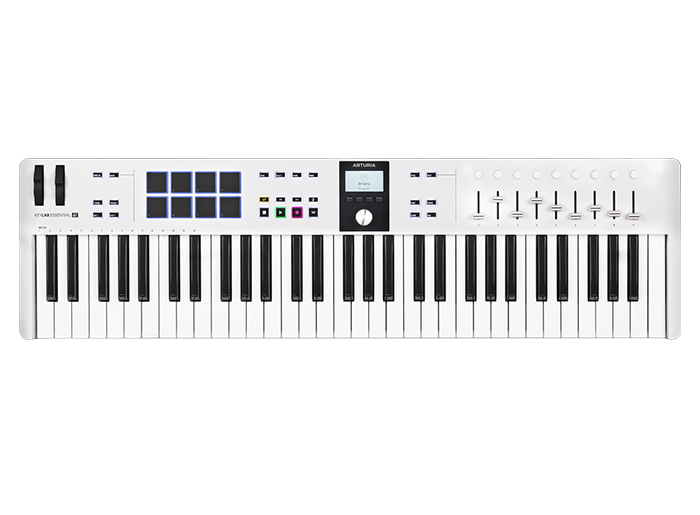
Arturia KeyLab Essential 61 mk3 White
Arturia KeyLab
Buy — Arturia provides a dedicated Logic Pro integration script for Logic 10.7.4 and later, alongside nine encoders and nine 30 mm faders.
A supported 61-key option for playing Logic instruments and controlling the DAW through Arturia’s dedicated script. Its 30 mm faders offer limited travel for precise level adjustments.Available at Amazon(paid link) — opens Amazon in a new tab. Price and availability shown there.
Sources
Pages consulted while researching this article. None of these are affiliate links.
- Arturia: KeyLab Essential mk3 — DAW Integration — support.arturia.com
- Arturia: KeyLab Essential mk3 Resources — arturia.com
- Arturia: KeyLab Essential mk3 — General Questions — support.arturia.com
- Apple: Get started with Logic Pro software instrument tracks — support.apple.com
- Arturia: KeyLab mk3 — DAW Integration — support.arturia.com
- MusicRadar: Arturia KeyLab Essential Mk3 review — musicradar.com
- Apple: Before recording software instruments in Logic Pro — support.apple.com
- Arturia: Troubleshoot USB detection and communication issues — support.arturia.com