iPhone 15 Pro for Android Switchers: Camera, Macro, Wired
The questionWhere do these come from?
Switching from Android to iPhone? Tips, advice, comparison, etc.?
I am currently an Android user. My phone is a Motorola Moto G Power 5G - 2023 - Unlocked, these are its specs: https://m.gsmarena.com/motorola\_moto\_g\_power\_5g-12219.
The iPhone 15 Pro covers macro, USB-C wired audio and long updates, but it lacks the Camera Control button that arrived on the iPhone 16 line.
The iPhone 15 Pro meets three of the four needs outright: macro, wired audio over USB-C, and long security support. The fourth, “camera control”, depends on what you mean. If you mean the physical Camera Control button, the 15 Pro does not have one; that arrived on the iPhone 16 line. If you mean manual control over the image, the 15 Pro does it through third-party apps and through a remappable Action button.
Quick fit check against the four needs
| Need | iPhone 15 Pro | The catch |
|---|---|---|
| Macro | Yes, via the autofocus ultra-wide (13mm equivalent) | Switches automatically; can be turned off in Settings > Camera > Macro Control |
| Wired audio | USB-C, no 3.5 mm jack | Needs a USB-C headset or an adapter |
| Camera control | Action button can open the camera; manual ISO and shutter need an app | No dedicated Camera Control button |
| Security updates | Runs current iOS; Apple lists fixes per release | Apple publishes no fixed end date |
Apple’s own specification page lists the 15 Pro’s camera system as a 48MP main, a 12MP ultra-wide and a 12MP 3x telephoto, with the ultra-wide handling macro photos and video.
How macro works and what Android switchers trip over
On the 15 Pro there is no macro mode button. Move the phone close to a subject and the camera swaps to the ultra-wide lens and crops to the framing you had, which is why some people see the view jump. If it keeps hopping between lenses while you shoot a small object, open Settings > Camera and switch off Auto Macro (labelled Macro Control) so it stays on the main lens, or step back and use the 3x. Many Android phones have a visible macro toggle; this is the main behavioural difference.
The standard iPhone 15 has an ultra-wide without autofocus, so it cannot macro the same way, according to Apple’s iPhone 15 specifications. That is why the non-Pro is the wrong shortcut for this requirement.
Camera control: the button versus manual control
The Camera Control button is on the iPhone 16 family, as listed on Apple’s iPhone 16 Pro specifications. If a physical shutter-and-slider key is the point, the iPhone 16 Pro is the model to look at instead, and the 15 Pro is the wrong buy.
Just want the recommendation?
Skip to the picksIf you mean Pro-style manual settings, the stock Camera app gives exposure compensation, Photographic Styles and 48MP ProRAW, but not a full manual shutter and ISO dial. Third-party apps such as Halide or Blackmagic Camera add those. Switchers used to a Pro mode in the Android camera app should expect to install one. The Action button can be mapped to the Camera in Settings > Action Button, which gets you a one-press launch even though it is not a shutter control.
Wired audio without a headphone jack
The 15 Pro has a USB-C port instead of Lightning, and it supports USB 3 speeds on the Pro models, which matters for external storage and for recording video straight to a drive. For headphones, three routes work:
- a USB-C wired headset or earbuds, plugged straight in;
- Apple’s USB-C to 3.5 mm Headphone Jack Adapter, if your headphones already have a 3.5 mm plug;
- a USB-C DAC dongle, if you want a specific audio chain.
Plan on listening and charging not happening on the same port at once unless you use a splitter or wireless charging.
Security updates: what can and cannot be promised
Apple lists every security fix per release on its security releases page, and the 15 Pro, as a 2023 model, receives the current iOS. Apple does not publish a guaranteed number of years, so a precise end date cannot be stated. The honest summary is that iPhones have historically received major iOS updates for many years after launch, which is the usual reason switchers cite for moving over from Android phones with shorter commitments. Check Apple’s iOS compatibility list before buying a used unit, and confirm the seller is not an iCloud-locked or carrier-locked device.
When the 15 Pro is the wrong pick
- Skip the standard iPhone 15 if macro matters: its ultra-wide has no autofocus.
- Choose the iPhone 16 Pro instead if the Camera Control button is the feature you want.
- If you need long-range zoom, the 15 Pro’s 3x telephoto is shorter than the 5x on the 15 Pro Max, which is a different model.
No independent lab figures are cited here for macro sharpness; the camera facts above come from Apple’s specification pages, and the update claims come from Apple’s release pages. Verify the exact storage tier and condition grade on whichever used or refurbished unit you pick.
The bottom line
Two answers, depending on what you meant:
Top pick
Buy this
Apple iPhone 15 Pro, 256GB, Blue Titanium - Unlocked (Renewed)
Apple
It has an autofocus 13mm ultra-wide that macro-focuses to about 2 cm, a 48MP main camera, a USB-C port with USB 3 speeds, and iOS support that Apple has historically kept going for years.
The model the question is about. It fits a switcher who wants macro, USB-C wired audio and long security updates, and is now mostly bought refurbished or used. The drawback is no dedicated Camera Control button, and the telephoto is 3x, shorter than the 5x on the 15 Pro Max.Available at Amazon(paid link) — opens Amazon in a new tab. Price and availability shown there.The alternative
It depends
Apple iPhone 16 Pro, 128GB, Black Titanium - Unlocked (Renewed)
Apple
It adds the physical Camera Control button and a 48MP autofocus ultra-wide for macro, at the cost of a bigger outlay than a 15 Pro.
The newer alternative. Pick it if the Camera Control button (half-press focus and exposure, slide for zoom) is the feature you actually mean by camera control; it also keeps USB-C and has longer remaining update runway.Available at Amazon(paid link) — opens Amazon in a new tab. Price and availability shown there.
Recommended products
Ordered by how well each one fits the situations above. Each link below is a paid link.

Apple iPhone 15 Pro, 256GB, Blue Titanium - Unlocked (Renewed)
Apple
Buy — It has an autofocus 13mm ultra-wide that macro-focuses to about 2 cm, a 48MP main camera, a USB-C port with USB 3 speeds, and iOS support that Apple has historically kept going for years.
The model the question is about. It fits a switcher who wants macro, USB-C wired audio and long security updates, and is now mostly bought refurbished or used. The drawback is no dedicated Camera Control button, and the telephoto is 3x, shorter than the 5x on the 15 Pro Max.Available at Amazon(paid link) — opens Amazon in a new tab. Price and availability shown there.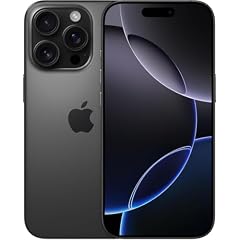
Apple iPhone 16 Pro, 128GB, Black Titanium - Unlocked (Renewed)
Apple
It depends — It adds the physical Camera Control button and a 48MP autofocus ultra-wide for macro, at the cost of a bigger outlay than a 15 Pro.
The newer alternative. Pick it if the Camera Control button (half-press focus and exposure, slide for zoom) is the feature you actually mean by camera control; it also keeps USB-C and has longer remaining update runway.Available at Amazon(paid link) — opens Amazon in a new tab. Price and availability shown there.Apple iPhone 15 128GB unlocked
Apple
Skip — Its 12MP ultra-wide has no autofocus, so it cannot do close-focus macro, and it has no telephoto or Action-button camera ProRAW options of the Pro.
The cheaper rival people find first. Skip it if macro is a requirement: it shares the USB-C port but not the camera hardware.Available at Amazon(paid link) — opens Amazon in a new tab. Price and availability shown there.
Apple USB-C to 3.5 mm Headphone Jack Adapter
Apple
It depends — It is the complement for wired audio on any USB-C iPhone, but it is a dongle that is easy to lose and ties up the only port while in use.
A complement, not an alternative: it lets existing 3.5 mm headphones work with the 15 Pro. Buy it if you own wired headphones you like; otherwise a USB-C headset works with no adapter.Available at Amazon(paid link) — opens Amazon in a new tab. Price and availability shown there.
Sources
Pages consulted while researching this article. None of these are affiliate links.
- iPhone 15 Pro and 15 Pro Max technical specifications – Apple — apple.com
- Apple security releases – Apple Support — support.apple.com
- iPhone 16 Pro and 16 Pro Max technical specifications – Apple — apple.com
- iPhone 15 and 15 Plus technical specifications – Apple — apple.com