Basilisk V3 Pro Lighting: What Onboard Memory Saves
The question this answersWhere do these come from?
Can I save a custom lighting color to my Basilisk V3 Pro's onboard memory?
The Basilisk V3 Pro saves mouse profiles, but Synapse does not save custom lighting effects to onboard memory—even a static color.
The Razer Basilisk V3 Pro cannot save custom lighting effects to onboard memory through Synapse—even a single static color. Its saved mouse profiles and its Chroma lighting are separate: Razer support says lighting effects require Synapse to remain running. Razer’s support response
Skip the Razer Basilisk V3 Pro if your purchase depends on setting a custom color once and carrying it between computers without lighting software. If you already own it, returning to rainbow lighting after exiting Synapse does not, by itself, mean the mouse is defective.
When your saved profile returns to rainbow lighting
The original Basilisk V3 Pro has five profile slots, described as 4+1 profiles in Razer’s specifications. The manual instructs you to open On-board Profiles and drag a profile into a memory slot. It also explains that the underside profile indicator identifies the selected slot. That indicator is separate from the decorative RGB lighting. Basilisk V3 Pro official manual
This distinction explains an otherwise confusing result: switching profiles can change a mouse setting successfully while leaving the lighting on its default effect. The fact that the profile transferred does not establish that every setting visible in Synapse transferred with it.
A useful check is to save two profiles with noticeably different sensitivity settings, exit Synapse fully, and switch between them using the underside button. If pointer sensitivity changes but your chosen color disappears, you have separated profile storage from lighting control. Repeatedly dragging the same profile into every slot will not add support for storing its Chroma effect.
A static color is still a lighting effect. Choosing Static instead of an animation does not create a supported exception to Razer’s stated limitation. Likewise, a profile visible in Synapse is not proof that all its contents exist inside the mouse.
For the distinction between downloadable effects and device profiles, see what Basilisk V3 Pro Chroma profiles actually contain.
If you only want the RGB switched off
Turning the lighting off is a different requirement from retaining a particular color. Start with the brightness control before considering a replacement mouse.
In the Synapse 3 interface documented for the original Basilisk V3 Pro, open Mouse > Lighting and turn off the Brightness toggle. Razer separately provides Switch Off Lighting options for display-off and idle conditions; those are conditional behaviors, rather than the same setting as disabling brightness. Razer’s lighting instructions
Then check persistence on your own unit:
- Exit Synapse completely; simply closing its window may leave background software active.
- Switch the mouse off and back on.
- Reconnect using the connection you normally use.
- If portability matters, connect to the destination computer without launching lighting software.
These steps establish whether the off state survives your actual use. They are a verification procedure, not a promise that every firmware and connection combination retains every brightness setting.
Just want the recommendation?
Skip to the picksDo not treat a successful lights-off result as evidence that static colors will also save. Conversely, if lighting comes back, record whether that happens immediately after exiting software, after a power cycle, or only on another computer. Those are different triggers and give support something specific to investigate.
When the color changes while Synapse is still running
Lighting that changes with Synapse active needs a different check. On Windows 11, Dynamic Lighting can take control of compatible devices and interfere with the color selected in Razer’s software.
To give Razer control, follow its documented sequence:
- Open Windows Settings > Personalization > Dynamic Lighting.
- Disable Use Dynamic Lighting on my devices.
- In Synapse 4, open Settings > DEVICE LIGHTING.
- Select Chroma RGB, then reapply the desired lighting.
Razer documents these steps specifically for incorrect colors and unresponsive effects. They resolve a possible controller conflict; they do not change what the onboard profile stores. Razer’s RGB troubleshooting guide
Windows lighting control can also be an intentional alternative on compatible hardware. However, Windows applying a color is still computer-controlled lighting. A color appearing without Synapse is therefore insufficient evidence of onboard storage. Microsoft describes Dynamic Lighting as a Windows feature for controlling compatible lighting devices. Microsoft’s Dynamic Lighting documentation
What Linux workaround reports actually establish
There is a reason to phrase the limitation as unsupported through Synapse, rather than claiming the hardware could never retain lighting information.
In the same discussion containing Razer’s support response, an owner reports retaining a lighting setting using OpenRazer and Polychromatic on Linux, but says launching Synapse overwrote it. That is an individual report, not a documented procedure guaranteed across firmware versions, connection modes, or both Basilisk V3 Pro generations. The owner report and Razer response
Treat that as a possible experiment for an existing owner, not a reason to buy the mouse expecting supported, portable RGB profiles. An effect surviving application exit also needs to survive power loss and reconnection before it demonstrates the behavior you wanted.
Before replacing or returning the mouse
If onboard custom lighting is essential, the Basilisk V3 Pro is the wrong purchase for that requirement. If you are comfortable leaving lighting software running, this particular limitation need not rule it out.
A replacement also changes the physical experience. LanOC’s Wes Compton measured the original Basilisk V3 Pro at 114 grams, rising to 117 grams with the charging puck installed. That measurement matters when replacing a mouse you otherwise like: check the replacement’s shape and weight alongside its explicitly documented lighting storage. It does not measure RGB persistence, which remains a separate compatibility question. LanOC’s measured review
An exchange for another identical unit should not be expected to remove a documented software limitation. If the LEDs fail to respond even with the intended controller active, or ordinary saved settings also disappear, contact Razer support with the model number, firmware version, connection mode, and exact reproduction steps. Those symptoms need diagnosis; custom lighting disappearing only when its controlling software exits does not establish a need for an RMA.
The bottom line
Confirmed to fit:
Top pick
Skip this
Razer Basilisk V3 Pro Wireless Gaming Mouse
Razer
Razer support states that lighting effects cannot be stored in the mouse’s onboard memory through Synapse and require the software to remain running.
Skip this model if you need a custom RGB color to travel with the mouse without lighting software. Its onboard mouse profiles do not provide Synapse-supported storage of custom lighting effects.Available at Amazon(paid link) — opens Amazon in a new tab. Price and availability shown there.
Recommended products
Ordered by how well each one fits the situations above. Each link below is a paid link.
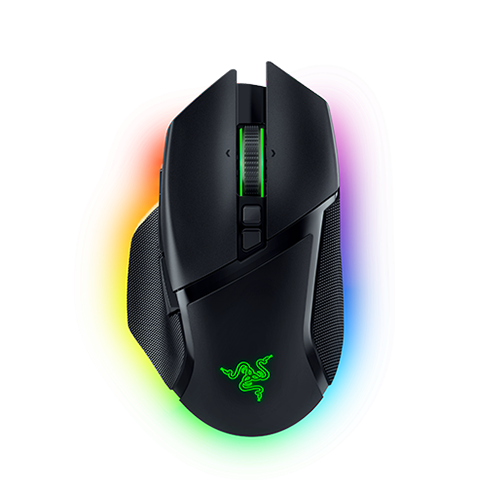
Razer Basilisk V3 Pro Wireless Gaming Mouse
Razer
Skip — Razer support states that lighting effects cannot be stored in the mouse’s onboard memory through Synapse and require the software to remain running.
Skip this model if you need a custom RGB color to travel with the mouse without lighting software. Its onboard mouse profiles do not provide Synapse-supported storage of custom lighting effects.Available at Amazon(paid link) — opens Amazon in a new tab. Price and availability shown there.
Sources
Pages consulted while researching this article. None of these are affiliate links.
- Razer support response and owner report about onboard lighting storage — insider.razer.com
- Razer Basilisk V3 Pro official master guide — dl.razerzone.com
- My Razer device has RGB lighting issues — mysupport.razer.com
- Microsoft: Dynamic lighting devices — learn.microsoft.com
- LanOC: Razer Basilisk V3 Pro review — lanoc.org