Elecom HUGE Plus Feels Gritty? Skip Ceramic Balls
The questionWhere do these come from?
Elecom Huge Plus feels scratchy
Hello everyone, I got my hands on an Elecom Huge Plus roughly two weeks ago, and I've absolutely loved it so far. My only issue with is the "scratchy" or "grindy" sensation that the bearings have.
Some roller texture can improve with use, but loose 2.5 mm ceramic balls are not a drop-in replacement for the HUGE Plus.
A faint, even grinding sensation with smooth cursor movement can be the normal texture of the Elecom HUGE Plus roller supports, and it may diminish as the assembly wears in. Persistent drag, directional sticking, repeated clicking, or a jumping cursor after proper cleaning points instead to a poorly seated, damaged, or defective support—and loose 2.5 mm ceramic balls are not the right replacement.
Skip the uxcell 2.5mm Ceramic Bearing Balls for the HUGE Plus: model M-HT1MRBK accepts complete M-BS10 or M-RS10 support cartridges, not loose 2.5 mm support balls. Those ceramic balls are associated with modifications to the original HUGE, including M-HT1DRBK and M-HT1URBK.
| Product | What it contains | HUGE Plus compatibility | Verdict |
|---|---|---|---|
| ELECOM M-BS10 | Three 8 × 7 × 4 mm rolling-support cartridges and a removal tool | Official M-HT1MRBK replacement | Consider after confirming a bad cartridge |
| ELECOM M-RS10 | Three 8 × 7 × 4 mm static synthetic-ruby cartridges and a removal tool | Listed as an optional support for M-HT1MRBK | Consider for a different, higher-friction feel |
| uxcell 2.5mm ZrO2 G5 balls | Ten loose zirconia ceramic balls | No documented drop-in fit | Skip for the HUGE Plus |
The 2.5 mm trap: HUGE versus HUGE Plus
The product names are frustratingly similar, but their support systems are different. The original ELECOM HUGE rests its 52 mm ball on three small, stationary artificial-ruby balls. Replacing those loose supports with 2.5 mm zirconia or silicon-nitride balls is a long-standing enthusiast modification.
The HUGE Plus M-HT1MRBK uses three removable roller-bearing support cartridges instead. ELECOM calls the rolling replacement set M-BS10 and the static synthetic-ruby alternative M-RS10. The HUGE Plus manual identifies both as optional parts, while ELECOM’s current compatibility chart explicitly includes M-HT1MRBK in its replaceable-support system. Each M-BS10 package contains three complete cartridges rather than three loose support balls. ELECOM’s HUGE Plus manual and support-unit compatibility chart make that distinction checkable.
Opening an M-BS10 cartridge to experiment with loose ceramic balls would be an undocumented modification, not the routine bearing swap demonstrated for the original HUGE. Do not sacrifice a return or warranty claim to try it.
Do this before ordering replacement parts
-
Turn the trackball off and move the ball slowly. If the scratchy sensation remains with power off, it is mechanical; changing DPI, firmware, Bluetooth settings, or the USB receiver cannot remove it.
-
Push the 52 mm ball out through the hole underneath. Inspect the entire ball under light coming from the side. A fine hair can be almost invisible from above, while a scratch, embedded particle, or developing circular wear mark can reveal where contact is occurring.
-
Follow ELECOM’s cleaning procedure exactly. Use a dry cotton bud on the contact surfaces of the three supports and gently wipe the ball with a tissue. ELECOM specifically says not to use alcohol or cleaning cloths on the ball because removing its surface oil can worsen performance. If the freshly cleaned ball feels sticky, the manual instructs you to rub it in your hands for about 30 seconds so normal skin oil returns to the surface. ELECOM’s cleaning instructions are unusually important here: aggressive degreasing can create the symptom it was supposed to cure.
-
Remove and examine all three M-BS10 cartridges. Use the supplied extraction tool in the side notch, as described in the M-BS10 manual. Look for a split plastic frame, a roller that sits crooked, trapped fibres around an axle, or one roller that hesitates. Avoid touching the optical sensor.
-
Reseat every cartridge until it clicks. A cartridge that is not fully engaged can hold the ball at the wrong height or angle. After reseating, reinstall the ball and compare slow horizontal, vertical, and diagonal movements.
A roller that feels smooth under a fingertip is encouraging but not conclusive. The 52 mm ball loads the support from a different direction and across a different contact patch, so a damaged axle or distorted frame may bind only when installed.
Normal roller texture or a defective support?
Treat the sensation as normal break-in only when all of these are true:
- The texture is mild and substantially even in every direction.
- The cursor begins moving with the ball instead of pausing and then jumping.
- There is no repeating click or bump once per rotation.
- No cartridge is cracked, crooked, or visibly obstructed.
- The ball is not contacting the plastic cup.
A third-party GAME Watch review described the HUGE Plus as producing a hard, slightly rubbing roller sound while still feeling extremely smooth. That distinction matters: roller noise or fine vibration without resistance is not necessarily a fault. The same review reports ELECOM’s claim of approximately 50% less starting friction and 40% less moving friction than its synthetic-ruby support, but those are manufacturer figures rather than an independent force measurement. GAME Watch’s hands-on review also found the different stopping behavior noticeable within its first few hours.
Just want the recommendation?
Skip to the picksBreak-in is plausible, but ELECOM publishes no official number of hours or days. In one HUGE Plus field report, the mechanism was said to become quieter and smoother after a couple of months, while other owners reported continuing stiction. That makes break-in an observation, not a guarantee. The scratchy-bearing discussion also separates tactile feedback from the more important question of whether cursor motion remains smooth.
Do not let an entire return period expire while hoping that obvious binding will disappear. Mild uniform texture can be monitored; sand-like drag, a repeatable rough spot, or failed fine movements deserves an exchange or support claim.
When cleaning makes the grind worse
A HUGE Plus that becomes rough immediately after being thoroughly degreased may not have defective rollers. ELECOM warns that the ball can perform poorly when its surface oil is inadequate, which explains why a visually spotless ball is not always the smoothest ball.
Do not respond by applying graphite, silicone oil, automotive coating, abrasive toothpaste, or wax while the device is returnable. Those remedies appear in enthusiast discussions, but ELECOM’s documented recovery is simply a tissue wipe followed by approximately 30 seconds of handling. Lubricant can retain dust inside a rolling cartridge, while an abrasive permanently changes the ball surface.
The M-RS10 gets the choice wrong for anyone trying to minimize start-up resistance: it converts the trackball back to stationary synthetic-ruby contacts. It is worth considering only when the audible and tactile character of rollers is the actual problem and a more controlled, higher-friction feel is acceptable. Its official manual confirms that it is a three-cartridge assembly, not a bag of loose rubies.
What measured evidence says about ceramic swaps
No independent laboratory has published force-in-newtons or sound-level measurements for the HUGE Plus M-BS10 mechanism. MyBest did assemble a panel of 20 people with at least a year of trackball experience and assigned the HUGE Plus a 4.46/5 ball-movement score. Individual panel comments nevertheless ranged from smooth movement in all directions to noticeable resistance and poor fine control. That variation supports the possibility of unit-to-unit or user-to-user differences; it cannot diagnose one mouse remotely. MyBest documents both its panel method and results.
There is, however, a useful measured warning against treating ceramic as an automatic upgrade. In an independent DIY test of the original HUGE, Setsuyaku Neet used the same ruler-and-scale setup before and after installing 2.5 mm ZrO2 balls. The scale reading increased from 3 g with the established ruby supports to 5–7 g immediately after the swap, then returned to 3 g in both measured directions after two months. It was an improvised comparison rather than a calibrated friction rig, and it does not measure M-BS10 cartridges, but it shows two things: fresh ceramic supports can initially feel worse, and material alone does not guarantee lower friction. The original-HUGE bearing test documents the method and readings.
That evidence is relevant only if you actually have the original HUGE. It is not a reason to dismantle the Plus’s roller cartridges.
When the problem is electronic rather than gritty
If the pointer skips but your fingers feel no drag, repeat the test over a wired USB connection and set the power switch to H. ELECOM says high-speed mode improves tracking during fast ball movement and is permanently active over the wired connection. The manual also warns that active USB 3.0 devices near a 2.4 GHz receiver can degrade its radio signal.
Those checks can resolve cursor instability, but they cannot fix physical grinding. A sensation that remains with the mouse powered off has already ruled out the sensor and wireless link.
The point where replacement or RMA is justified
Exchange or RMA a recently purchased HUGE Plus when official cleaning and reseating do not remove pronounced binding, especially when one direction is worse, a cartridge is damaged, or fine movements repeatedly jump. Replacing parts in a new mouse can mask a housing-alignment or ball-surface defect and leave you with both the original problem and an unused support set.
Once return coverage is unavailable, the ELECOM M-BS10 is the sensible replacement if inspection identifies a rough or damaged roller support. Its documented package supplies all three cartridges and the correct extraction tool, allowing the supports to be replaced as a matched set.
If all three supports appear intact but the ball visibly rubs the cup, or a new M-BS10 set produces the same strong directional grind, stop replacing bearings. That result points beyond normal break-in and requires ELECOM support, a seller exchange, or replacement of the complete trackball.
The bottom line
Two candidates — the symptom tells you which:
Top pick
It depends
ELECOM M-BS10 Trackball Replacement Bearing Support Unit
ELECOM
ELECOM documents M-BS10 as three 8 × 7 × 4 mm bearing-support cartridges compatible with the HUGE Plus M-HT1MRBK.
Consider this after confirming that one of the HUGE Plus roller cartridges is damaged or binds under load. It supplies three complete supports and the proper removal tool, but replacing parts before using a valid return option could leave a broader defect unresolved.Available at Amazon(paid link) — opens Amazon in a new tab. Price and availability shown there.The alternative
Skip this
uxcell 2.5mm Ceramic Bearing Balls ZrO2 Zirconium Oxide Ball G5 Precision 10pcs
uxcell
The HUGE Plus accepts three M-BS10 or M-RS10 support cartridges, whereas this product contains ten loose 2.5 mm balls.
These loose ceramic balls are useful for unsupported modifications to older static-bearing trackballs, including the original HUGE. They are not a drop-in replacement for the cartridge-based HUGE Plus.Available at Amazon(paid link) — opens Amazon in a new tab. Price and availability shown there.
Recommended products
Ordered by how well each one fits the situations above. Each link below is a paid link.
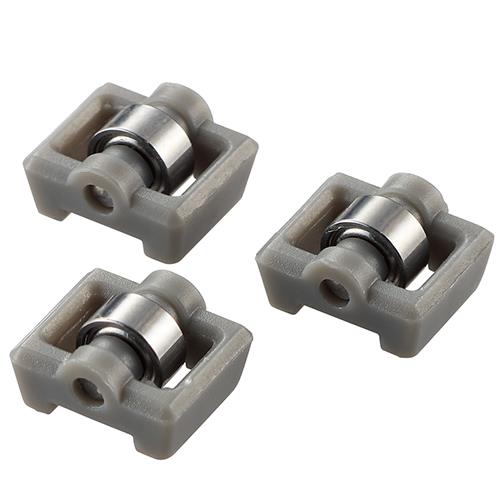
ELECOM M-BS10 Trackball Replacement Bearing Support Unit
ELECOM
It depends — ELECOM documents M-BS10 as three 8 × 7 × 4 mm bearing-support cartridges compatible with the HUGE Plus M-HT1MRBK.
Consider this after confirming that one of the HUGE Plus roller cartridges is damaged or binds under load. It supplies three complete supports and the proper removal tool, but replacing parts before using a valid return option could leave a broader defect unresolved.Available at Amazon(paid link) — opens Amazon in a new tab. Price and availability shown there.uxcell 2.5mm Ceramic Bearing Balls ZrO2 Zirconium Oxide Ball G5 Precision 10pcs
uxcell
Skip — The HUGE Plus accepts three M-BS10 or M-RS10 support cartridges, whereas this product contains ten loose 2.5 mm balls.
These loose ceramic balls are useful for unsupported modifications to older static-bearing trackballs, including the original HUGE. They are not a drop-in replacement for the cartridge-based HUGE Plus.Available at Amazon(paid link) — opens Amazon in a new tab. Price and availability shown there.
Sources
Pages consulted while researching this article. None of these are affiliate links.
- ELECOM HUGE Plus M-HT1MR Series User Manual — elecom.co.jp
- ELECOM Trackball Replacement Support Unit Compatibility List — elecom.co.jp
- ELECOM M-BS10 Bearing Support Unit User Manual — elecom.co.jp
- ELECOM M-RS10 Synthetic Ruby Support Unit User Manual — elecom.co.jp
- GAME Watch ELECOM HUGE Plus Review — game.watch.impress.co.jp
- MyBest ELECOM HUGE Plus M-HT1MRBK Test Review — my-best.com
- Elecom Huge Plus Feels Scratchy — reddit.com
- Measured ELECOM HUGE Zirconia Bearing Modification — setsuyaku-neet.com