Amazfit Band 7 vs Galaxy Fit3: Which Fits Your Life?
The question this answersWhere do these come from?
Should I get the Amazfit Band 7 or the Samsung Galaxy Fit3?
Choose Galaxy Fit3 for everyday tracking on Android; pick Amazfit Band 7 for iPhone compatibility or simpler, lighter daily wear.
The Samsung Galaxy Fit3 is the better default for Android users, especially if you already use Samsung Health; choose the Amazfit Band 7 if you use an iPhone or prefer its narrower design and Zepp app. Skip the Galaxy Fit3 for an iPhone: Samsung explicitly lists it as incompatible with iOS. Samsung phone compatibility
| Deciding feature | Amazfit Band 7 | Samsung Galaxy Fit3 |
|---|---|---|
| Phone platforms | Android and iOS | Android only |
| AMOLED display | 1.47 inches, 198 × 368 | 1.6 inches, 256 × 402 |
| Physical navigation button | None | Home button |
| Built-in GPS | No | No |
| Advertised typical battery life | Up to 18 days | Up to 13 days |
Display and battery figures come from the manufacturers; the endurance claims use different test conditions and are not a direct comparison. Amazfit specifications, Samsung specifications and battery footnotes
Your phone makes the first decision
For an iPhone, the Amazfit Band 7 wins this comparison by compatibility. It connects through Zepp, which also holds your activity history and device settings. Before buying for an older phone, check that you can install the current app: an operating-system requirement printed when a band launched does not guarantee that today’s companion app still supports that phone.
A Samsung phone makes the Fit3 an easier recommendation, but you do not universally need a Samsung phone to connect it. Samsung’s US compatibility document lists the Fit3 under both Samsung and non-Samsung Android phones, with Android 10 or higher. The same document cautions that support can differ by region, operator and device brand. For a Pixel, Motorola or another Android phone, check your local support page and app availability before ordering. Samsung compatibility requirements
Connection compatibility also does not mean every feature transfers. Samsung lists fall detection, SOS emergency calling and Mode syncing in connection with a paired Galaxy phone. If one of those features is the reason you are buying, confirm support for your exact handset. Galaxy Fit3 features
Galaxy Fit3 wins for checking the band throughout the day
The Fit3’s larger display and physical Home button give it the stronger everyday interface on paper. The button provides a direct way back through the interface, and Samsung lets you customize its action. Samsung also documents preset text replies and media controls, useful when you want to acknowledge a message without reaching for your phone. Samsung controls and features
The Amazfit Band 7 is the weaker choice for Android users who want convenient message handling: Notebookcheck found no notification reply function, and its interface relies entirely on touchscreen gestures. That is a specific reason to choose the Fit3, rather than assuming the two offer identical smartwatch features. Notebookcheck’s Band 7 review
Amazfit still has a useful physical advantage. Its body is 24.36 mm wide, against Samsung’s 28.8 mm. If you dislike a broad rectangle on your wrist, that narrower shape may matter more than extra screen space. Neither deserves a blanket warning: the trade is a smaller band against a larger interface. Amazfit dimensions, Samsung dimensions
The 18-day battery claim needs its footnote
Do not choose the Amazfit Band 7 simply because 18 is greater than 13. Amazfit’s typical-use test measures heart rate at 30-minute intervals, disables high-precision sleep and all-day stress monitoring, and records just 60 minutes of exercise per week. Those conditions are substantially lighter than continuous monitoring plus frequent workouts. Amazfit battery test conditions
Just want the recommendation?
Skip to the picksSamsung’s headline also needs qualification. The Fit3’s advertised endurance falls from up to 13 days to up to 3.5 days with always-on display enabled. Its typical-use scenario includes 30 minutes of exercise per day. You cannot turn those two manufacturers’ headline figures into a reliable five-day advantage for Amazfit. Samsung battery test conditions
Independent results reinforce that caution. Notebookcheck obtained less than one week from the Band 7 with extensive monitoring enabled; with always-on display, it reported roughly 35% battery consumption per day. That was one review configuration, not a guaranteed runtime for every owner. Notebookcheck battery measurements
If long endurance is your priority, decide which monitoring features you will actually enable. The evidence here does not establish a battery winner under identical settings.
Walking accuracy favors Samsung; training needs more caution
TechGearLab checked the Galaxy Fit3 against an analog step counter during a half-mile walk covering more than 1,200 steps. The Fit3 differed by just one step. Its reviewers also reported heart-rate readings within a few beats of their chest strap reference. Those are useful measured results supporting the Fit3 for ordinary activity tracking. TechGearLab’s Galaxy Fit3 measurements
The Band 7’s exercise heart rate deserves more caution. Notebookcheck measured deviations of up to 39 beats per minute against a Polar H10 during portions of a cycling test, although resting readings were much closer. That makes the Band 7 a less convincing purchase if your main purpose is adjusting exercise intensity from live heart-rate readings. Notebookcheck heart-rate testing
These tests used different people and protocols, so they do not prove Samsung will be more accurate during every activity. They also do not establish a sleep-stage accuracy winner. A detailed sleep chart alone cannot settle that question.
If you already own the Amazfit and the concern is missing steps, work through why the Amazfit Band 7 misses steps before replacing it. A single controlled walking result does not promise an equally accurate count while pushing a trolley or keeping your wrist still.
Neither records a GPS route without your phone
Neither band has built-in GPS. Samsung documents using GPS from a paired Galaxy smartphone; Amazfit’s manual requires the phone connection and location permission for Zepp. For the Band 7, the manual specifically advises waiting for successful positioning on the workout preparation screen before tapping GO. Samsung connected GPS, Amazfit workout instructions
That rules out both if your requirement is leaving the phone at home while recording a mapped run. Counting steps or displaying an estimated distance is not the same capability.
Buy the Galaxy Fit3 for everyday Android activity tracking and convenient wrist controls. Consider the Amazfit Band 7 when iPhone support, the Zepp app or a narrower body outweigh those advantages. Its longer advertised battery life is a conditional benefit, not sufficient evidence to overturn the Samsung recommendation.
The bottom line
Neither is wrong; the use case separates them:
Top pick
Buy this
Samsung Galaxy Fit3 SM-R390 Gray
Samsung
Its 1.6-inch AMOLED display and documented preset replies favor everyday Android use, while TechGearLab measured only a one-step error over more than 1,200 counted steps.
The default choice for everyday Android tracking, with a larger display, physical Home button and preset text replies. It cannot pair with an iPhone and lacks built-in GPS.Available at Amazon(paid link) — opens Amazon in a new tab. Price and availability shown there.The alternative
It depends
Amazfit Band 7 Black
Amazfit Band
It supports Android and iOS and measures 24.36 mm wide, but Notebookcheck recorded cycling heart-rate deviations of up to 39 beats per minute against a Polar H10.
Choose it for iPhone compatibility, the Zepp app or its narrower body. Exercise heart-rate discrepancies in independent testing weaken its appeal for training by live heart rate.Available at Amazon(paid link) — opens Amazon in a new tab. Price and availability shown there.
Recommended products
Ordered by how well each one fits the situations above. Each link below is a paid link.
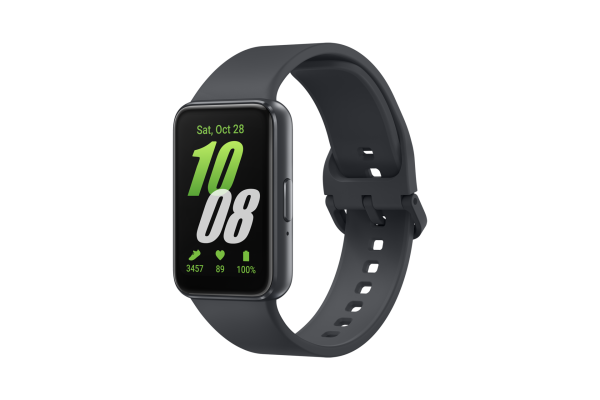
Samsung Galaxy Fit3 SM-R390 Gray
Samsung
Buy — Its 1.6-inch AMOLED display and documented preset replies favor everyday Android use, while TechGearLab measured only a one-step error over more than 1,200 counted steps.
The default choice for everyday Android tracking, with a larger display, physical Home button and preset text replies. It cannot pair with an iPhone and lacks built-in GPS.Available at Amazon(paid link) — opens Amazon in a new tab. Price and availability shown there.
Amazfit Band 7 Black
Amazfit Band
It depends — It supports Android and iOS and measures 24.36 mm wide, but Notebookcheck recorded cycling heart-rate deviations of up to 39 beats per minute against a Polar H10.
Choose it for iPhone compatibility, the Zepp app or its narrower body. Exercise heart-rate discrepancies in independent testing weaken its appeal for training by live heart rate.Available at Amazon(paid link) — opens Amazon in a new tab. Price and availability shown there.
Sources
Pages consulted while researching this article. None of these are affiliate links.
- Samsung Galaxy smart watch and phone compatibility — samsung.com
- Amazfit Band 7 specifications and battery test conditions — us.amazfit.com
- Samsung Galaxy Fit3 specifications and feature footnotes — samsung.com
- Galaxy Fit3 features and specs — samsung.com
- Notebookcheck: Amazfit Band 7 review and measurements — notebookcheck.net
- TechGearLab: Samsung Galaxy Fit3 review — techgearlab.com
- Amazfit Band 7 User Manual — support.amazfit.com