ThinkPad T480 256GB SSD vs eMMC IdeaPad for Light Work
The questionWhere do these come from?
Does a LENOVO IdeaPad Slim 3 14" Intel® Core™ i3, 128 GB eMMC fit my usage case?
Hello all, I'm looking to get a personal laptop, I'm provided with a computer at work so don't need for that, more for the following tasks: General life admin Online banking Google sheets Google docs Gmail Streaming YouTube Netflix General online Shopping ChatGPT Canva Honestly nothing too heavy, and I've seen a secondhand Lenovo Idea Pad Slim 3 in great condition for £150 - just wonder if it's worth it for me for that price or if I should look at something Windows instead of ChromeOS?
For admin, streaming and web apps, a used ThinkPad T480 with a 256GB SSD is the safer buy than an eMMC IdeaPad, which is slow and cannot be upgraded.
A used ThinkPad T480 with a 256GB SSD is the better buy than a secondhand IdeaPad with eMMC storage for admin work, streaming and web apps. The reason is the storage. eMMC is slow, usually small and soldered to the board, while the T480 has a real SSD in a slot you can replace.
Why eMMC is the weak point
eMMC is flash storage soldered onto the motherboard, usually in 32GB, 64GB or 128GB sizes. Windows Central lists a theoretical ceiling of about 330MB/s for eMMC 5.1, against more than 3,500MB/s for a good PCIe 3.0 SSD. Real drives usually fall well short of that ceiling. The same article reports an SSD in a Surface Go that was at least four times faster than the eMMC in the same device. SlashGear makes the same point about large file transfers and about eMMC being non-upgradable.
Light tasks mostly hide this. Streaming is network-bound, and a browser tab does not care about disk speed once it has loaded. The pain shows up in four places:
- Boot and wake: Windows takes noticeably longer to start and to open apps.
- Updates: Windows feature updates write many gigabytes and can crawl on eMMC.
- Free space: Windows 11’s own minimum storage requirement is 64GB, so a 64GB eMMC machine has very little left once Windows and updates are installed.
- No fix: because the chip is soldered, you cannot swap it later. Some budget laptops have no free storage slot either.
What the T480 gives you instead
The ThinkPad T480 (14-inch, 2018) shipped with quad-core 8th-generation Core i5 and i7 chips. Notebookcheck’s reviews cover units with an i7-8550U and an i7-8650U, and one review unit shipped with a 256GB PCIe SSD and 8GB of RAM. For admin, streaming and web apps, a Core i5 with 8GB of RAM and a 256GB SSD is well above what the job needs.
Just want the recommendation?
Skip to the picksPoints that matter for long-term value:
- Replaceable storage and RAM: the SSD is a standard M.2 drive, and the memory is SO-DIMM. If 256GB fills up, you swap the drive.
- Battery: the T480 has an internal battery plus an external, hot-swappable one. Check the exact listing, since reported capacities differ between configurations and a worn battery on a used unit is the most common weakness.
- Windows 11: 8th-generation Core processors are on Microsoft’s supported list, so the machine is not stranded on Windows 10.
- Ports and keyboard: HDMI, USB-C and a good keyboard make it comfortable for daily admin work.
Where the T480 loses
- Weight and size: it is heavier and thicker than a typical thin IdeaPad.
- Condition risk: a used business laptop may have a worn battery, a scuffed screen or a locked BIOS. Check the seller’s return policy, and ask for a photo of the BIOS or an “About” screen showing the real RAM and SSD.
- Screen: some units have the low-resolution HD panel, which looks dull next to the full-HD options. For streaming, look for the 1920x1080 panel.
When the eMMC IdeaPad is still acceptable
Consider it if all of these are true: the machine will only run a browser and a few web apps, you will not install large software, you want something light and quiet, and it comes with 128GB of eMMC or more, or you have a clear return option. If you plan to keep the laptop for several years, the lack of an upgrade path counts against it.
Quick comparison
| Verdict | What decides it | The catch | |
|---|---|---|---|
| ThinkPad T480, 256GB SSD | Buy | Real SSD, quad-core CPU, upgradable drive and RAM | Older, heavier, battery condition varies |
| IdeaPad-class laptop with 64GB eMMC | Consider | Light and quiet for browser-only use | Slow, soldered and tight on space after Windows updates |
What to skip
Skip any laptop with 32GB of eMMC, and be wary of 64GB, when you plan to run Windows 11 with updates. Little free space and a drive you cannot replace make it a poor long-term buy. If a seller lists only “SSD” without the capacity, ask.
What is not settled
No independent lab has published eMMC benchmarks for specific IdeaPad models that this page could find, so the speed gap above rests on general eMMC-versus-SSD testing rather than a measurement of a particular IdeaPad. Check the exact model number before buying.
For a related older-ThinkPad storage decision, see IdeaPad Gaming 3 15ARH7 SSD: Is the WD Blue SN580 Right?.
The bottom line
The choice turns on one thing:
Top pick
Buy this
Lenovo ThinkPad T480 14" FHD, Core i5-8350U 1.7GHz, 16GB RAM, 256GB Solid State Drive, Windows 11 Pro 64Bit, CAM, No Touch, 8-in-1 USB-C Hub Docking Station, (Renewed)
Lenovo
It has a real SSD plus a quad-core 8th-gen Core CPU, and the drive and RAM can be upgraded later, none of which a soldered eMMC IdeaPad offers.
The subject of the comparison. A used or refurbished T480 with a 256GB SSD has a quad-core 8th-gen CPU, a user-replaceable drive and memory, and a swappable battery. The drawback is age: a secondhand unit’s battery and condition vary, so buy from a seller with a return window.Available at Amazon(paid link) — opens Amazon in a new tab. Price and availability shown there.The alternative
It depends
Lenovo IdeaPad 1 14IGL7 14" Laptop Pentium Silver N5030 4GB Ram 128 GB eMMC W11H in S Mode
Lenovo
Fine for a single-purpose browser machine, but 64GB of soldered eMMC leaves little headroom after Windows 11 and feature updates, and it cannot be upgraded.
The rival being weighed: a cheap IdeaPad-class machine with soldered eMMC storage. It suits someone who only wants a light, quiet browser-and-documents machine and will not install much. The catch is that the storage is slow, tiny and cannot be swapped.Available at Amazon(paid link) — opens Amazon in a new tab. Price and availability shown there.
Recommended products
Ordered by how well each one fits the situations above. Each link below is a paid link.
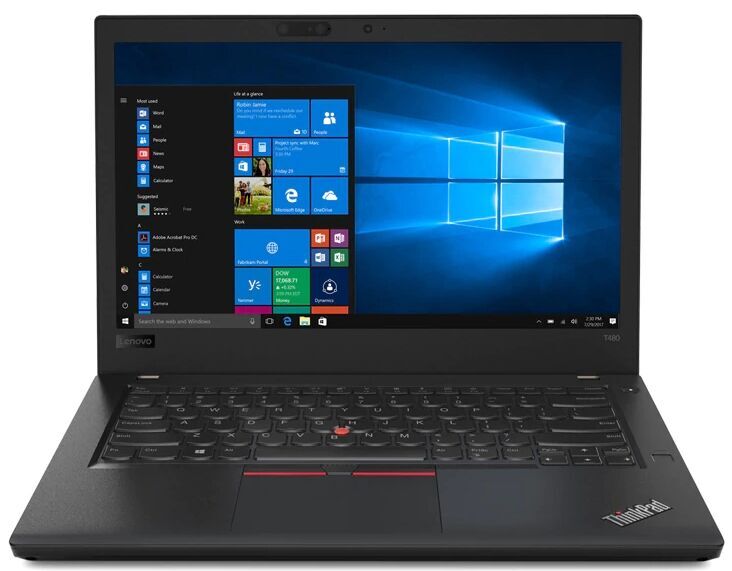
Lenovo ThinkPad T480 14" FHD, Core i5-8350U 1.7GHz, 16GB RAM, 256GB Solid State Drive, Windows 11 Pro 64Bit, CAM, No Touch, 8-in-1 USB-C Hub Docking Station, (Renewed)
Lenovo
Buy — It has a real SSD plus a quad-core 8th-gen Core CPU, and the drive and RAM can be upgraded later, none of which a soldered eMMC IdeaPad offers.
The subject of the comparison. A used or refurbished T480 with a 256GB SSD has a quad-core 8th-gen CPU, a user-replaceable drive and memory, and a swappable battery. The drawback is age: a secondhand unit’s battery and condition vary, so buy from a seller with a return window.Available at Amazon(paid link) — opens Amazon in a new tab. Price and availability shown there.Lenovo IdeaPad 1 14IGL7 14" Laptop Pentium Silver N5030 4GB Ram 128 GB eMMC W11H in S Mode
Lenovo
It depends — Fine for a single-purpose browser machine, but 64GB of soldered eMMC leaves little headroom after Windows 11 and feature updates, and it cannot be upgraded.
The rival being weighed: a cheap IdeaPad-class machine with soldered eMMC storage. It suits someone who only wants a light, quiet browser-and-documents machine and will not install much. The catch is that the storage is slow, tiny and cannot be swapped.Available at Amazon(paid link) — opens Amazon in a new tab. Price and availability shown there.
Sources
Pages consulted while researching this article. None of these are affiliate links.
- Notebookcheck: Lenovo ThinkPad T480 (i7-8550U, MX150, FHD) review — notebookcheck.net
- Notebookcheck: Lenovo ThinkPad T480 (Core i7-8650U, FHD) review — notebookcheck.net
- Windows Central: eMMC vs. SSD storage — windowscentral.com
- SlashGear: eMMC vs SSD storage, what's the difference — slashgear.com