ThinkPad T16 Gen 5 32GB: Check the RAM Type First
The question this answersWhere do these come from?
Does the 32GB ThinkPad T16 Gen 5 use LPCAMM2 or SO-DIMM memory?
The ThinkPad T16 Gen 5 supports 32GB RAM, but Intel uses LPCAMM2 and AMD uses SO-DIMMs—with different upgrade limits.
The Lenovo ThinkPad T16 Gen 5 comes in 32GB configurations, and its memory is replaceable on both Intel and AMD versions. The buying distinction is the memory format: Intel uses one LPCAMM2 module, while AMD uses two DDR5 SO-DIMM slots, so the same upgrade parts will not fit both. Lenovo Intel specifications, Lenovo AMD specifications.
For office work and general software development, 32GB is a sensible starting configuration. Before ordering, check the full processor name, installed memory arrangement and screen specification: “T16 Gen 5, 32GB” leaves several meaningful differences unresolved.
Buying a 32GB model: identify the platform first
These are Lenovo’s documented memory arrangements and maximum capacities. The limits describe Lenovo’s tested offerings, rather than a guarantee about every aftermarket module.
| T16 Gen 5 platform | Memory format | Memory sockets | Lenovo maximum |
|---|---|---|---|
| Intel Core Ultra Series 3 | LPDDR5X LPCAMM2 | One module, dual-channel | 64GB |
| AMD Ryzen PRO 200 series | DDR5-5600 SO-DIMM | Two slots | 64GB |
| AMD Ryzen AI PRO 400 series | DDR5-5600 SO-DIMM | Two slots | 96GB |
The AMD distinction matters if you expect to grow beyond 64GB. Lenovo identifies Ryzen PRO 200 models as Hawk Point and Ryzen AI PRO 400 models as Gorgon Point; only the latter has a documented 96GB ceiling. Choosing “AMD” alone does not establish that upgrade path. Lenovo AMD PSREF.
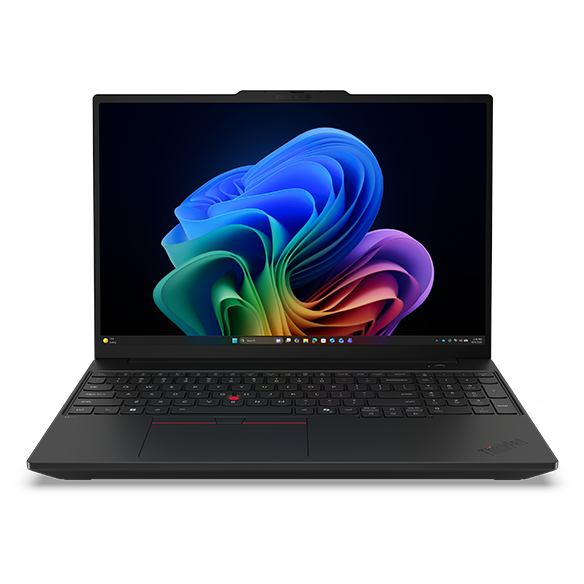
A specific configuration to look for when buying a complete office laptop is ThinkPad T16 Gen 5 Intel 21WT000EUS, sold with a Core Ultra 7 365, 32GB memory, 1TB SSD and WUXGA touchscreen. Its limitation for future expansion is the Intel platform’s 64GB ceiling and single memory-module position. It belongs on your shortlist when 32GB meets your workload; it is not the configuration to choose if you already anticipate needing 96GB.
Do not transfer specifications between regional model numbers. For example, Lenovo documents 21WT009TMZ with a Core Ultra 7 356H, 32GB LPCAMM2-7467, 512GB SSD and a 2880 × 1800 OLED display. That is a Swiss configuration with a Swiss keyboard, despite sharing the same T16 Gen 5 family name. Lenovo’s configuration record for 21WT009TMZ.
The screen deserves a separate check. Avoid the base narrow-gamut screen if you edit photographs or approve colors on the laptop itself. Notebookcheck measured 61.1% sRGB coverage and 452 nits average brightness on its AMD review unit, model 22AN001WGE, using the N160JCA-ELN panel. Those results show why adequate brightness does not establish adequate color coverage. They apply to that tested panel, not every T16 Gen 5 screen. Notebookcheck’s T16 Gen 5 AMD measurements.
There is no evidence here for a blanket warning against either platform. The real buying traps are an unsuitable screen and an upgrade path that does not match your plans.
Just want the recommendation?
Skip to the picksUpgrading to 32GB: Intel and AMD need different parts
On the Intel model, the single LPCAMM2 position means increasing capacity requires replacing the existing module. You cannot add a second stick. One LPCAMM2 module already provides dual-channel memory, so advice to “buy two sticks for dual-channel” does not apply to this Intel design.
There is also a specification footnote worth checking before treating a listing as unusually fast: Lenovo says the installed LPDDR5X-8533 memory operates at 6800 or 7467 MT/s because of platform limitations. An 8533 module rating does not promise an 8533 operating rate in this laptop. Use the exact configuration record to establish its supported speed. Lenovo Intel memory specifications and footnotes.
On AMD, establish what occupies the two slots before buying anything. A machine with one 16GB module presents a different upgrade job from one with two 8GB modules. Likewise, a factory 32GB configuration does not necessarily mean two 16GB modules: Lenovo explicitly lists 21WX002EMB with one 32GB DDR5-5600 SO-DIMM. Lenovo’s configuration record for 21WX002EMB.
That distinction changes what you should order. If you already have 32GB in one module and want more capacity, replacing it with a 32GB two-module kit would leave total capacity unchanged. If you are starting from 16GB, confirm the installed module and a compatible addition before assuming that a complete replacement kit is necessary.
For either platform, obtain the replacement procedure and approved part information for your exact machine before opening it. Replaceable memory does not make every module with the right capacity compatible. If the seller cannot identify the installed arrangement, ask for the full machine model; if the configuration remains unclear, Lenovo support must resolve it before you order RAM.
When 32GB is enough—and when to start higher
Choose 32GB for a mix of browser work, documents, spreadsheets, video meetings and development tools when your current workload fits comfortably within that capacity. This is a workload recommendation, not a claim that every application or project has been benchmarked on this configuration.
For development, the deciding factor is what runs simultaneously. An editor and browser have different requirements from several virtual machines, local databases and containers. The guide to when coding needs more memory explains that distinction in more detail.
Before replacing an existing computer, run your normal workload and inspect Task Manager → Performance → Memory. Look at sustained use during the work that causes delays, rather than an idle desktop. Persistent memory pressure supports buying more capacity; a slow task with ample available memory calls for checking other bottlenecks.
A 32GB T16 Gen 5 is therefore a reasonable office and development purchase, provided you verify the configuration. Order by the complete model number, check the screen independently of RAM capacity, and choose the AMD Ryzen AI PRO 400 platform specifically if a documented path to 96GB is part of the requirement.
The bottom line
The one worth buying:
Top pick
Buy this
Lenovo ThinkPad T16 Gen 5 21WT000EUS Core Ultra 7 365 32GB 1TB
Lenovo
It supplies the requested 32GB capacity using replaceable LPCAMM2 memory, with a documented Intel-platform upgrade ceiling of 64GB.
A complete 32GB configuration for office work and general development, with a WUXGA touchscreen and 1TB SSD. Future memory expansion requires replacing its LPCAMM2 module, and Lenovo documents a 64GB maximum.Available at Amazon(paid link) — opens Amazon in a new tab. Price and availability shown there.
Recommended products
Ordered by how well each one fits the situations above. Each link below is a paid link.
Lenovo ThinkPad T16 Gen 5 21WT000EUS Core Ultra 7 365 32GB 1TB
Lenovo
Buy — It supplies the requested 32GB capacity using replaceable LPCAMM2 memory, with a documented Intel-platform upgrade ceiling of 64GB.
A complete 32GB configuration for office work and general development, with a WUXGA touchscreen and 1TB SSD. Future memory expansion requires replacing its LPCAMM2 module, and Lenovo documents a 64GB maximum.Available at Amazon(paid link) — opens Amazon in a new tab. Price and availability shown there.
Sources
Pages consulted while researching this article. None of these are affiliate links.
- Lenovo PSREF: ThinkPad T16 Gen 5 Intel specifications — psref.lenovo.com
- Lenovo PSREF: ThinkPad T16 Gen 5 AMD specifications — psref.lenovo.com
- Lenovo PSREF: ThinkPad T16 Gen 5 Intel 21WT009TMZ — psref.lenovo.com
- Lenovo PSREF: ThinkPad T16 Gen 5 AMD 21WX002EMB — psref.lenovo.com
- Notebookcheck: ThinkPad T16 Gen 5 AMD review and measurements — notebookcheck.net