Legion Pro 7i AI: Which Specs Actually Matter?
The questionWhere do these come from?
Planning to buy Legion Pro 7i Gen 10
So im planning to buy my first ever gaming laptop and after quite an intensive research b/w asus rog strix g16 (5070Ti) and other similar ones, I came across the Legion pro 7i gen 10, i really loved everything about it and watched tons of reviews...
The Legion Pro 7i Gen 10 suits local AI work, but GPU memory and software support matter more than its AI Engine+ branding.
The Lenovo Legion Pro 7i Gen 10 is a strong choice for local AI development when you need NVIDIA GPU acceleration alongside gaming and editing. Choose the RTX 5080 configuration for mixed workloads; choose the RTX 5090 when you can identify a workload that needs its additional GPU memory.
The confusing part is the word AI. Lenovo’s gaming optimization, Intel’s neural processing unit and the NVIDIA GPU perform different jobs. Understanding that distinction prevents buying the wrong configuration—or expecting a gaming setting to accelerate a machine-learning project.
What the AI features actually do—and how to enable them
Lenovo AI Engine+ manages system performance for gaming. Lenovo’s Gen 10 user guide describes its AI Core as powering an algorithm that adjusts performance, with Smart FPS allocating power to improve game frame rates. This is separate from the GPU acceleration your AI application uses.
For supported configurations, Lenovo documents this sequence:
- Enable Smart Power in the firmware setup utility.
- Open Legion Space.
- Enable AI Chip to activate Smart FPS.
The guide marks AI Core availability as configuration dependent. If those controls are absent, check the documentation for your exact machine before assuming the laptop is faulty. Enabling Smart FPS is not a prerequisite for running a local language model. Lenovo’s Legion Pro 7 Gen 10 user guide
The Intel Core Ultra 9 275HX also contains an Intel AI Boost NPU rated at 13 TOPS. That figure describes the processor’s dedicated neural accelerator. It does not describe the NVIDIA GPU’s capability. Intel Core Ultra 9 275HX specifications
This distinction matters if you are searching for Windows AI features. Microsoft defines Copilot+ PCs around an NPU capable of more than 40 TOPS. The 275HX configuration does not meet that requirement, even though its discrete GPU can run demanding AI applications. A large GPU TOPS figure does not substitute for the required NPU. Microsoft’s Copilot+ PC requirements
Treat these as separate buying questions: whether you want automatic gaming optimization, whether a specific Windows feature requires Copilot+ hardware, and whether your development tools support the RTX GPU.
For local AI, choose GPU memory before the badge
Lenovo’s specifications identify this platform as Legion Pro 7 16IAX10H. Its three GPU options have substantially different memory capacities:
| Gen 10 GPU option | Dedicated VRAM | Lenovo-listed TGP |
|---|---|---|
| GeForce RTX 5070 Ti Laptop GPU | 12GB GDDR7 | 140W |
| GeForce RTX 5080 Laptop GPU | 16GB GDDR7 | 175W |
| GeForce RTX 5090 Laptop GPU | 24GB GDDR7 | 175W |
These are laptop GPUs. Match the complete GPU name when checking benchmarks or software requirements. Lenovo’s platform specifications
The RTX 5080 is the sensible starting recommendation for mixed use. It gives you room to explore local inference and GPU development without automatically selecting the largest configuration. The RTX 5070 Ti remains reasonable when your intended models and experiments fit its memory, particularly when AI is occasional coursework.
Just want the recommendation?
Skip to the picksThe RTX 5090 becomes the stronger choice when memory capacity determines whether a project fits. Its additional capacity can matter more than a gaming benchmark lead. Conversely, selecting it solely because a course includes “AI” is premature: first establish whether assignments actually run locally and require CUDA.
A useful screening calculation makes the distinction concrete. Assuming exactly four bits per parameter, a 32-billion-parameter model needs 16 billion bytes for weights alone: 32 billion × 4 ÷ 8. That is approximately 14.9 GiB, before quantization metadata, working buffers and the attention cache. This is a calculated lower bound, not a measured model footprint or a promise of compatibility.
That explains why a nominally 16GB GPU is a tight target for such a model, while 24GB provides more room. You must still check the actual model file, runtime and context length. Hugging Face documents that the KV cache can consume substantial memory during long-context generation; moving it to CPU memory saves GPU space but involves a speed tradeoff. Hugging Face’s cache strategies
Do not confuse system RAM with VRAM. More system memory helps accommodate datasets, development tools and supported offloading workflows, but it does not enlarge the GPU’s dedicated memory. As a buying recommendation, start with 32GB RAM for mixed school and development use; consider 64GB when large datasets, virtual machines or editing projects justify it.
There is also a software trap worth checking before purchase. PyTorch 2.7 introduced Blackwell support with CUDA 12.8 wheels. An older course environment or repository with pinned dependencies can therefore cause compatibility problems even when the hardware is capable. Verify the project’s supported PyTorch build and any compiled extensions; installing a newer driver alone does not update those dependencies. The release is a compatibility milestone, not a recommendation to freeze a new installation on that version. PyTorch’s Blackwell support announcement
The evidence here supports a hardware selection, not a tokens-per-second prediction. No reproducible model-specific inference measurement is established by the sources cited here. For a decisive benchmark, require the model, quantization, context length, runtime and power mode alongside the result. If you are also comparing chassis tiers, the Legion Pro 5i versus 7i comparison addresses that separate choice.
School, editing and long ownership change the verdict
The Legion Pro 7i makes most sense when it travels between desks where you can plug it in. Notebookcheck measured 5 hours 23 minutes of Wi-Fi browsing on its Core Ultra 9 275HX/RTX 5080 review unit, using Balanced mode and integrated graphics. Its maximum-brightness load test lasted 48 minutes. Neither measurement supports expecting a full day of unplugged AI development. Notebookcheck’s Legion Pro 7i Gen 10 measurements
Noise also changes where you can use that performance. Notebookcheck recorded 54.2 dB(A) during its Cyberpunk 2077 Ultra test. That is a gaming measurement, rather than an ML noise benchmark, but it demonstrates the practical consequence of sustained GPU use: plan demanding work around a space where audible fans are acceptable. The AI branding does not establish quiet operation.
For editing, check your actual application, codecs and effects before selecting the GPU tier. A project that runs out of graphics memory creates a clear reason to move up; occasional editing alone does not establish that need. Likewise, a display specification cannot tell you how quickly a particular timeline exports.
Expansion is a useful ownership advantage. Lenovo lists two DDR5 CSODIMM slots and memory offerings up to 64GB, plus two M.2 storage slots: one PCIe 5.0 x4 and one PCIe 4.0 x4. Those figures describe the platform; verify the installed configuration and compatible parts before ordering an upgrade. Lenovo’s memory and storage specifications
No short review establishes a five- or seven-year failure rate. For long ownership, confirm the exact machine type, regional warranty eligibility and responsibility for any seller-installed upgrades. If the configuration or coverage cannot be verified, resolve it with Lenovo before buying.
Choose the RTX 5080 Legion Pro 7i Gen 10 when you want one plugged-in machine for gaming, editing and local AI experimentation. Move to the RTX 5090 when your model’s memory requirements justify it. If your main need is taking notes through an outlet-free school day, this laptop’s measured endurance is the reason to choose a more portable machine.
The bottom line
What to get:
Top pick
Buy this
Lenovo Legion Pro 7i Gen 10 Intel Core Ultra 9 275HX RTX 5080 32GB RAM 1TB Gen 5 SSD OLED Windows 11 Home
Lenovo
The article recommends the RTX 5080 configuration with 16GB of dedicated GPU memory as the sensible starting choice for plugged-in gaming, editing and local AI experimentation.
A practical configuration for gaming, editing and local AI development, with 16GB of dedicated GPU memory. Its limits are battery endurance and the memory ceiling for larger local models.Available at Amazon(paid link) — opens Amazon in a new tab. Price and availability shown there.
Recommended products
Ordered by how well each one fits the situations above. Each link below is a paid link.
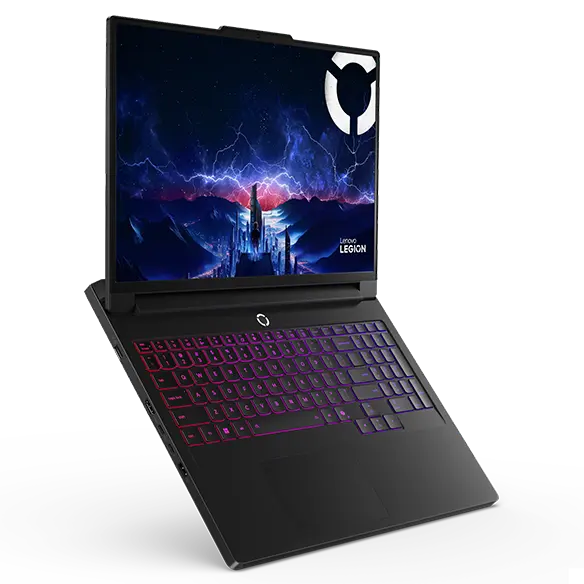
Lenovo Legion Pro 7i Gen 10 Intel Core Ultra 9 275HX RTX 5080 32GB RAM 1TB Gen 5 SSD OLED Windows 11 Home
Lenovo
Buy — The article recommends the RTX 5080 configuration with 16GB of dedicated GPU memory as the sensible starting choice for plugged-in gaming, editing and local AI experimentation.
A practical configuration for gaming, editing and local AI development, with 16GB of dedicated GPU memory. Its limits are battery endurance and the memory ceiling for larger local models.Available at Amazon(paid link) — opens Amazon in a new tab. Price and availability shown there.
Sources
Pages consulted while researching this article. None of these are affiliate links.
- Lenovo Legion Pro 7i and Legion Pro 7 Gen 10 User Guide — download.lenovo.com
- Intel Core Ultra 9 Processor 275HX Specifications — intel.com
- Microsoft Copilot+ PCs Developer Guide — learn.microsoft.com
- Lenovo Legion Pro 7 16IAX10H Platform Specifications — psref.lenovo.com
- Hugging Face Transformers: Cache Strategies — huggingface.co
- PyTorch 2.7 Release: Blackwell Support — pytorch.org
- Notebookcheck: Lenovo Legion Pro 7i 16 Gen 10 Review — notebookcheck.net