How to Fix Garmin vívofit jr. 2 Battery Problems
The question this answersWhere do these come from?
How do I fix battery problems on my Garmin vívofit jr. 2?
The vívofit jr. 2 uses one replaceable CR1632 battery; check its orientation, reset the tracker, and recognize when hardware has failed.
Work through these steps in order: check what the screen is showing, reset the tracker before opening it, then replace the single CR1632 coin cell if the reset doesn’t fix it. Most Garmin vívofit jr. 2 battery problems end at step 3; a tracker that still fails after two fresh, correctly installed batteries has a hardware fault, not a battery problem.
The vívofit jr. 2 is not rechargeable. It uses exactly one user-replaceable CR1632 coin cell, rated by Garmin for up to one year — a maximum, not a guarantee. There is no charging cable or charging port to check. The Star Wars The Resistance edition uses the identical battery and the identical procedure below. Garmin’s specifications confirm the battery type and stated life.
Step 1: Match what the screen shows to the cause
| What you see | Most likely explanation | Next step |
|---|---|---|
| Triangle or blank screen with a red bar | Battery is low or critically low | Skip to Step 3: replace the CR1632 |
| Visible screen that ignores button presses | Tracker has stopped responding | Go to Step 2: reset it |
| Completely blank after a battery replacement | Wrong battery, reversed polarity, poor contact, or hardware failure | Go to Step 4: recheck the installation |
| Another fresh battery dies within days or weeks | Weak replacement cell or tracker fault | Go to Step 5: recognize hardware failure |
A triangle that stays on the display while the button does nothing is a low-battery symptom, and Garmin separately identifies a blank display with a red bar as a likely low-battery condition. Garmin’s Bluetooth troubleshooting page documents both warning displays. The Garmin Jr. app can also show Battery Low and Battery Critical icons beside the child’s avatar; these are status warnings, not an exact percentage or remaining-days estimate, and they may be stale if the tracker hasn’t synced recently. Garmin explains the app’s battery status icons here.
Step 2: Reset it before opening the case
A visible but unresponsive screen doesn’t automatically mean the battery is empty, and a reset costs nothing. Hold the tracker’s device key continuously for 15 seconds, then release it. The screen should turn off, reset, and come back on. Garmin says this does not erase stored data, though it does reset the move bar. Follow Garmin’s vívofit jr. 2 reset procedure.
If the reset succeeds, manually sync the tracker: bring it near the phone, open the Garmin Jr. app — called the vívofit jr. app in the original manual — hold the tracker key to display its menu, and swipe down in the app to refresh. Garmin documents the manual-sync sequence. A sync also lets the tracker pick up any pending software update: Garmin says updates download automatically when data is sent to the phone, a progress bar appears, and the tracker restarts when the update finishes. Keep it near the phone for the several-minute process. Garmin does not publish any firmware version as a battery fix, so don’t install unofficial files or chase an unsupported version number. Garmin’s software-update instructions explain the supported process. If the reset does nothing, move to Step 3.
Step 3: Replace the CR1632 correctly
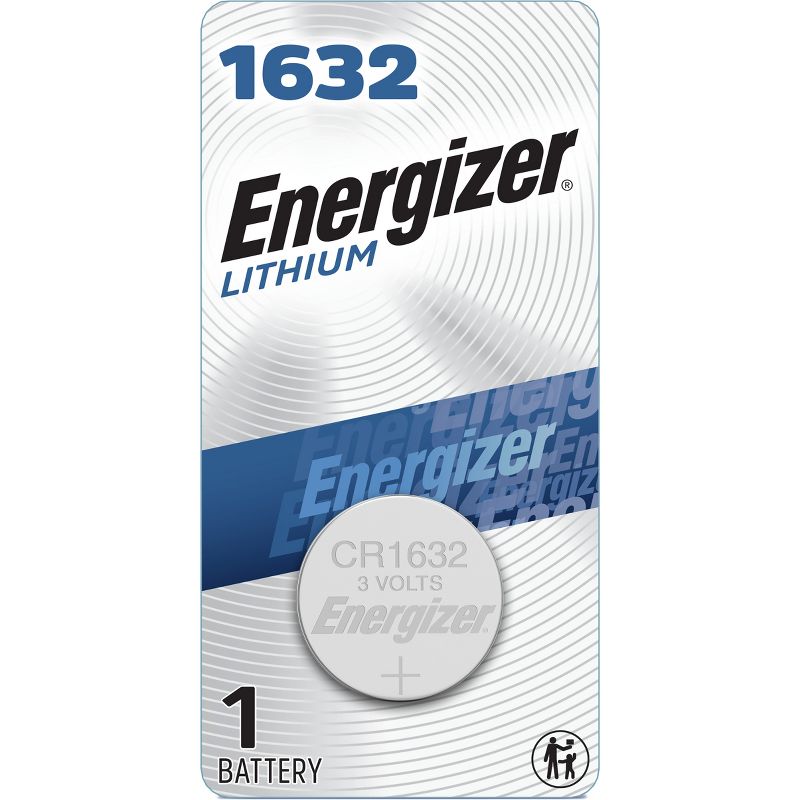
Do not substitute a CR1620, CR2025, CR2032, or rechargeable cell because it looks similar — coin cells with different designations have different dimensions and are not interchangeable. Use a newly opened CR1632 from a reputable seller; Energizer, for example, identifies its 1632 product as a 3-volt CR1632 and warns against substituting other coin-cell sizes. See Energizer’s CR1632 specifications.
Work over a clear surface where a child cannot reach the loose coin cell or four small screws:
- Stretch the silicone band away from the tracker and remove the module.
- Use a Phillips #00 screwdriver to remove the four rear screws. Garmin specifically identifies #00 as suitable for vívofit battery compartments. See Garmin’s screwdriver guidance.
- Lift off the rear case and remove the old battery.
- Insert one new CR1632 with its negative side facing the front cover — the positive side faces the removable rear case.
- Inspect the gasket. It must be undamaged and fully seated in the rear case.
- Refit the rear case and tighten all four screws equally and firmly. Garmin gives no torque specification, so stop when the case is evenly seated; forcing the screws risks stripping them.
- Stretch the band around the module, aligning the arrow on the tracker with the arrow inside the band.
These orientation, gasket, screw, and alignment steps come directly from Garmin’s vívofit jr. 2 battery-replacement procedure.
Just want the recommendation?
Skip to the picksCoin cells are a serious ingestion hazard. Keep both new and depleted batteries away from children. After removal, cover the old cell’s terminals with non-conductive tape and take it to an appropriate battery-collection point. If ingestion is suspected, seek emergency medical help immediately; do not wait for symptoms. The U.S. Consumer Product Safety Commission’s coin-battery guidance provides emergency contacts and disposal precautions.
Press the device key after reassembly. If the screen stays dead, go to Step 4.
Step 4: Recheck the installation before assuming failure
Reopen the compartment and verify all four points below before concluding that the tracker has failed:
- The cell is marked CR1632, not merely “1632” in an unfamiliar rechargeable format.
- Only one battery is installed.
- The battery’s negative side faces the inside of the front cover, toward the display side of the module.
- The battery sits flat and the rear case closes without pinching or displacing the gasket.
After reassembly, press the device key; if nothing happens, perform the full 15-second hold once. Don’t repeatedly dismantle the tracker if the first known-new cell fails — each opening is another chance to damage the gasket, screws, or contacts.
A battery can be new to you but old, counterfeit, or poorly stored, so the sensible cross-check is a second CR1632 from a different sealed package and reputable manufacturer. If two known-new batteries produce no display, or both fail unusually quickly, additional battery purchases are unlikely to solve the problem — move to Step 5.
Step 5: Recognize when it’s hardware, not the battery
Garmin’s “up to one year” figure is a maximum, and Garmin publishes no minimum guaranteed runtime per cell, so a single battery lasting less than a year doesn’t by itself prove the tracker is defective.
Repeated failure is different. If two reputable, newly opened CR1632 batteries each last only days or a few weeks, or the tracker becomes warm, shows random display segments, contains corrosion, or has visible moisture inside, stop using it. A reset or app setting cannot repair a short circuit, damaged seal, corroded contact, or failing circuit board.
Contact Garmin support or the original retailer with the tracker’s serial number, approximate installation dates for both batteries, and photographs of any corrosion or gasket damage. Ask directly whether repair, replacement, or an out-of-warranty exchange is available in your region. If the gasket is torn, screws are stripped, the case is cracked, or the compartment cannot close securely, do not return the tracker to a child or rely on its water resistance — the safe resolution is professional service or replacement.
The bottom line
Which part you need depends on what broke:
Top pick
Buy this
Energizer 1632 Lithium Coin Battery, 1 Pack
Energizer
The vívofit jr. 2 requires one CR1632 coin cell, and the article identifies Energizer’s 1632 as the correct 3-volt CR1632 type.
This is the exact CR1632 cell type specified for the vívofit jr. 2, from an established manufacturer. It cannot fix rapid drain caused by a damaged tracker, and the loose coin cell must be kept away from children.Available at Amazon(paid link) — opens Amazon in a new tab. Price and availability shown there.The alternative
Buy this
iFixit Marlin 5 Standard Precision Screwdriver Set - Phillips, Flathead
iFixit
The article instructs readers to use a Phillips #00 screwdriver to remove the four rear screws, citing Garmin’s screwdriver guidance.
Garmin specifies a Phillips #00 driver for vívofit battery-compartment screws, and a correctly fitting tip reduces the risk of stripping them. The drawback is that it is a specialized single-size tool.Available at Amazon(paid link) — opens Amazon in a new tab. Price and availability shown there.
Recommended products
Ordered by how well each one fits the situations above. Each link below is a paid link.
Energizer 1632 Lithium Coin Battery, 1 Pack
Energizer
Buy — The vívofit jr. 2 requires one CR1632 coin cell, and the article identifies Energizer’s 1632 as the correct 3-volt CR1632 type.
This is the exact CR1632 cell type specified for the vívofit jr. 2, from an established manufacturer. It cannot fix rapid drain caused by a damaged tracker, and the loose coin cell must be kept away from children.Available at Amazon(paid link) — opens Amazon in a new tab. Price and availability shown there.
iFixit Marlin 5 Standard Precision Screwdriver Set - Phillips, Flathead
iFixit
Buy — The article instructs readers to use a Phillips #00 screwdriver to remove the four rear screws, citing Garmin’s screwdriver guidance.
Garmin specifies a Phillips #00 driver for vívofit battery-compartment screws, and a correctly fitting tip reduces the risk of stripping them. The drawback is that it is a specialized single-size tool.Available at Amazon(paid link) — opens Amazon in a new tab. Price and availability shown there.
Sources
Pages consulted while researching this article. None of these are affiliate links.
- Garmin — vívofit jr. 2: My device won't turn on — www8.garmin.com
- Garmin — Important Safety and Product Information for vívofit jr. — static.garmin.com
- Garmin — vívofit jr. 2 The Resistance Activity Tracker for Kids — garmin.com.sg
- Panasonic Energy — Introduction of Coin-type Lithium Batteries — industrial.panasonic.com
- U.S. EPA — Used Household Batteries — epa.gov
- vívofit jr. 2 Specifications — www8.garmin.com
- vívofit jr. 2 — Replacing the Battery — www8.garmin.com
- vívofit jr. 2 — Resetting the Device — www8.garmin.com
- vívofit jr. 2 — Sending Data Manually to Your Smartphone — www8.garmin.com
- vívofit jr. 2 — Software Update — www8.garmin.com
- Garmin Jr. App Bluetooth Troubleshooting — support.garmin.com
- Status Icons in the Garmin Jr. App — support.garmin.com
- Screwdriver Size for Replacing a vívofit Battery — support.garmin.com