Breville Oracle Touch: One-Touch Weekdays, Manual Weekends
The questionWhere do these come from?
Am I the only one who wants both a super automatic and a semi-auto in one machine?
https://preview.redd.it/4g2fe8qglqeh1.png?width=714&format=png&auto=webp&s=adb61b0b54d5f7cea33ddd070a7c141ed7a5b838 I feel like I have two completely different coffee routines.
The Breville Oracle Touch runs fully automatic on weekdays and switches to a hold-to-brew manual mode for weekends, in one machine.
The Breville Oracle Touch is the one current machine that genuinely runs both ways: fully automatic grind-dose-tamp-and-pour for a weekday flat white, and a hold-to-brew manual mode with independently adjustable grind, dose position, shot timing and steam for a weekend pull. It does this without becoming two machines bolted together, which is the compromise most “hybrid” espresso machines make instead.
That’s the short answer. The longer one is about where the automation actually stops, because it doesn’t stop everywhere at once, and knowing exactly where the seam is decides whether this machine — or something cheaper, or something more manual — is the right one to buy.
What “one-touch” actually means on this machine
On the Oracle Touch, the built-in conical burr grinder (45 settings, Baratza European Precision Burrs) grinds directly into the 58mm portafilter, doses to roughly 22g, and tamps with an internal auger-driven tamper — all before you touch anything, according to Breville’s own product listing. You lock the portafilter into the group head, tap one of up to eight saved “My Brew” presets on the touchscreen, and the dual boiler system (each side running its own PID loop) pulls the shot and, if you asked for milk, textures it automatically too. That’s the entire weekday routine: load beans, tap the screen, walk away.
Reviewers who’ve spent time with it echo the same point about the tamping step specifically — CoffeeGeek’s first-look review called the auto-tamp mechanism capable of “a better job distributing and tamping your espresso-ground coffee than maybe 97% of the home and pro baristas,” which is the whole case for using automatic mode on a Tuesday morning instead of doing it by hand.
Where manual mode actually lives
The manual side isn’t a separate machine mode buried in a settings menu — it’s a press-and-hold on the same Brew button. Hold it for roughly two seconds to enter manual extraction: one tap starts the shot, a second tap stops it, so you’re timing the pull yourself instead of trusting a preset duration. Milk works the same way — the touchscreen offers a manual steam option alongside the automatic one, so weekend milk texturing is genuinely hands-on if you want the practice.
Grind is adjustable across all 45 settings regardless of mode, and dose can be changed too, but not from the touchscreen — you pull the tamping fan and turn an Allen-key screw on the auger assembly, with roughly one thread of adjustment per gram, according to a long-time owner’s breakdown on the CoffeeSnobs forum. That’s real control, just not fast control; it’s a once-in-a-while adjustment, not something you’d redial between back-to-back shots.
Just want the recommendation?
Skip to the picksThe one thing manual mode never gives you
Tamping stays automatic in both modes. There’s no way to pull a naked tamper and set your own distribution or pressure by hand, which is the specific piece of “manual espresso control” that pressure-profiling enthusiasts usually mean. The same CoffeeSnobs thread flags the practical downstream effect: the auto-doser can run noticeably over target weight with real variance between shots, and because tamping happens inside the machine, you can’t isolate whether an off shot is a distribution problem, a tamp problem, or a dose problem the way you could on a machine where you build the puck yourself. If that specific control — diagnosing and correcting puck prep by hand — is the actual weekend goal, no version of the Oracle Touch delivers it, and no amount of manual-mode button-holding changes that.
What manual mode does deliver is control over the variables that sit outside puck prep: grind size, dose weight (via the auger screw), extraction time, and milk texture. For most people who describe wanting “weekend manual control,” that’s the set of dials they mean — dialing in a new bag of beans, pulling a shot a few seconds longer, steaming milk by feel instead of by sensor. If that’s the target, the Oracle Touch’s manual mode reaches it. If the target is full puck-prep control, it doesn’t, on this machine or any other one-touch machine on the market.
How it compares to the two machines people weigh against it
| Auto workflow | Manual depth | Verdict | |
|---|---|---|---|
| Breville Oracle Touch | Auto grind/dose/tamp, 8 saved presets, dual PID boiler | Hold-to-brew timing, manual steam, 45 grind settings, auger dose adjustment | Buy |
| Breville Barista Touch Impress | Manual grind dial with per-shot feedback, lever-engaged auto-tamp, single ThermoJet heater | Extraction is auto-managed once started; CoffeeGeek’s first-look review notes core features are “specifically designed to prevent the kind of deep, granular control that hobbyists require” | Consider |
| Rancilio Silvia Pro X | None — no grinder, no auto-dose, no auto-tamp | Full manual: dual boiler, independent PID per boiler, adjustable 0–6 second pre-infusion | Skip for this question |
The Barista Touch Impress is the less expensive machine in Breville’s own lineup, and it looks like a shortcut to the same answer — it has a burr grinder and an auto-tamp lever, so on paper it sounds like a smaller Oracle Touch. It isn’t, on either end of the workflow. Its “Impress” tamp station is a mechanical side lever you engage yourself rather than something that happens while you’re not touching the machine, its single ThermoJet heater needs a blank warm-up shot before the grouphead is at temperature, and CoffeeGeek’s review is explicit that the deep manual control a weekend enthusiast wants is engineered out on purpose. It’s the right call if the budget ceiling matters more than either end of this question — but it satisfies neither the one-touch requirement nor the manual-control requirement as fully as the Oracle Touch does.
The Rancilio Silvia Pro X is the machine people bring up when the real desire is maximum weekend control, and on that axis it’s excellent: two independently PID-controlled boilers, a shot timer, adjustable pre-infusion, and none of the Oracle Touch’s automation getting in the way of puck prep, according to Rancilio’s own product specifications. But it has no grinder, no auto-dose and no auto-tamp — every weekday shot on the Silvia Pro X is exactly as hands-on as every weekend shot. Running it as your weekday machine means grinding and tamping by hand every morning, or buying a second, automatic machine to cover weekdays — which is precisely the two-machine setup this question is trying to avoid. It’s the right rival if you’d rather own two dedicated machines than one that compromises; it’s the wrong answer if the point is avoiding that second purchase.
If serviceability is the real concern
Hybrid machines get a reputation for compromising serviceability along with workflow, because packing a grinder, a tamper and a boiler system into one chassis means more that can need repair inside one unit rather than two separate ones. That tradeoff is real and worth naming plainly: a fault in the Oracle Touch’s grinder or auto-tamp mechanism takes out both your weekday and weekend workflow at once, where a two-machine setup would only lose you one side. If that single-point-of-failure risk matters more to you than the counter space and cost of a second machine, that’s a legitimate reason to choose the Silvia Pro X plus a separate automatic machine instead — it’s just a different question than the one about workflow control that the Oracle Touch answers directly.
The actual verdict
For a single machine that runs hands-off on a Tuesday and hands-on on a Saturday, the Oracle Touch is the buy: automatic grind-dose-tamp and eight saved presets for the workweek, a hold-to-brew manual mode with manual steam and full-range grind and dose adjustment for the weekend, without needing a second machine to get there. The one thing to go in with eyes open on is that tamping itself never becomes manual — if hands-on puck prep specifically is the goal, that requirement sits outside what any one-touch machine, including this one, is built to offer.
The bottom line
Both work; your situation picks one:
Top pick
Buy this
Breville Oracle Touch BES990BSS Espresso Machine
Breville Oracle
Its hold-to-brew manual extraction, manual steam option, and full 45-setting grind range give it real weekend control that the cheaper Barista Touch Impress deliberately limits.
The only current one-machine setup that runs fully automatic grind-dose-tamp on weekdays and a genuine hold-to-brew manual mode on weekends. The tamping step itself is never manual, in either mode.Available at Amazon(paid link) — opens Amazon in a new tab. Price and availability shown there.The alternative
It depends
Breville Barista Touch Impress BES881BSS Espresso Machine
Breville Barista
CoffeeGeek's first-look review notes its core features are built to prevent the deep manual control weekend enthusiasts want, and its single ThermoJet heater needs a blank warm-up shot before brewing.
An alternative for a smaller budget: a burr grinder and a lever-engaged auto-tamp station make it look like a scaled-down Oracle Touch, but it is weaker on both ends of this specific question.Available at Amazon(paid link) — opens Amazon in a new tab. Price and availability shown there.
Recommended products
Ordered by how well each one fits the situations above. Each link below is a paid link.
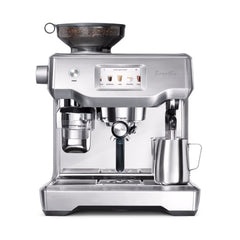
Breville Oracle Touch BES990BSS Espresso Machine
Breville Oracle
Buy — Its hold-to-brew manual extraction, manual steam option, and full 45-setting grind range give it real weekend control that the cheaper Barista Touch Impress deliberately limits.
The only current one-machine setup that runs fully automatic grind-dose-tamp on weekdays and a genuine hold-to-brew manual mode on weekends. The tamping step itself is never manual, in either mode.Available at Amazon(paid link) — opens Amazon in a new tab. Price and availability shown there.
Breville Barista Touch Impress BES881BSS Espresso Machine
Breville Barista
It depends — CoffeeGeek's first-look review notes its core features are built to prevent the deep manual control weekend enthusiasts want, and its single ThermoJet heater needs a blank warm-up shot before brewing.
An alternative for a smaller budget: a burr grinder and a lever-engaged auto-tamp station make it look like a scaled-down Oracle Touch, but it is weaker on both ends of this specific question.Available at Amazon(paid link) — opens Amazon in a new tab. Price and availability shown there.
Sources
Pages consulted while researching this article. None of these are affiliate links.
- the Oracle® Touch - Super Automatic Espresso Machine | Breville (US) — breville.com
- Breville Oracle Touch Espresso Machine First Look - CoffeeGeek — coffeegeek.com
- Breville Oracle Touch Espresso Machine Review - Coffeeness — coffeeness.de
- Breville Oracle Touch - Manual override? - CoffeeSnobs forum — coffeesnobs.com.au
- Breville Oracle Touch Review - The Coffee Folk — thecoffeefolk.com
- The Breville Barista Touch Impress First Look - CoffeeGeek — coffeegeek.com
- Silvia Pro X: dual boiler espresso machine for home - Rancilio — ranciliogroup.com