Amazfit Active 2 Hiking Maps: What Works Offline
The questionWhere do these come from?
What are you using for weekend camping and hiking? my current watch dies too fast
Went out last weekend for a 2-day trial loop and my Galaxy watch gave up before we even pitched the tent on Saturday night.
The Amazfit Active 2 supports offline hiking maps and imported routes, but needs phone setup and cannot deliver days of continuous GPS.
The Amazfit Active 2 can display offline hiking maps and navigate an imported route without a connected phone once setup is complete. It suits planned day hikes, but its GPS endurance makes it a poor choice for several days of uninterrupted tracking without charging. Notebookcheck’s Active 2 review
This article covers the Active 2 Round. The useful distinction is between preparing navigation on your phone and following it on your wrist: you can put the phone away on the trail, but you still need it to prepare the watch.
What you can navigate without your phone
The Active 2’s offline map and your hiking route are separate downloads. The map supplies the background geography; the route supplies the course you intend to follow. Amazfit explicitly states that navigation requires an imported route and that you cannot select a point on the offline map to generate directions there. Downloaded map coverage must also match your actual location. Amazfit’s mapping limitations, note 6
That matters when plans change. Loading the area around a campsite does not mean you can subsequently tap another campsite and ask the watch to calculate a walk there. Prepare the intended route before departure, and review possible alternatives while you still have access to your planning tools. Do not buy the Active 2 expecting the map interface to replace that planning step.
For following an established trail, the proposition is more useful. Notebookcheck confirmed that navigation works without a smartphone after downloading the maps. Its examination of recorded GPS tracks nevertheless found imperfect tracing through curves. Treat the position marker as navigation assistance, particularly where nearby paths diverge, and check the actual junction before committing to a turn. Notebookcheck’s navigation assessment
Map detail is another practical limit. Advnture’s reviewer followed a route during a 21 km hike but judged the maps insufficiently detailed to navigate without a backup. That supports using the Active 2 for convenient route checks while keeping another way to inspect the surrounding terrain. It does not establish that every trail is missing or that navigation fails everywhere. Advnture’s hiking review
Before relying on the watch away from familiar trails, rehearse a short local route with the phone disconnected. Confirm that you can see your position, distinguish the course from the background map and understand the turn prompts. A successful file transfer alone does not show that you will find the display useful outdoors.
Load both files—and check the map inside Hiking
Use the following sequence from Amazfit’s documentation; menu wording can change with app and watch updates:
- In Zepp, open Device > Amazfit Active 2 (Round) > Device Application Settings > Map Management.
- Select the area, add it to the device download list and complete the transfer prompts.
- Open your GPX route file with Zepp, choose Save track, then Send to device.
- On the watch, select Hiking > Navigation > My Route, choose the route and start navigation.
- Enable turn alerts through Navigation > Navigation settings > Navigation Reminder.
These are separate map-transfer and route-import operations. Amazfit Active 2 Round user manual
Just want the recommendation?
Skip to the picksChoose coverage that includes the whole outing, rather than concentrating only on the trailhead. Consider where you would need to inspect the map if you turned around, took a planned alternative or approached the start from another direction. Finish the download before travelling; discovering an incomplete transfer at the trailhead defeats the purpose of offline navigation.
If the route appears over a blank background, check Settings > Map > Map Resources, enable Settings > Map > Show Base Map, wait for a GPS fix and confirm that the downloaded area includes your current position. Those are Amazfit’s documented checks for a missing workout map. Amazfit’s map troubleshooting instructions
A visible route line should therefore prompt you to inspect the map resource before repeatedly importing the route. Take the watch outdoors and check within the actual Hiking activity you intend to use. Browsing a downloaded region beforehand is useful, but the final check should reproduce the way you will navigate.
If the correct resource is present and those checks still leave the background blank, contact Amazfit support with the watch firmware, Zepp version, selected activity and affected map area. The documentation does not establish a universal fix beyond those checks, so a factory reset should not be presented as a guaranteed cure.
A camping weekend is different from continuous GPS
Amazfit rates the Active 2 Round for up to 21 hours of continuous GPS, versus up to ten days of typical use. The buried detail is that its typical-use test includes only three 30-minute GPS workouts per week. Its longer battery-saver claim disables GPS entirely. Neither everyday battery figure describes a hiking expedition. Amazfit’s battery specifications and test conditions
Independent measurements also argue against treating 21 hours as a guaranteed navigation allowance. Wareable’s Michael Sawh recorded a 10% battery drop during one hour of GPS exercise, and just over 20% during nearly two hours of outdoor running with mapping. These were shorter observations, not a complete GPS rundown test, so they cannot establish an exact maximum hiking duration. Wareable’s battery measurements
Count the hours you will actually record. Two six-hour hiking days require 12 hours of GPS, plus overnight watch use. Three eight-hour days require 24 hours before allowing any reserve. Those are itinerary calculations, not measured Active 2 runtimes, but they expose why “a three-day battery” is an inadequate buying criterion.
Skip the Amazfit Active 2 if your requirement is 48–72 hours of continuous GPS without charging. For a weekend with shorter walks and charging available at camp, it remains a reasonable consideration. Establish battery consumption on a representative local hike before allocating an entire trip to one charge.
For overnight use, pack the watch’s charging base as well as the appropriate cable. Notebookcheck confirms that the base has a USB-C socket and that the watch does not support Qi charging; a wireless charging pad cannot substitute for it. Notebookcheck’s charging assessment
Choose the Active 2 Round when you want to follow a prepared hike from your wrist and can accommodate its charging needs. If your requirement includes creating new routes directly on the watch or navigating for several days continuously, its documented limits rule it out.
The bottom line
What actually works with it:
Top pick
It depends
Amazfit Active 2 Round Smart Watch 44mm Black Silicone
Amazfit Active
It supports offline maps and imported routes, but its stated maximum of 21 hours of continuous GPS excludes 48–72-hour tracking without charging.
Consider it for following prepared day hikes with offline maps and your phone disconnected. Route preparation still needs Zepp, and longer trips require a charging plan.Available at Amazon(paid link) — opens Amazon in a new tab. Price and availability shown there.
Recommended products
Ordered by how well each one fits the situations above. Each link below is a paid link.
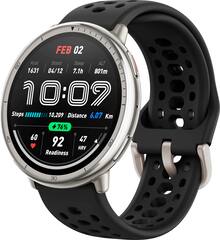
Amazfit Active 2 Round Smart Watch 44mm Black Silicone
Amazfit Active
It depends — It supports offline maps and imported routes, but its stated maximum of 21 hours of continuous GPS excludes 48–72-hour tracking without charging.
Consider it for following prepared day hikes with offline maps and your phone disconnected. Route preparation still needs Zepp, and longer trips require a charging plan.Available at Amazon(paid link) — opens Amazon in a new tab. Price and availability shown there.
Sources
Pages consulted while researching this article. None of these are affiliate links.
- Amazfit Active 2: technical specifications and mapping limitations — eu.amazfit.com
- Amazfit Active 2 Round user manual — support.amazfit.com
- Notebookcheck: Amazfit Active 2 smartwatch review — notebookcheck.net
- Wareable: Amazfit Active 2 review — wareable.com
- Advnture: Amazfit Active 2 review — advnture.com