Used ColorChecker Passport Video: Worth It for GH5/GH7?
The questionWhere do these come from?
In prep for a feature doc using GH7 + GH5 combo - is a color checker worth the investment?
A used X-Rite ColorChecker Passport Video is worth buying if the seller can show its production date and unfaded red patches before you pay.
A used X-Rite ColorChecker Passport Video is a reasonable buy for matching mismatched Panasonic bodies across interview locations, but only if two things check out first: the production date printed on the back of the chart, and whether the red and orange patches show any visible fading under strong light. A chart bought sight-unseen from a listing with no photos of its storage history is the real risk on a used purchase — not the chart’s age by itself.
What the Passport Video actually corrects for
The Passport Video packs three references into one hinged case: a grey balance panel for setting exposure and waveform levels, a white balance card for in-camera custom white balance, and a removable 24-patch ColorChecker Classic target for building a color profile. On a multi-location documentary, the workflow is the same at every setup — frame the chart in the shot before rolling, then in the grade use it as a known target to pull each camera’s footage toward a common color response instead of eyeballing a match between clips shot weeks or months apart.
That only works if the values printed on the chart are the values the software is told to expect. That’s where a used unit’s history starts to matter more than its price.
Why GH5 and GH7 footage drifts apart before you even touch a chart
A GH5 and a GH7 were never built to output matching color by default. The GH5 shipped in 2017 with a 20.3-megapixel Four Thirds sensor and V-Log as its only log option; CineD’s lab testing measured its usable dynamic range in V-Log at roughly 10 stops at a 1/0.5 signal-to-noise threshold. The GH7, released in 2024, moved to a 25.21-megapixel sensor and added ARRI LogC3 as a firmware option alongside V-Log — a completely different log curve family, per DPReview’s GH7 specifications, on top of the sensor generation gap. Two sensors seven years apart, with different dynamic range headroom and different color pipelines feeding the log curve, is exactly the gap a physical color reference is meant to close. Without one, “close enough” grading between the two bodies becomes a guess repeated at every location.
Check the date on the back before the price
X-Rite changed the colorant formulation used on ColorChecker Classic and SG charts — the same 24-patch target built into the Passport Video — in November 2014, changing “all black and gray shades as well as the color shades” in the process. Charts made before that date use the old reference values; charts made after use the new ones. X-Rite identifies which set applies by the production date printed on the back of the chart, not by a serial number. Buy a used chart without checking that date and you risk feeding the wrong reference values into your matching software from day one, independent of how well the chart was stored — a mismatch that has nothing to do with fading and everything to do with which spec sheet the seller doesn’t know to mention.
Just want the recommendation?
Skip to the picksWhat fading actually does to an interview grade
X-Rite describes its charts as made with “very light-resistant colorants,” while stating plainly that “no colorant, however, is absolutely resistant,” and recommends replacing a chart every two years under normal use, sooner with heavy sun or heat exposure. The company’s own care guidance is specific: keep the chart in its cover when not in use, avoid touching the patches, and protect it from heat, humidity and dust.
For a feature documentary, the practical risk isn’t that a faded chart stops working — it’s that fading is patch-specific and directional, typically hitting reds and oranges hardest, and Resolve’s Color Match tool treats the printed values as ground truth. Feed it a chart with even mildly shifted red patches and it teaches the correction a slightly wrong target, which shows up as a subtle, consistent bias across every shot corrected against that chart rather than a visible failure. That’s survivable for matching cameras to each other across a documentary cut over many months, since the goal is relative consistency, not archival color accuracy — but it’s the kind of low-grade error that doesn’t get caught until well into the grade.
Comparing the used chart, a new one, and the cheaper rival
| Chart | Verdict | What decides it | The catch |
|---|---|---|---|
| Calibrite ColorChecker Passport Video 2 (new) | Buy | Current-issue pigments and one unambiguous calibration reference set | Same case, patches and price whether the shoot covers one location or twenty |
| X-Rite ColorChecker Passport Video (used) | Consider | Same hinged case and 24-patch layout, lower cost if inspected first | Needs its production date checked against X-Rite’s November 2014 spec change, plus a visual check for fading |
| Datacolor SpyderCheckr 24 (new) | Consider | Portable, includes a neutral grey/exposure ramp target | Datacolor’s own supported software list is Lightroom Classic, Camera Raw and Hasselblad Phocus — not DaVinci Resolve |
The current Calibrite ColorChecker Passport Video 2 is the safer buy for a production spanning many shoot days: 52 patches across four targets in one small case, including the Classic 24-patch target for building camera profiles, with a single current reference data set and no unknown storage or light-exposure history to account for. Against the cost of tracking down and troubleshooting a subtle color bias weeks into a grade, a new chart is the cheap insurance.
The Datacolor SpyderCheckr 24 is a legitimate budget option — 24 color patches plus a neutral grey and exposure ramp target, built into a thin, portable sleeve — but check what it’s actually built for before treating it as a drop-in substitute. Datacolor’s own product listing names Lightroom Classic, Adobe Camera Raw and Hasselblad Phocus as its supported software; DaVinci Resolve isn’t on that list. Colorists do use it inside Resolve by manually placing the Color Match matte over its patches, the same generic technique used for any third-party chart, but Resolve’s Color Match panel doesn’t carry it as a named preset the way it does the ColorChecker Passport Video. On a documentary with many interview locations, that means re-aligning the matte by hand at every setup instead of pulling a saved chart profile — a repeated manual step that adds up over a long shoot far more than the price difference does.
The practical order to do this in
Before paying for a used X-Rite ColorChecker Passport Video, ask the seller for a clear photo of the production date printed on the back and a close-up of the red, orange and skin-tone patches under bright, even light. If the date is illegible, undisclosed, or the seller can’t say how the chart was stored, treat that as a pass rather than a maybe. If the chart checks out on both counts, it will do the job of matching mismatched GH5 and GH7 footage across interview locations exactly as well as a new one. If it doesn’t check out, or the listing won’t provide either photo, the newer Calibrite ColorChecker Passport Video 2 removes the guesswork entirely for a project where the color-matching workflow is going to run at every single location, over what could be a year or more of production.
The bottom line
Worth it either way — the difference is your budget:
Top pick
It depends
X-Rite ColorChecker Passport Video
X-Rite ColorChecker
X-Rite changed the chart's official color specification in November 2014, so a used unit's accuracy depends on matching its printed production date to the right reference data, not just its visible condition.
The exact chart in question, built for matching mismatched cameras across locations with a grey balance panel, white balance card and 24-patch target in one hinged case.Available at Amazon(paid link) — opens Amazon in a new tab. Price and availability shown there.The alternative
Buy this
Calibrite ColorChecker Passport Video 2
Calibrite ColorChecker
It ships with current-issue pigments and one unambiguous calibration reference file, removing the pre/post-2014 guesswork a used X-Rite chart carries.
The current-production successor to the X-Rite Passport Video, sold by X-Rite’s rebranded video and photo division; buy this instead if the used chart’s date or condition can’t be confirmed.Available at Amazon(paid link) — opens Amazon in a new tab. Price and availability shown there.
Recommended products
Ordered by how well each one fits the situations above. Each link below is a paid link.
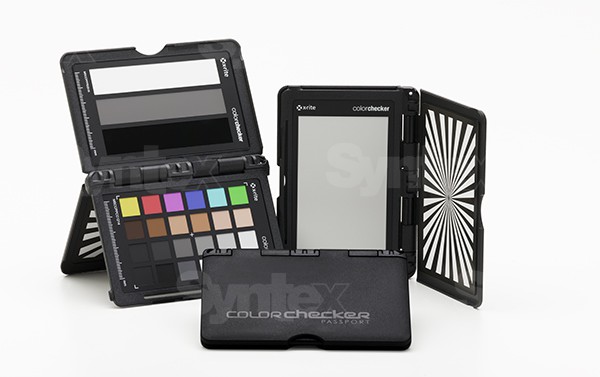
X-Rite ColorChecker Passport Video
X-Rite ColorChecker
It depends — X-Rite changed the chart's official color specification in November 2014, so a used unit's accuracy depends on matching its printed production date to the right reference data, not just its visible condition.
The exact chart in question, built for matching mismatched cameras across locations with a grey balance panel, white balance card and 24-patch target in one hinged case.Available at Amazon(paid link) — opens Amazon in a new tab. Price and availability shown there.
Calibrite ColorChecker Passport Video 2
Calibrite ColorChecker
Buy — It ships with current-issue pigments and one unambiguous calibration reference file, removing the pre/post-2014 guesswork a used X-Rite chart carries.
The current-production successor to the X-Rite Passport Video, sold by X-Rite’s rebranded video and photo division; buy this instead if the used chart’s date or condition can’t be confirmed.Available at Amazon(paid link) — opens Amazon in a new tab. Price and availability shown there.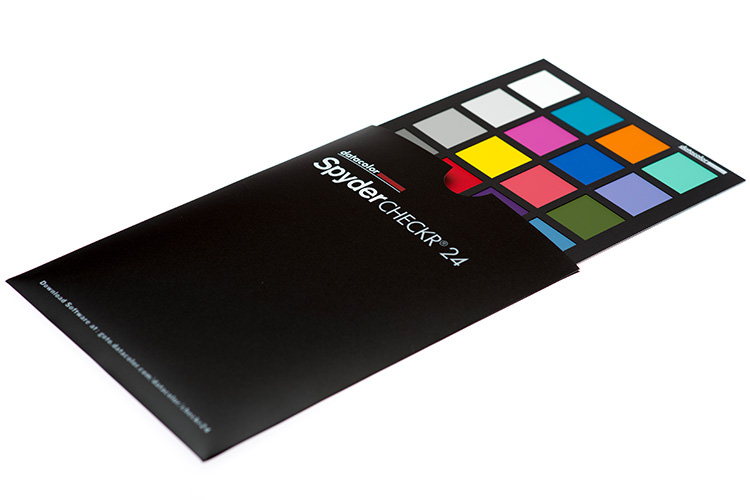
Datacolor SpyderCheckr 24
Datacolor SpyderCheckr
It depends — Datacolor lists Lightroom Classic, Camera Raw and Hasselblad Phocus as its supported software, not DaVinci Resolve, so matching in Resolve means manually aligning the patches every session instead of using a named chart preset.
A cheaper, more portable rival chart with 24 color patches plus a grey/exposure ramp target, worth considering if the budget is tight and you don’t mind extra manual setup in Resolve.Available at Amazon(paid link) — opens Amazon in a new tab. Price and availability shown there.
Sources
Pages consulted while researching this article. None of these are affiliate links.
- Recommendations for Maintaining ColorChecker Charts — xrite.com
- New Color Specifications for ColorChecker SG and Classic Charts — xrite.com
- ColorChecker Passport Video 2 — calibrite.com
- ColorChecker Video — calibrite.com
- Spyder Checkr 24 — datacolor.com
- How to Use the DSC Labs OneShot, Calibrite ColorChecker or DataColor SpyderCheckr with DaVinci Resolve to Match Color — wolfcrow.com
- How to Use a Calibrite ColorChecker Video — newsshooter.com
- How Good is the Panasonic GH5? Lab Review + Free GH5 LUT — cined.com