Arctis Nova 7 on the MSI Claw: Keep Astro or Switch?
The questionWhere do these come from?
The possibility of using either of my old Astro headphones for my future MSI Claw EX AI +
My Astro A40 vs. A50 gen 4 conundrum. To be used with my soon to be purchased MSI Claw EX AI +. Ok. I have both the Astros above. I can use the A40 3.
The Nova 7 works on the Claw's single USB-C port over Bluetooth alone; old Astro dongles can't, since neither Astro headset has Bluetooth built in.
Keep the Astro headset only if the MSI Claw stays parked at a desk with a hub or dock attached. For a Claw that actually leaves the desk, switch to the Arctis Nova 7 — it’s the only one of the three that can run wirelessly without touching the Claw’s charging port, because it’s the only one with Bluetooth built into the headset itself.
That single fact settles most of this question. The rest is about which Claw model you own and how you actually use it.
Why the Astro dongle doesn’t just plug in
The original MSI Claw (model A1M) has exactly one external data port: a single USB-C connector that doubles as USB4, Thunderbolt 4, DisplayPort 1.4, and the charging input, confirmed on MSI’s own Claw A1M product page. There’s a microSD slot and a 3.5mm combo audio jack alongside it, and nothing else.
Every Astro wireless system — the A50 Gen 4 base station and the A20 Wireless Gen 2’s USB transmitter — ships with a USB-A dongle. Logitech G’s A20 Gen 2 transmitter page confirms it’s a USB-A stick with no USB-C version offered. Neither Astro headset has Bluetooth built in; the dongle or base station is the only way either one talks to anything. That means before you even get to the question of whether the Claw has a spare port, you need a USB-A-to-USB-C adapter just to make the connector fit. Astro doesn’t include one.
The Arctis Nova 7 avoids that mismatch by design. SteelSeries’ own Nova 7 page describes its 2.4GHz transmitter as a USB-C dongle, with a USB-A adapter bundled in for older devices — the reverse of the Astro situation. On the Claw, the Nova 7 dongle plugs straight into the one port with nothing extra needed.
The constraint that actually decides this
| Headset | Dongle connector | Works over Bluetooth alone | Needs desk placement |
|---|---|---|---|
| Arctis Nova 7 | USB-C native (USB-A adapter included) | Yes — Bluetooth 5.0, built into the headset | No |
| Astro A20 Wireless (Gen 2) | USB-A only | No — 2.4GHz dongle required | No |
| Astro A50 (Gen 4) | USB-A + optical, via base station | No | Yes — base station with charging cradle |
| Astro A40 TR + MixAmp | USB-A (MixAmp), wired 3.5mm to headset | No | Effectively yes — MixAmp box plus cabling |
The column that matters for a handheld is the third one. Nothing about sound quality changes this comparison — it’s whether the headset can get audio to the Claw without a USB port at all.
Playing handheld, away from a charger
This is where the Astro headsets lose. On the A1M, plugging in an Astro dongle (via an adapter you’ll need to supply yourself) uses the only port the Claw has. If the battery is running low on a train or a flight, you’re choosing between wireless audio and charging — there’s no third port to split the difference.
The Nova 7 sidesteps this because Bluetooth lives inside the headset, not in a separate transmitter. Pair it to the Claw’s Bluetooth radio once, in Windows Bluetooth settings, and audio runs with the USB-C port completely free for a power bank or the Claw’s own charger. TechPowerUp’s Nova 7 review confirms the headset supports Bluetooth 5.0 for exactly this kind of simultaneous or standalone use — separate from the 2.4GHz gaming connection.
There’s a real tradeoff for taking the Bluetooth route instead of the dongle, covered below, but it’s the only option on this list that works at all without the port.
Docked or hubbed, the port problem disappears
If the Claw sits on a desk connected to a USB-C hub or dock, none of this matters as much. A hub with spare USB-A ports — the kind reviewed in XDA’s roundup of Claw docks, which notes the Claw’s single port is the reason a hub exists in the first place — gives an Astro dongle somewhere to plug in that isn’t the Claw’s own port. A review of MSI’s official Nest Docking Station lists two USB-A 3.2 Gen 1 ports and a spare USB-C port on the dock itself, specifically to work around the handheld’s single connector.
Just want the recommendation?
Skip to the picksIn this setup, keeping the Astro headset is a reasonable call. The A50 base station and the A20 transmitter both plug into the dock’s USB-A ports, the Claw’s own port stays free for charging through the dock’s power delivery pass-through, and you keep whatever headset you already own. The Nova 7’s 2.4GHz dongle would work here too, and arguably with less desk clutter than an A50 base station’s charging cradle, but there’s no compatibility reason to replace a headset that already works once a dock is in the picture.
The Claw 8 AI+ changes the math
MSI’s second-generation handhelds — the Claw 8 AI+ and Claw 7 AI+, launched in 2025 — carry two Thunderbolt 4 USB-C ports instead of one. GamesRadar’s review of the Claw 8 AI+ confirms both ports sit at the top of the unit and both support charging.
On these models, the single-port conflict that pushes handheld players toward Bluetooth mostly goes away. Plug a charger into one port and an Astro dongle (through a USB-A adapter) into the other, and you get wireless audio and power at the same time, even away from a desk. If you own a Claw 8 AI+ or 7 AI+ specifically, the case for replacing an Astro headset on compatibility grounds alone is much weaker — it’s really down to whether you’d rather not carry an adapter.
What Bluetooth costs you
Choosing the Nova 7’s Bluetooth connection over its 2.4GHz dongle isn’t free. TechPowerUp’s testing notes the Nova 7 supports only the SBC Bluetooth codec, which carries more compression and more latency than the 2.4GHz link. For fast-paced or competitive games, that lag is noticeable enough that the 2.4GHz dongle remains the better connection whenever a spare port is available — which is exactly the case when the Claw is docked or when you own a Claw 8 AI+ with a port to spare.
Battery life shifts too: SteelSeries lists 38 hours on 2.4GHz alone versus 26 hours if you run 2.4GHz and Bluetooth simultaneously (SteelSeries’ dual-wireless mode, used for mixing in phone audio), per the same official spec page cited above. Using Bluetooth by itself on the Claw falls in between, since only one radio is active. A 15-minute fast charge still recovers about 6 hours of use either way.
For anyone specifically comparing this to the newer Arctis Nova 7 Gen 2, the underlying logic doesn’t change — SteelSeries carried the same dual-wireless, USB-C dongle design forward and extended the rated battery life, but the port-shape and Bluetooth-fallback advantages over the Astro lineup are identical.
If neither Bluetooth’s latency nor the adapter hassle sounds appealing, the Nova 7 also ships with a 3.5mm cable. Per SteelSeries’ own support documentation, plugging it in switches the headset to a fully passive wired mode and powers down its wireless radios — a fallback that works through the Claw’s 3.5mm combo jack with no USB port, dongle, or battery involved at all. None of the Astro headsets covered here offer an equivalent direct-wired path into a handheld’s headphone jack.
What to skip, and what’s fine to keep
Skip the Astro A50 Gen 4 for Claw use unless the Claw never leaves a dock. Its base station is a desk-bound charging cradle with no Bluetooth fallback and a USB-A connector that doesn’t fit the Claw’s port without an adapter — exactly the setup that turns into a compatibility headache the moment you want to play handheld.
The Astro A20 Wireless Gen 2 is a reasonable “consider”: lighter than the A50 setup and cheaper to replace if lost, but it inherits the same USB-A-only, no-Bluetooth limitation, so it only avoids the port conflict when a hub or dock is already in the bag.
If keeping an Astro headset docked is the plan, a basic USB-C hub with spare USB-A ports and power delivery pass-through is worth adding to the setup — it’s a small, one-time purchase that resolves the adapter and port-budget problem for good, though it only helps at the desk, not on the go.
The Arctis Nova 7 is the buy for anyone who takes the Claw out of the house: it’s the only headset here that reaches the Claw without a dongle, an adapter, or a spare port, and it still has the 2.4GHz option in reserve for whenever the Claw is docked and lower latency matters more than convenience.
The bottom line
Two options, and the revision you own picks one:
Top pick
Buy this
SteelSeries Arctis Nova 7 Wireless Gaming Headset
SteelSeries
Its Bluetooth 5.0 radio pairs directly to the Claw without occupying the USB-C port, while its 2.4GHz dongle is USB-C native for docked use.
The only headset in this comparison that reaches the MSI Claw without a dongle or adapter, since Bluetooth is built into the headset itself and can pair directly without touching the Claw’s single USB-C port.Available at Amazon(paid link) — opens Amazon in a new tab. Price and availability shown there.The alternative
It depends
ASTRO A20 Wireless Gen 2 Gaming Headset
ASTRO
Fine when the Claw stays connected to a dock or hub with spare USB-A ports, but it loses the Claw's only port in handheld use since the headset has no built-in Bluetooth.
Lighter and cheaper to replace than the A50 setup, but it still needs a USB-A dongle and a USB-C adapter to connect to the Claw at all, and has no Bluetooth fallback.Available at Amazon(paid link) — opens Amazon in a new tab. Price and availability shown there.
Recommended products
Ordered by how well each one fits the situations above. Each link below is a paid link.
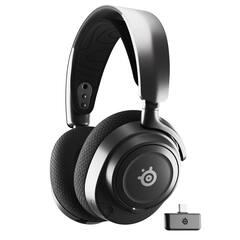
SteelSeries Arctis Nova 7 Wireless Gaming Headset
SteelSeries
Buy — Its Bluetooth 5.0 radio pairs directly to the Claw without occupying the USB-C port, while its 2.4GHz dongle is USB-C native for docked use.
The only headset in this comparison that reaches the MSI Claw without a dongle or adapter, since Bluetooth is built into the headset itself and can pair directly without touching the Claw’s single USB-C port.Available at Amazon(paid link) — opens Amazon in a new tab. Price and availability shown there.
ASTRO A20 Wireless Gen 2 Gaming Headset
ASTRO
It depends — Fine when the Claw stays connected to a dock or hub with spare USB-A ports, but it loses the Claw's only port in handheld use since the headset has no built-in Bluetooth.
Lighter and cheaper to replace than the A50 setup, but it still needs a USB-A dongle and a USB-C adapter to connect to the Claw at all, and has no Bluetooth fallback.Available at Amazon(paid link) — opens Amazon in a new tab. Price and availability shown there.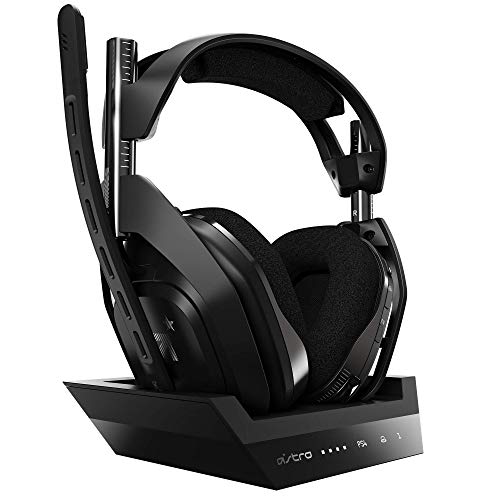
ASTRO A50 Gen 4 Wireless Headset with Base Station
ASTRO
Skip — The base station has no Bluetooth fallback and requires a USB-A connection an adapter has to bridge to the Claw's USB-C port, and it's a charging cradle, not a portable transmitter.
A desk-bound charging base station built for a console or PC setup that doesn’t move, which works against a handheld you’re meant to carry around.Available at Amazon(paid link) — opens Amazon in a new tab. Price and availability shown there.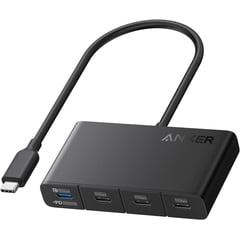
Anker USB-C Hub 100W PD Multiport Adapter
Anker
It depends — A hub with USB-A ports and PD pass-through resolves the Claw's single-port limitation for docked use, which is the only scenario where keeping an Astro headset makes sense.
Adds the spare USB-A ports an Astro dongle needs and passes through charging power, but it only solves the port conflict at a desk, not when the Claw is out of the house.Available at Amazon(paid link) — opens Amazon in a new tab. Price and availability shown there.
Sources
Pages consulted while researching this article. None of these are affiliate links.
- Arctis Nova 7 Wireless — SteelSeries — steelseries.com
- What is the 3.5mm jack on my Nova headset for? — SteelSeries Support — support.steelseries.com
- SteelSeries Arctis Nova 7 Wireless Review — Wireless Performance & Battery Life — TechPowerUp — techpowerup.com
- MSI Claw A1M — Official Product Page (MSI Store) — my-store.msi.com
- MSI Claw 8 AI+ review — GamesRadar+ — gamesradar.com
- MSI Nest Docking Station Review — NAG — nag.co.za
- A50 Gen 4 Base Station — Astro Series — Logitech G — logitechg.com
- ASTRO A20 Gaming Headset Gen 2 — Logitech G — logitechg.com