JBL Tune 770NC Aux Mic: The Cable Fix
The questionWhere do these come from?
Mic not working over auxiliary cable
This is a JBL Tune 770NC Headphone. Its mic is not working when i am using an auxiliary cable for connection. It's working properly over bluetooth. The auxiliary cable came with these headphones.
A four-pole cable cannot expose the Tune 770NC's built-in mic; use a 2.5-to-3.5mm lead with its own inline mic, or use Bluetooth.
A TRRS-to-TRRS aux cable will not make the JBL Tune 770NC’s built-in microphone work over a wired connection. For wired calls or voice chat, use a 2.5mm-to-3.5mm cable with its own inline microphone; otherwise, keep using the headphone’s microphone over Bluetooth.
That distinction matters: the replacement cable supplies a new microphone. It does not unlock the microphones inside the Tune 770NC.
The cable fix that actually works
The practical replacement is the Geekria Audio Cable with Mic and Mute Control Compatible with JBL Tune 770NC/760NC, Live 760NC/670NC Headphones. It has the 2.5mm connector needed by the right earcup, a 3.5mm connector for the source device, and an inline microphone built into the cable. Geekria explicitly lists the Tune 770NC among its compatible models and specifies a 2.5mm headphone plug on the cable (Geekria cable specifications).
This works around the limitation rather than changing it. Your computer, phone or controller records the inline microphone, while the Tune 770NC receives left and right audio through its 2.5mm socket.
Skip the CableCreation TRRS 3.5mm Audio Cable for this job: it has 3.5mm connectors at both ends, while the Tune 770NC requires a 2.5mm headphone-side plug, and it has no microphone capsule of its own. CableCreation correctly describes it as a four-conductor TRRS-to-TRRS aux cable, but those conductors cannot carry a signal that the Tune 770NC’s aux socket never supplies (CableCreation connector specification). It gets both the headphone-side connector size and the microphone source wrong for Tune 770NC owners who need wired voice chat.
Why three black bands do not prove mic support
A plug with three black insulating bands has four metal segments: tip, ring, ring and sleeve, usually abbreviated TRRS. A plug with two bands has three segments, or TRS. In a conventional CTIA headset connection, the four conductors carry left audio, right audio, ground and microphone. Google’s Android accessory specification documents that order as LRGM and notes that the older OMTP arrangement swaps microphone and ground (Android 3.5mm headset specification).
But the number of visible segments does not reveal how a cable is wired internally. DIY-Audio-Heaven physically inspected the Tune 770NC’s supplied cable and found a 2.5mm TRS plug at the headphone end and a 3.5mm TRRS plug at the source end. Crucially, its inspection found the final ring and sleeve of the 3.5mm plug connected together, making the cable electrically equivalent to an ordinary stereo TRS lead. The same inspection concluded that the headphone’s Bluetooth microphones are unavailable through the analog connection (DIY-Audio-Heaven’s Tune 770NC measurements).
That is why simply counting bands leads to the wrong answer. The four-segment source plug does not mean the stock cable carries a microphone signal, and changing it to another passive four-conductor cable cannot create one.
The linked JBL quick-start guide cannot verify the Tune 770NC’s behavior because it is for the Tune 777NC, even though it labels the analog function “Wired listening mode” and lists HFP among the wireless profiles (JBL Tune 777NC quick-start guide). It does not document whether the Tune 770NC has an analog headset-microphone mode.
Which cable setup matches your device
| Product | Connection it provides | Microphone source | Verdict and catch |
|---|---|---|---|
| Geekria Tune 770NC cable with mic | 2.5mm headphone to 3.5mm source | Inline microphone on the cable | Buy for wired calls; it does not activate the JBL microphones |
| CableCreation TRRS 3.5mm Audio Cable | 3.5mm TRRS at both ends | Only passes a mic signal supplied by a connected device | Skip; it does not fit the 2.5mm earcup directly or add a microphone |
| UGREEN Headphone Mic Splitter 20899 | One 3.5mm TRRS socket to separate headphone and mic plugs | Passes the Geekria inline mic to a desktop mic input | Consider only for computers with two separate audio sockets |
| JBL Tune 770NC | Bluetooth headset plus analog stereo listening | Built-in mic over Bluetooth; no built-in mic output over aux | Consider if wired voice chat is not a requirement |
A phone or laptop with one combo jack
A single headset socket normally accepts one CTIA TRRS plug for stereo output and microphone input. Connect the Geekria cable’s 2.5mm end to the right earcup and its 3.5mm end to that combo socket. Push both plugs fully home; a partly inserted 2.5mm plug can leave one audio channel missing.
The source also has to support microphone input. Some USB-C and Lightning adapters provide headphone output only, even though they accept a 3.5mm plug physically. Test the adapter with known wired earbuds that have a microphone. If those earbuds also cannot record, replacing the JBL cable will not fix the output-only adapter.
Just want the recommendation?
Skip to the picksOn Windows 11, open Settings → System → Sound → Input and select the external or headset microphone. Because this is an analog connection, Windows may identify it as Microphone (Realtek Audio) rather than “JBL Tune 770NC.” On macOS, use System Settings → Sound → Input. Disable or disconnect Bluetooth during the test so the operating system cannot silently keep using the wireless JBL microphone.
A desktop with separate green and pink sockets
A desktop PC with separate headphone and microphone jacks cannot accept a single combo-headset plug directly. Add the UGREEN Headphone Mic Splitter 3.5mm Jack Audio Mic Adapter Aux TRRS, model 20899, between the Geekria cable and the computer.
UGREEN documents one four-position TRRS female input and two three-position TRS male outputs: one for headphones and one for the microphone. It also specifies CTIA wiring (UGREEN 20899 specifications). This splitter is a complement to the inline-mic cable, not an alternative microphone. It is unnecessary on a laptop, controller or phone that already has one functioning combo headset jack.
Do not confuse this with a music-sharing splitter that has two headphone outputs. A music splitter duplicates playback and normally provides no microphone route.
A five-minute recording test
- Turn Bluetooth off on the source device.
- Connect the inline-mic cable directly to a known headset-compatible combo jack, avoiding extra extensions for the first test.
- Choose the external or headset microphone in the operating system’s input settings.
- Open the system voice recorder and speak while lightly rubbing the inline microphone housing.
- Cover the Tune 770NC’s earcup microphones and repeat the recording.
If rubbing the inline module is loud in the recording, the intended microphone is active. If the recording still comes from the laptop’s built-in microphone, recheck the selected input and whether the jack or adapter supports CTIA microphone input.
If the inline microphone works in a recorder but not in a particular game or meeting app, select the same input inside that application. Discord, Zoom, Teams and many games can override the operating system’s default recording device.
When the fault is actually in the headphone or socket
Failure of the built-in microphone only while using aux is normal for this model; it is not evidence of a defective Tune 770NC. A hardware fault becomes more likely when the stock cable also loses stereo audio, crackles whenever the plug moves, or produces only one channel across multiple known-good source devices.
Clean visible lint from the sockets without inserting metal tools, then try the original cable on a second device. If wired playback still fails on more than one source, the 2.5mm socket, supplied lead or internal connection may need warranty service. A TRRS replacement cannot repair a mechanically damaged jack.
The USB-C socket is presented in JBL’s documentation as the charging connection, so it should not be treated as a guaranteed USB-audio alternative. The official specification lists the detachable analog cable separately and describes hands-free calling through the headphone’s wireless features (JBL Tune 770NC specification sheet).
Is the JBL Tune 770NC still worth buying?
The JBL Tune 770NC remains worth considering for Bluetooth listening, Bluetooth calls and occasional wired stereo playback. Its aux behavior is not a reason to replace a working pair when an inline-mic cable solves the wired-chat requirement cleanly.
Do not choose it, however, if a headset’s own built-in microphone must operate through a passive analog cable—for example, on a Bluetooth-restricted work computer. In that narrower case, buy a headset designed with a wired boom or inline microphone from the start. The limitation is architectural, not a setting, firmware problem or ordinary TRRS-cable failure.
The bottom line
Two candidates — the symptom tells you which:
Top pick
Buy this
Geekria Audio Cable with Mic and Mute Control Compatible with JBL Tune 770NC 3.5mm to 2.5mm 4ft
Geekria Audio
It combines the Tune 770NC-compatible 2.5mm headphone plug, a 3.5mm source plug and an inline microphone in one documented 1.2m cable.
Buy this as the functional alternative to a plain TRRS-to-TRRS aux cable: its own inline microphone supplies the wired voice signal the Tune 770NC does not expose. The drawback is that calls use the cable-mounted mic, not JBL’s built-in microphones.Available at Amazon(paid link) — opens Amazon in a new tab. Price and availability shown there.The alternative
Skip this
CableCreation TRRS 3.5mm Audio Cable CC0389
CableCreation TRRS
Model CC0389 has two 3.5mm four-conductor plugs, while the Tune 770NC uses a 2.5mm TRS headphone connection that does not output its built-in microphone.
This is the TRRS-to-TRRS aux cable readers commonly consider, but it is the wrong choice for the Tune 770NC. Both ends are 3.5mm and it supplies no microphone capsule, so even an adapter would not activate the headphone’s internal mic.Available at Amazon(paid link) — opens Amazon in a new tab. Price and availability shown there.
Recommended products
Ordered by how well each one fits the situations above. Each link below is a paid link.
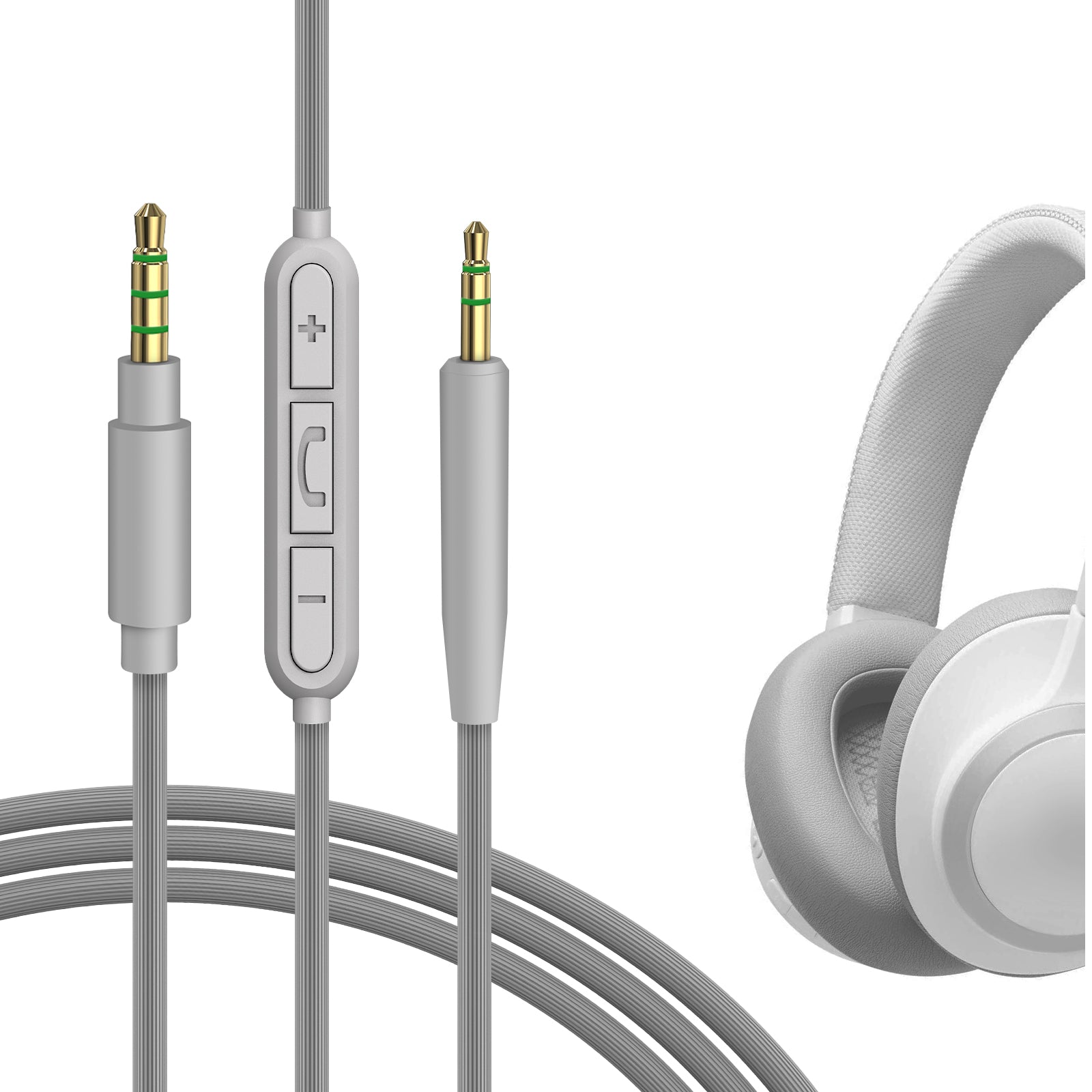
Geekria Audio Cable with Mic and Mute Control Compatible with JBL Tune 770NC 3.5mm to 2.5mm 4ft
Geekria Audio
Buy — It combines the Tune 770NC-compatible 2.5mm headphone plug, a 3.5mm source plug and an inline microphone in one documented 1.2m cable.
Buy this as the functional alternative to a plain TRRS-to-TRRS aux cable: its own inline microphone supplies the wired voice signal the Tune 770NC does not expose. The drawback is that calls use the cable-mounted mic, not JBL’s built-in microphones.Available at Amazon(paid link) — opens Amazon in a new tab. Price and availability shown there.
CableCreation TRRS 3.5mm Audio Cable CC0389
CableCreation TRRS
Skip — Model CC0389 has two 3.5mm four-conductor plugs, while the Tune 770NC uses a 2.5mm TRS headphone connection that does not output its built-in microphone.
This is the TRRS-to-TRRS aux cable readers commonly consider, but it is the wrong choice for the Tune 770NC. Both ends are 3.5mm and it supplies no microphone capsule, so even an adapter would not activate the headphone’s internal mic.Available at Amazon(paid link) — opens Amazon in a new tab. Price and availability shown there.
UGREEN Headphone Mic Splitter 3.5mm Jack Audio Mic Adapter Aux TRRS 20899
UGREEN Headphone
It depends — Model 20899 converts one four-position CTIA TRRS headset plug into separate three-position headphone and microphone plugs.
This is a conditional complement to the inline-mic replacement cable when a desktop has separate headphone and microphone sockets. It adds another connection and is unnecessary for devices with a single CTIA combo jack.Available at Amazon(paid link) — opens Amazon in a new tab. Price and availability shown there.
JBL Tune 770NC Wireless Over-Ear Headphones
JBL Tune
It depends — Independent cable inspection found its supplied 2.5mm-to-3.5mm path carries stereo audio but provides no analog access to the Bluetooth microphones.
This is the complement and endpoint the aux cable is meant to serve, included for readers deciding whether the limitation changes the purchase. It remains suitable for Bluetooth calls and wired listening, but not for anyone who requires its built-in microphone over analog aux.Available at Amazon(paid link) — opens Amazon in a new tab. Price and availability shown there.
Sources
Pages consulted while researching this article. None of these are affiliate links.
- DIY-Audio-Heaven: JBL Tune 770NC measurements and cable inspection — diyaudioheaven.wordpress.com
- JBL Tune 770NC Quick Start Guide — support.jbl.com
- JBL Tune 770NC Specification Sheet — support.jbl.com
- Android Open Source Project: 3.5mm Headset Accessory Specification — source.android.com
- Geekria Tune 770NC Audio Cable with Mic Specifications — shop.geekria.com
- CableCreation TRRS 3.5mm Audio Cable Specifications — cablecreation.com
- UGREEN Headphone Mic Splitter 20899 Specifications — eu.ugreen.com